







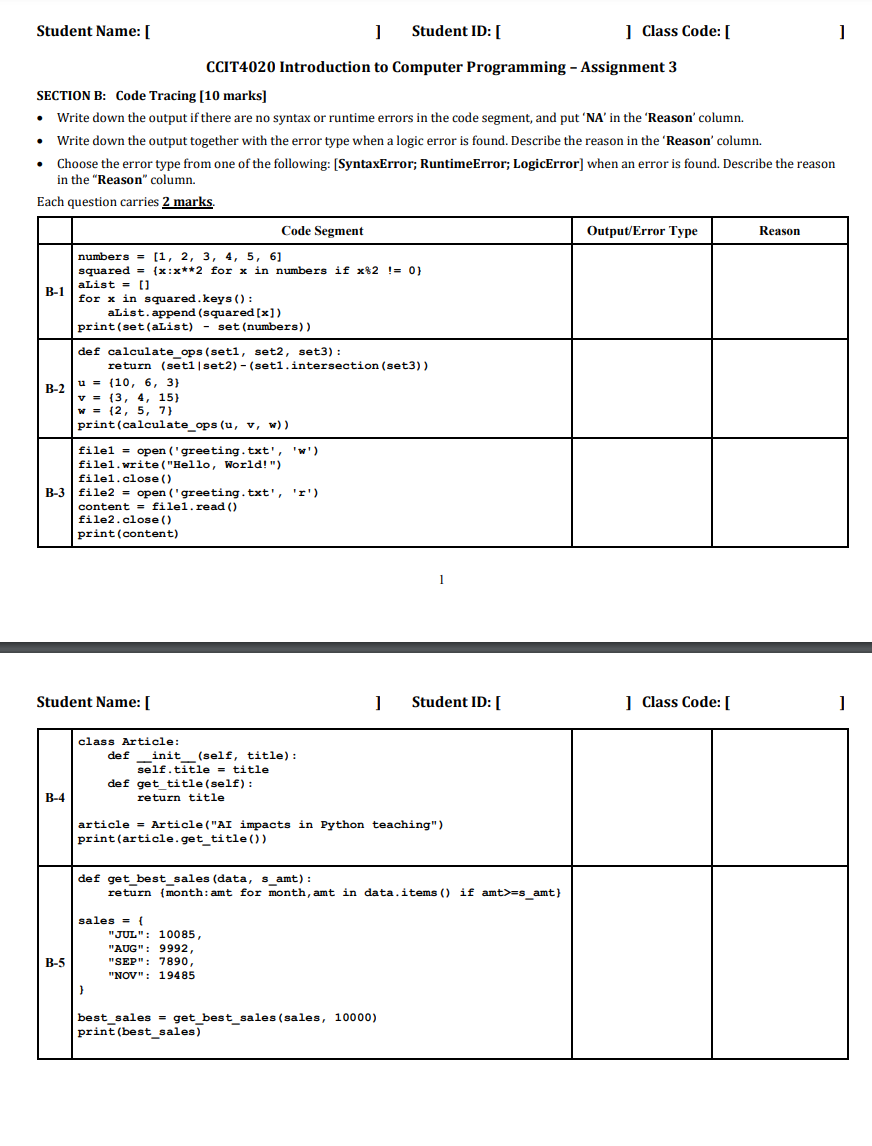
Question: CCIT 4 0 2 0 Introduction to Computer Programming - Assignment 3 SECTION B: Code Tracing [ 1 0 marks ] - Write down the
CCIT Introduction to Computer Programming Assignment
SECTION B: Code Tracing marks
Write down the output if there are no syntax or runtime errors in the code segment, and put NA in the 'Reason' column.
Write down the output together with the error type when a logic error is found. Describe the reason in the 'Reason' column.
Choose the error type from one of the following: SyntaxError; RuntimeError; LogicError when an error is found. Describe the reason in the "Reason" column.
Each question carries mathbf marks.
begintabularcccc
hline & Code Segment & OutputError Type & Reason
hline B &
numbers
squared x:x for x in numbers if x
aList
for x in squared.keys:
aList. append squared x
printsetaList setnumbers
& &
hline B &
def calculateopsset set set:
return setsetsetintersectionset
u
v
w
printcalculateopsu v w
& &
hline B &
file opengreetingtxtw
filewriteHello World!"
fileclose
file opengreetingtxtr
content fileread
fileclose
printcontent
& &
hline
endtabular
Student Name:
Student ID:
Class Code:
Step by Step Solution
There are 3 Steps involved in it
1 Expert Approved Answer
Step: 1 Unlock

Question Has Been Solved by an Expert!
Get step-by-step solutions from verified subject matter experts
Step: 2 Unlock
Step: 3 Unlock
 Study Help