Question: Cells Q1 K3:27 (5 marks) Task/problem Example Excel Functions/features to you should use Approval category: Jackie, has a credit Use functions we score of 973,
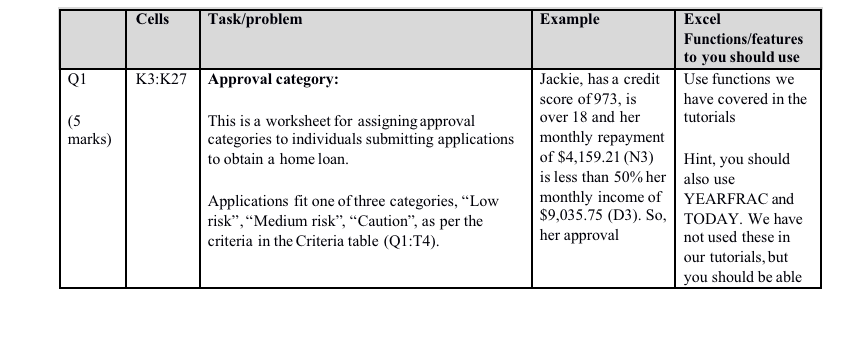
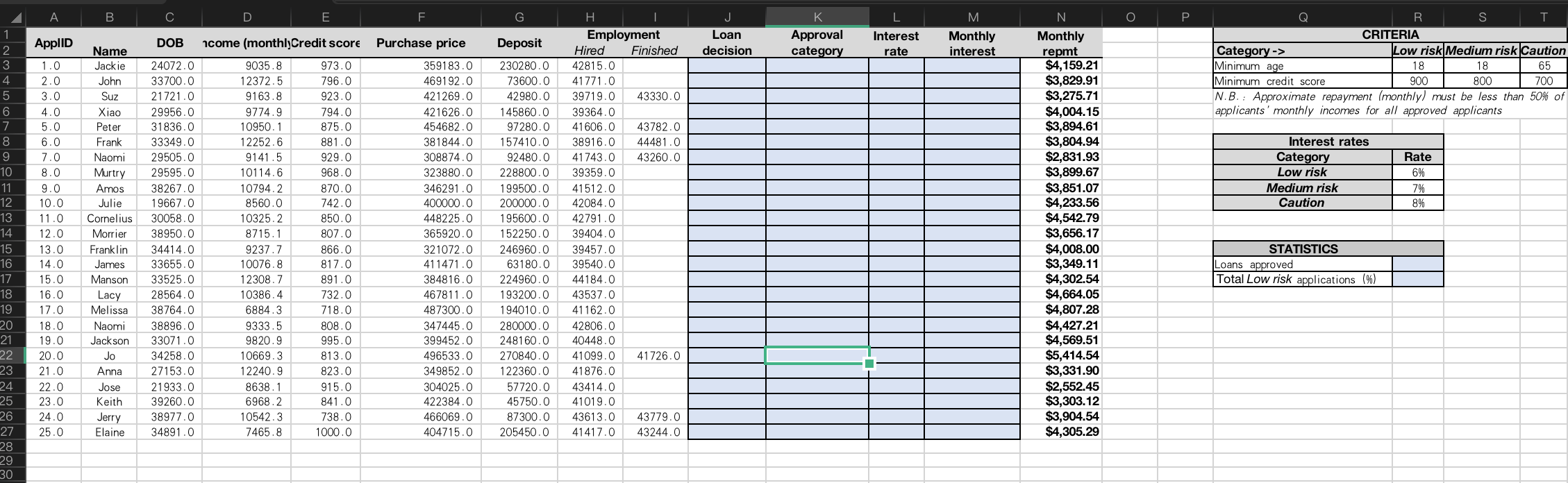
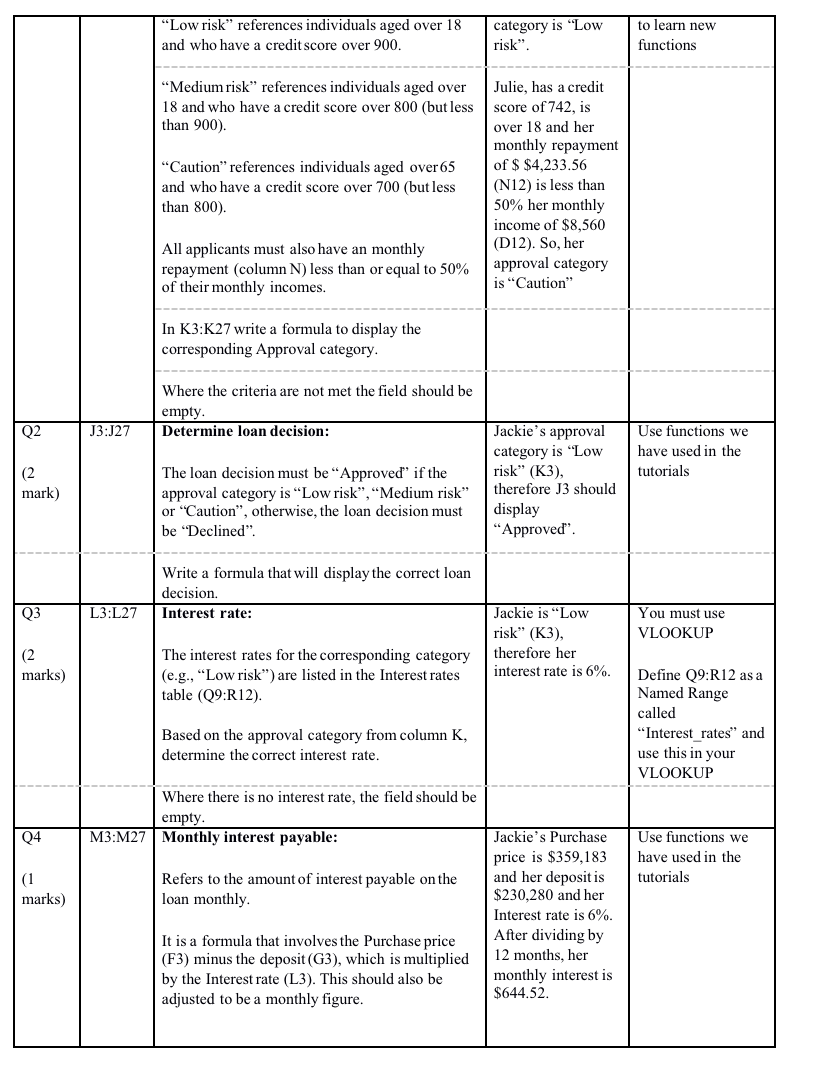
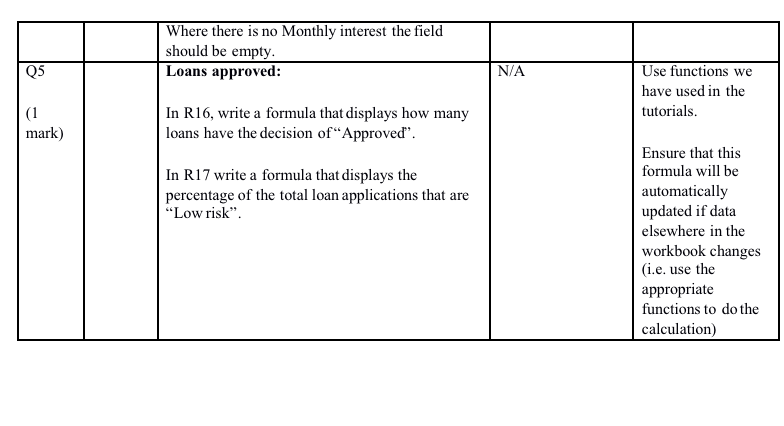
Cells Q1 K3:27 (5 marks) Task/problem Example Excel Functions/features to you should use Approval category: Jackie, has a credit Use functions we score of 973, is have covered in the This is a worksheet for assigning approval over 18 and her tutorials categories to individuals submitting applications monthly repayment to obtain a home loan. of $4,159.21 (N3) Hint, you should is less than 50% her also use Applications fit one of three categories, Low monthly income of YEARFRAC and risk, Medium risk, Caution", as per the $9,035.75 (D3). So, TODAY. We have criteria in the Criteria table (Q1:T4). her approval not used these in our tutorials, but you should be able . B D E F. G K N J Loan decision ApplID M Monthly interest DOB ncome (monthlyCredit score Purchase price Approval category Deposit Interest rate R S T CRITERIA Category -> Low risk Medium risk Caution Minimum age 18 18 65 Minimum credit score 900 800 700 N.B.: Approximate repayment Imonthly) must be less than 50% of applicants' monthly incomes for all approved applicants Interest rates Category Low risk Medium risk Caution 2 3 4 5 6 7 8 9 10 11 12 13 14 15 16 17 18 19 20 21 22 23 24 25 26 27 28 29 30 Name Jackie John Suz Xiao Peter Frank Naomi Murtry Amos Julie Cornelius Morrier Franklin James Manson Lacy Melissa Rate 6% 7% 8% 1.0 2.0 3.0 4.0 5.0 6.0 7.0 8.0 9.0 10.0 11.0 12.0 13.0 14.0 15.0 16.0 17.0 18.0 19.0 20.0 21.0 22.0 23.0 24.0 25.0 24072.0 33700.0 21721.0 29956.0 31836.0 33349.0 29505.0 29595.0 38267.0 19667.0 30058.0 38950.0 34414.0 33655.0 33525.0 28564.0 38764.0 38896.0 33071.0 34258.0 27153.0 21933.0 39260.0 38977.0 34891.0 9035.8 12372.5 9163.8 9774.9 10950.1 12252.6 9141.5 10114.6 10794.2 8560.0 10325.2 8715.1 9237.7 10076.8 12308.7 10386.4 6884.3 9333.5 9820.9 10669.3 12240.9 8638.1 6968.2 10542.3 7465.8 973.0 796.0 923.0 794.0 875.0 881.0 929.0 968.0 870.0 742.0 850.0 807.0 866.0 817.0 891.0 732.0 718.0 808.0 995.0 813.0 823.0 915.0 841.0 738.0 1000.0 359183.0 469192.0 421269.0 421626.0 454682.0 381844.0 308874.0 323880.0 346291.0 400000.0 448225.0 365920.0 321072.0 411471.0 384816.0 467811.0 487300.0 347445.0 399452.0 496533.0 349852.0 304025.0 422384.0 466069.0 404715.0 230280.0 73600.0 42980.0 145860.0 97280.0 157410.0 92480.0 228800.0 199500.0 200000.0 195600.0 152250.0 246960.0 63180.0 224960.0 193200.0 194010.0 280000.0 248160.0 270840.0 122360.0 57720.0 45750.0 87300.0 205450.0 . Employment Hired Finished 42815.0 41771.0 39719.0 43330.0 39364.0 41606.0 43782.0 38916.0 44481.0 41743.0 43260.0 39359.0 41512.0 42084.0 42791.0 39404.0 39457.0 39540.0 44184.0 43537.0 41162.0 42806.0 40448.0 41099.0 41726.0 41876.0 43414.0 41019.0 43613.0 43779.0 41417.0 43244.0 Monthly repmt $4,159.21 $3,829.91 $3,275.71 $4,004.15 $3,894.61 $3,804.94 $2,831.93 $3,899.67 $3,851.07 $4,233.56 $4,542.79 $3,656.17 $4,008.00 $3,349.11 $4,302.54 $4,664.05 $4,807.28 $4,427.21 $4,569.51 $5,414.54 $3,331.90 $2,552.45 $3,303.12 $3,904.54 $4,305.29 STATISTICS Loans approved Total Low risk applications (%) Naomi woon Jackson Jo Anna Jose Keith Jerry Elaine Low risk references individuals aged over 18 and who have a credit score over 900. category is "Low risk". to learn new functions Medium risk references individuals aged over 18 and who have a credit score over 800 (but less than 900) "Caution" references individuals aged over 65 and who have a credit score over 700 (but less than 800). Julie, has a credit score of 742, is over 18 and her monthly repayment of $ $4,233.56 (N12) is less than 50% her monthly income of $8,560 (D12). So, her approval category is Caution" All applicants must also have an monthly repayment (column N) less than or equal to 50% of their monthly incomes. In K3:K27 write a formula to display the corresponding Approval category. Where the criteria are not met the field should be empty. Determine loan decision: Q2 J3:J27 Use functions we have used in the tutorials (2 mark) The loan decision must be Approved if the approval category is "Low risk, Medium risk" or "Caution", otherwise, the loan decision must be "Declined". Jackie's approval category is "Low risk" (K3), therefore J3 should display "Approved". Write a formula that will display the correct loan decision. Interest rate: Q3 L3:L27 You must use VLOOKUP Jackie is "Low risk" (K3), therefore her interest rate is 6%. (2 marks) The interest rates for the corresponding category (e.g., "Low risk") are listed in the Interest rates table (Q9:R12). Define 09:R12 as a Named Range called "Interest rates and use this in your VLOOKUP Based on the approval category from column K, determine the correct interest rate. Where there is no interest rate, the field should be empty M3:M27 Monthly interest payable: 04 Use functions we have used in the tutorials (1 marks) Refers to the amount of interest payable on the loan monthly. Jackie's Purchase price is $359,183 and her deposit is $230,280 and her Interest rate is 6%. After dividing by 12 months, her monthly interest is $644.52. It is a formula that involves the Purchase price (F3) minus the deposit (G3), which is multiplied by the Interest rate (L3). This should also be adjusted to be a monthly figure. Where there is no Monthly interest the field should be empty. Loans approved: Q5 N/A Use functions we have used in the tutorials. (1 mark) In R16, write a formula that displays how many loans have the decision of Approved". In R17 write a formula that displays the percentage of the total loan applications that are "Low risk. Ensure that this formula will be automatically updated if data elsewhere in the workbook changes (i.e. use the appropriate functions to do the calculation)









 Study Help