







Question: CGS 2 8 2 0 : JavaScript Open the HTML file in your browser and in your editor. Study the HTML so that you are
CGS : JavaScript
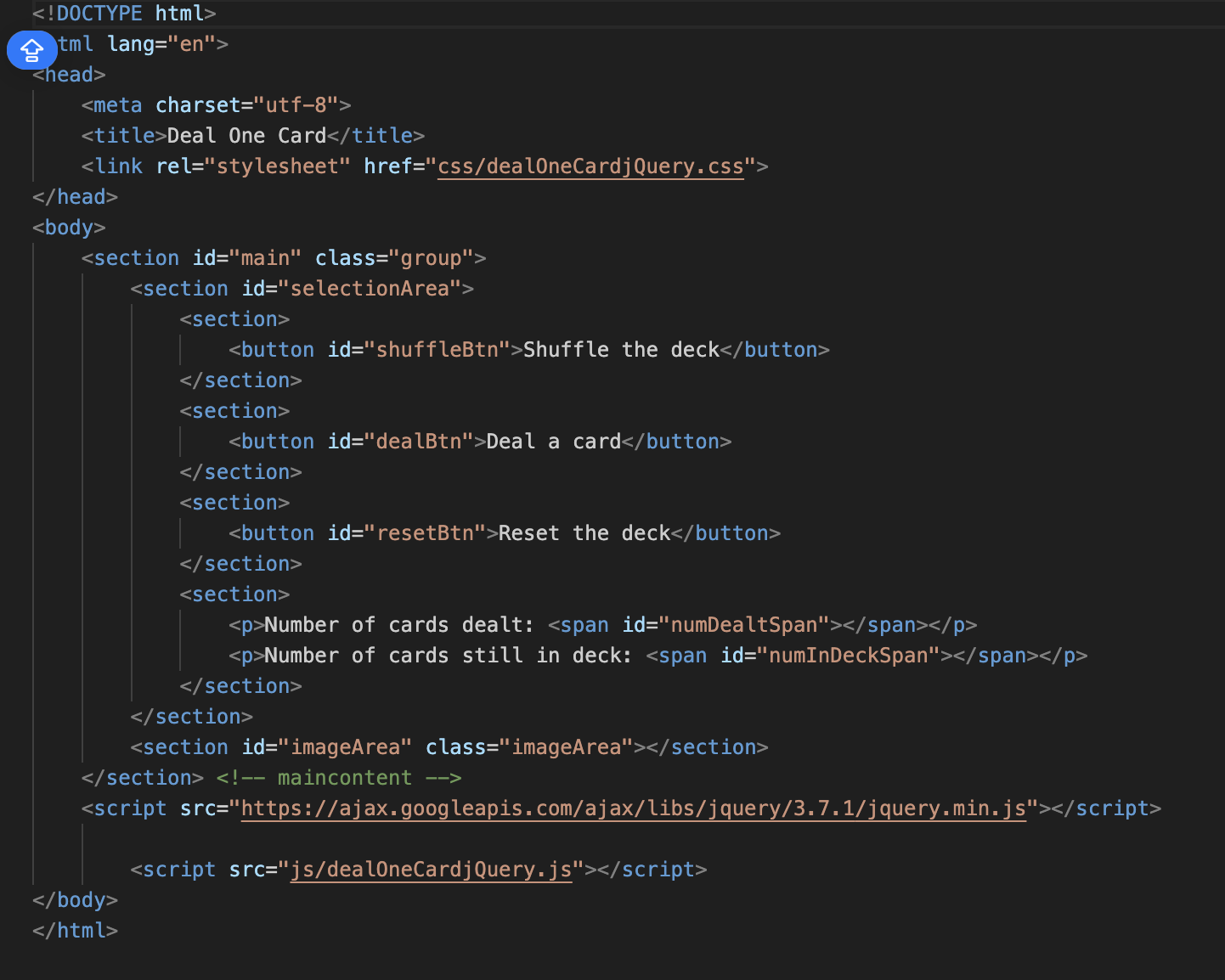
Open the HTML file in your browser and in your editor. Study the HTML so that you are familiar with all the elements and their IDs. Open the js folder and you should see a file named dealOneCardjQuery.js Rename the js file by adding your initials after the jQuery. If you don't see the extension, just add your initials. Modify the link to the js file that is in the HTML document so that it refers to the correct filename. Do NOT edit the HTML file in any other way. The purpose of the program is to allow a user to deal one card at a time from an invisible deck but only after the deck has been shuffled. Besides displaying the card, the program displays the number of cards that have been dealt and the number still in the deck. The user is able to shuffle the deck and reset the deck. Open the js file in your editor and add code to implement each comment found in the file. The comments make up the algorithm that you must follow to get the job done. All you have to do is write the statements that implement each comment.
tml langen
Deal One Card
Step by Step Solution
There are 3 Steps involved in it
1 Expert Approved Answer
Step: 1 Unlock

Question Has Been Solved by an Expert!
Get step-by-step solutions from verified subject matter experts
Step: 2 Unlock
Step: 3 Unlock
 Study Help