







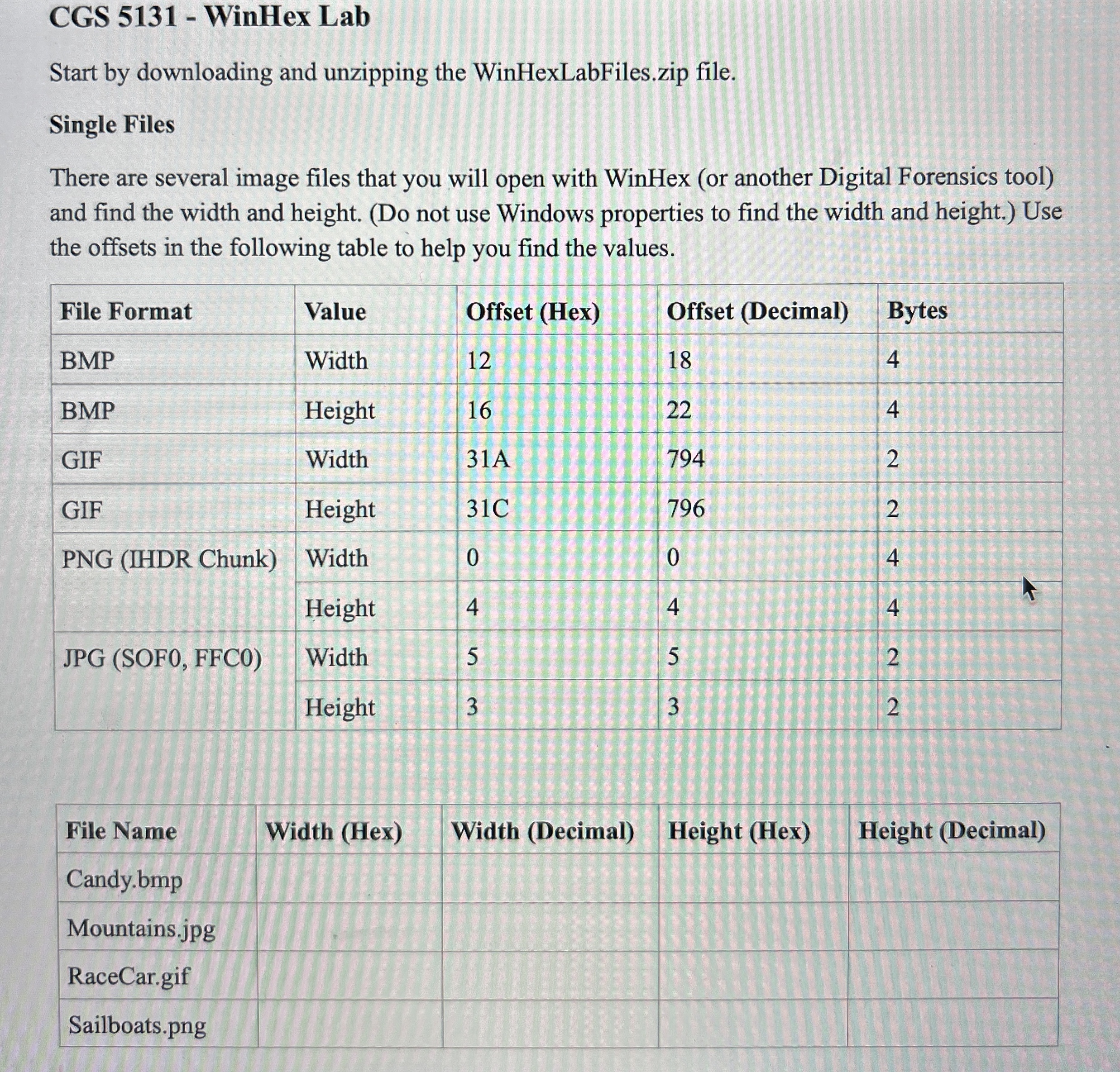
Question: CGS 5 1 3 1 - WinHex Lab Start by downloading and unzipping the WinHexLabFiles.zip file. Single Files There are several image files that you
CGS WinHex Lab
Start by downloading and unzipping the WinHexLabFiles.zip file.
Single Files
There are several image files that you will open with WinHex or another Digital Forensics tool and find the width and height. Do not use Windows properties to find the width and height. Use the offsets in the following table to help you find the values.
tableFile Format,Value,Offset HexOffset DecimalBytesBMPWidth,BMPHeight,GIFWidth, AGIFHeight, CPNG IHDR ChunkWidth,HeightJPG SOF FFCWidth,Height
tableFile Name,Width HexWidth DecimalHeight HexHeight DecimalCandybmpMountainsjpgRaceCargif,,,,Sailboatspng
Step by Step Solution
There are 3 Steps involved in it
1 Expert Approved Answer
Step: 1 Unlock

Question Has Been Solved by an Expert!
Get step-by-step solutions from verified subject matter experts
Step: 2 Unlock
Step: 3 Unlock
 Study Help