







Question: CH 5 Project 9 Stacks Write a program that graphically displays a working calculator for simple infix expressions that consist of single-digit operands; the operators
CH 5
Project 9 Stacks
Write a program that graphically displays a working calculator for simple infix expressions that consist of single-digit operands; the operators +, -, *, and /; and parentheses. Make the following assumptions:
- Unary operators (as in -2) are illegal.
- All operations, including division, are integer operations.
- The input expression contains no embedded spaces and no illegal characters since it is entered by using a keypad.
- The input expression is a syntactically correct infix expression.
- Division by zero will not occur. (Consider how you can remove this restriction.)
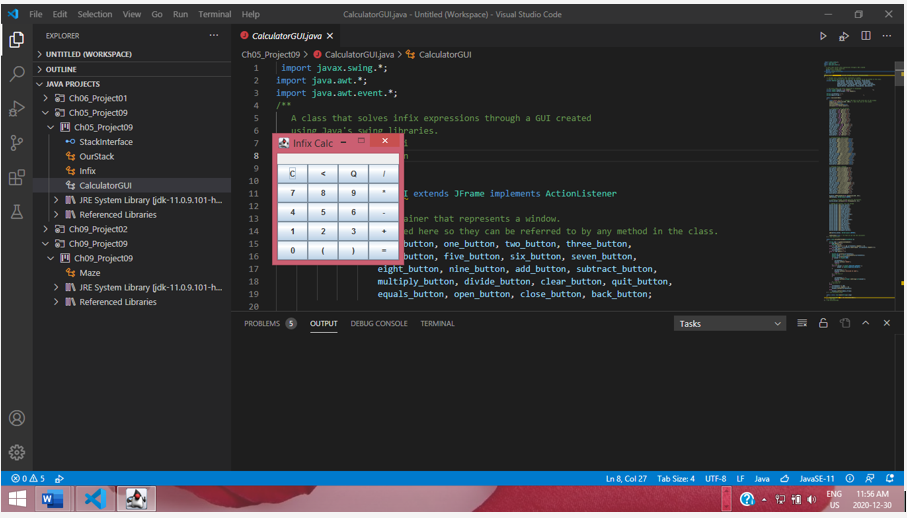
The calculator has a display and a keypad of 20 keys, which are arranged as follows:
As the user presses keys to enter an infix expression, the corresponding characters appear in the display. The C (Clear) key erases all input entered so far; the 6 (Backspace) key erases the last character entered. When the user presses the = key, the expression is evaluated and the result replaces the expression in the display window. The user can then press C and enter another expression. If the user presses the Q (Quit) key, the calculator ceases operation and is erased from the screen.
Task:
- Create Interface for the ADT stack.
- Create a Class of Stack
- Create Calculator GUI (OPTIONAL)
OUTPUT looks like this , if you create the GUI interface.
File Edit Selection View GO Run Terminal Help CalculatorGuljava - Untitled (Workspace) - Visual Studio Code o EXPLORER DI > UNTITLED (WORKSPACE) Calculatorguljava X ChoS_Project09 > CalculatorGuljava > As CalculatorGUI 1 import javax.swing. *; 2 import java.awt.*; 3 import java.awt.event.*; > OUTLINE 4 S 6 7 8 A class that solves infix expressions through a GUI created using Java's swing libraries. Infix Calc - e. c 33 Ch06_Project01 Chos_Projecto9 I chos_Projecto9 - Stackinterface es OurStack es Infix e CalculatorGUI > JRE System Library (jdk-11.0.9.101-h.. > I Referenced Libraries > Ch09_Projecto2 v Cho9_Project09 Ch09_Projecto9 Maze > JRE System Library (jdk-11.0.9.101-h... > Referenced Libraries 7 8 9 I extends JFrame implements ActionListener 4 5 6 1 2. 9 10 11 12 13 14 15 16 17 18 19 20 0 ) ainer that represents a window. ed here so they can be referred to by any method in the class. button, one_button, two_button, three_button, button, five_button, six_button, seven_button, eight_button, nine_button, add_button, subtract_button, multiply_button, divide_button, clear_button, quit_button, equals_button, open_button, close_button, back_button; PROBLEMS OUTPUT DEBUG CONSOLE TERMINAL Tasks IM 383 AS In 8, Col 27 Tab Sice: 4 UTF-8 LF Java JavaSE-11 O RC ENG 11:56 AM US 2020-12-30 W
Step by Step Solution
There are 3 Steps involved in it

Get step-by-step solutions from verified subject matter experts
 Study Help