







Question: Challenge Task: Collaborative Prime Number Finder Objective Implement a collaborative prime number finder using shared memory and message queues. This task will demonstrate your understanding
Challenge Task: Collaborative Prime Number Finder
Objective
Implement a collaborative prime number finder using shared memory and message queues. This task will demonstrate your understanding of both IPC mechanisms covered in this lab.
Requirements
Create two separate programs: primefinder.c and messagereporter.c
Use shared memory to store the list of prime numbers found.
Use a message queue for notifying the message reporter about newly found primes.
Implement proper error handling for all IPC operations.
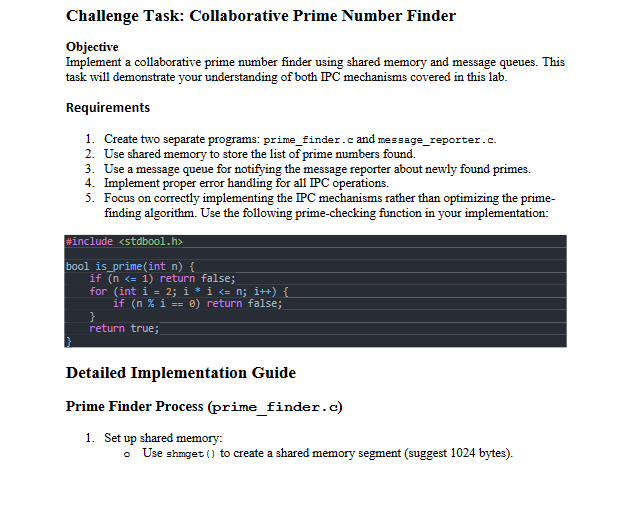
Focus on correctly implementing the IPC mechanisms rather than optimizing the primefinding algorithm. Use the following primechecking function in your implementation:
#include
bool isprimeint n
if n return false;
for int i ; i i n; i
if n i return false;
return true;
Detailed Implementation Guide
Prime Finder Process primefinder. c
Set up shared memory:
Use shmget to create a shared memory segment suggest bytes Use shmat to attach to the shared memory.
Set up message queue:
Use msgget to create a message queue.
Define a structure for the shared memory:
#define MAXPRIMES Assuming we'lL store up to prime numbers
struct shareddata
int count;
int primesMAXPRIMES;
;
Define a structure for the message queue:
struct msgbuffer
long mitype;
int prime;
;
Main loop:
Iterate through numbers from to
For each number, check if it's prime using isprime
If it's prime:
Add it to the shared memory.
Send a message to the message queue containing the prime number found.
Cleanup:
Use shmolt to detach from shared memory.
Message Reporter Process messagereporter.c
Set up shared memory:
Use shmget to access the existing shared memory segment.
Use shmat to attach to the shared memory.
Set up message queue:
Use msgget to access the existing message queue.
Main loop:
Use msgrev to receive messages from the queue.
After receiving a message:
Print the received prime number.
Read and print all primes from shared memory.
Cleanup:
Use shmod to detach from shared memory.
Use shmetl with IPCRMID to remove the shared memory segment.
Use msgctl with IPCRMID to remove the message queue.
Input and Output Input: None the program generates its own input by checking numbers from to
Output:
Prime numbers received via the message queue.
All prime numbers stored in shared memory after each message.
Example Output
Message received: Prime found:
Primes in shared memory:
Message received: Prime found:
Primes in shared memory:
Message received: Prime found:
Primes in shared memory:
Message received: Prime found:
Primes in shared memory:
Message received: Prime found:
Primes in shared memory:
Message received: Prime found:
Primes in shared memory:
Message received: Prime found:
Primes in shared memory:
Message received: Prime found:
Primes in shared memory:
Hints and Tips
Use the same key for both shared memory and message queue in both processes.
Ensure proper error handling for all system calls.
The message reporter should only read from shared memory after receiving a message, ensuring the prime finder has written something.
Remember to compile each program separately and run them in separate terminal windows.
Evaluation Criteria
Correct implementation of shared memory for storing prime numbers.
Proper use of message queue for notifying about new primes.
Correct reading and displaying of primes from both message queue and shared memory.
Proper cleanup of IPC resources.
Appropriate error handling.
Clear and organized code structure.
Step by Step Solution
There are 3 Steps involved in it
1 Expert Approved Answer
Step: 1 Unlock

Question Has Been Solved by an Expert!
Get step-by-step solutions from verified subject matter experts
Step: 2 Unlock
Step: 3 Unlock
 Study Help