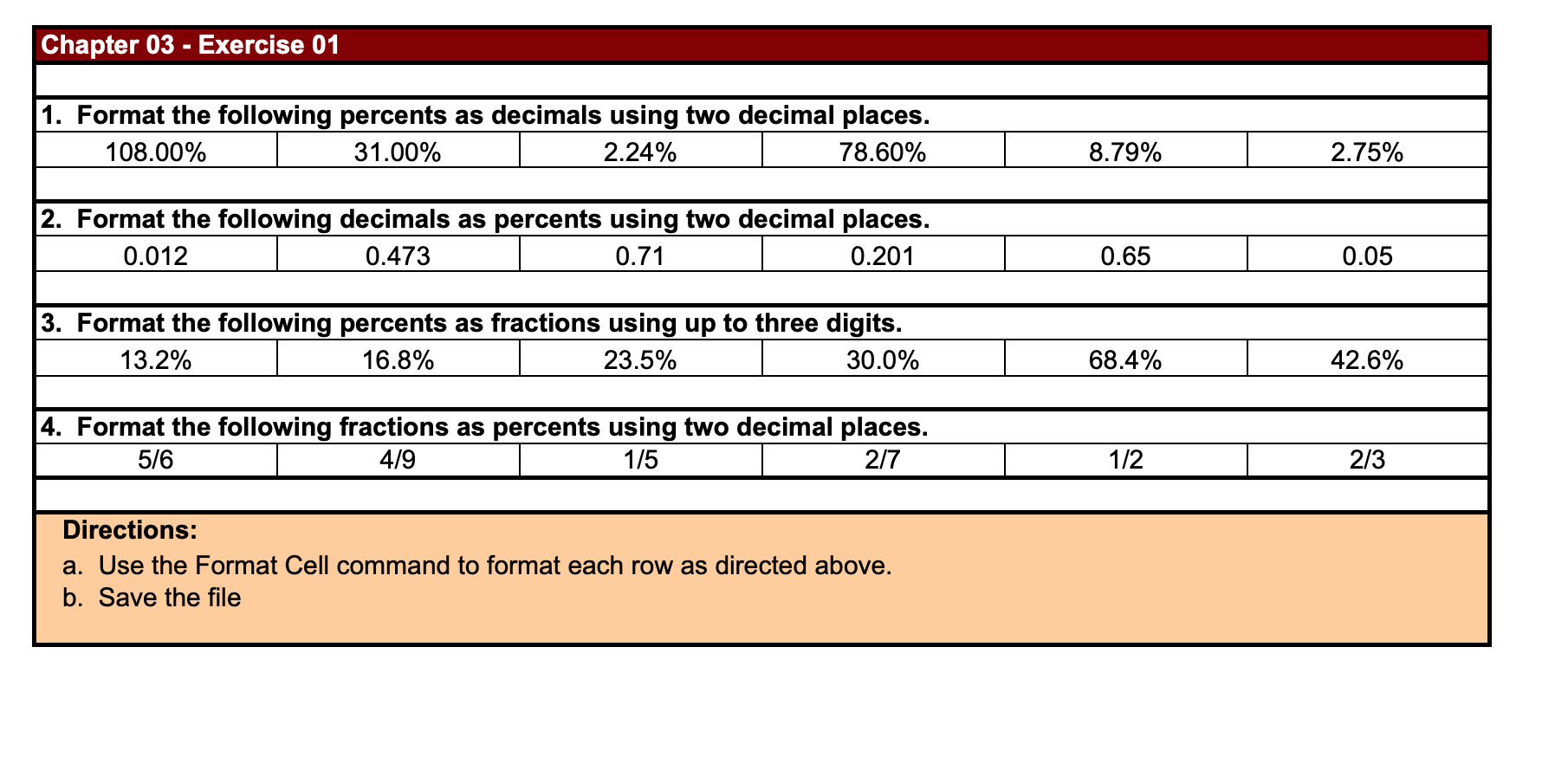
Question: Chapter 03 - Exercise 01 1. Format the following percents as decimals using two decimal places. 108.00% I 31.00% 2.24% 78.60% 2. Format the following
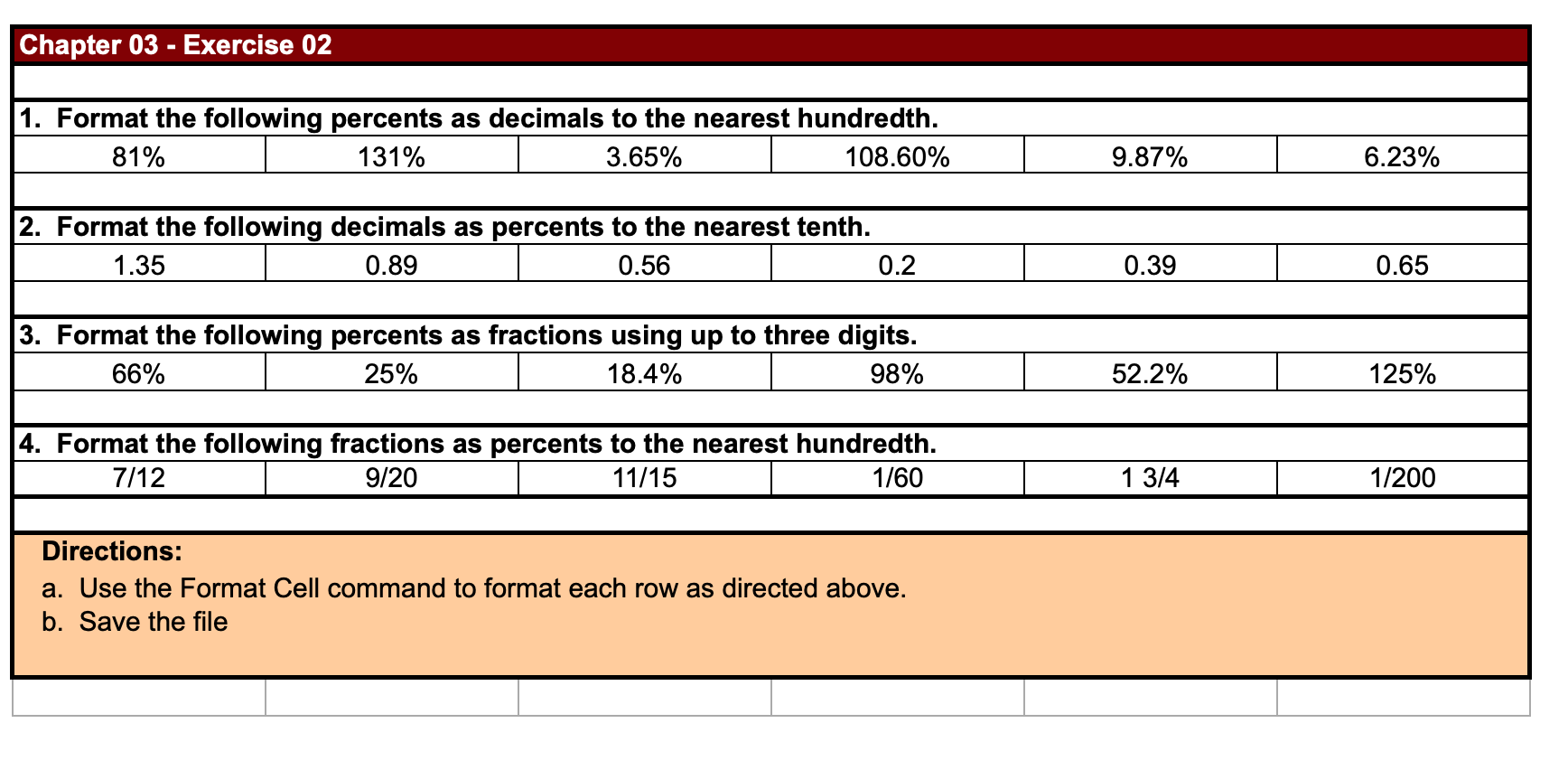
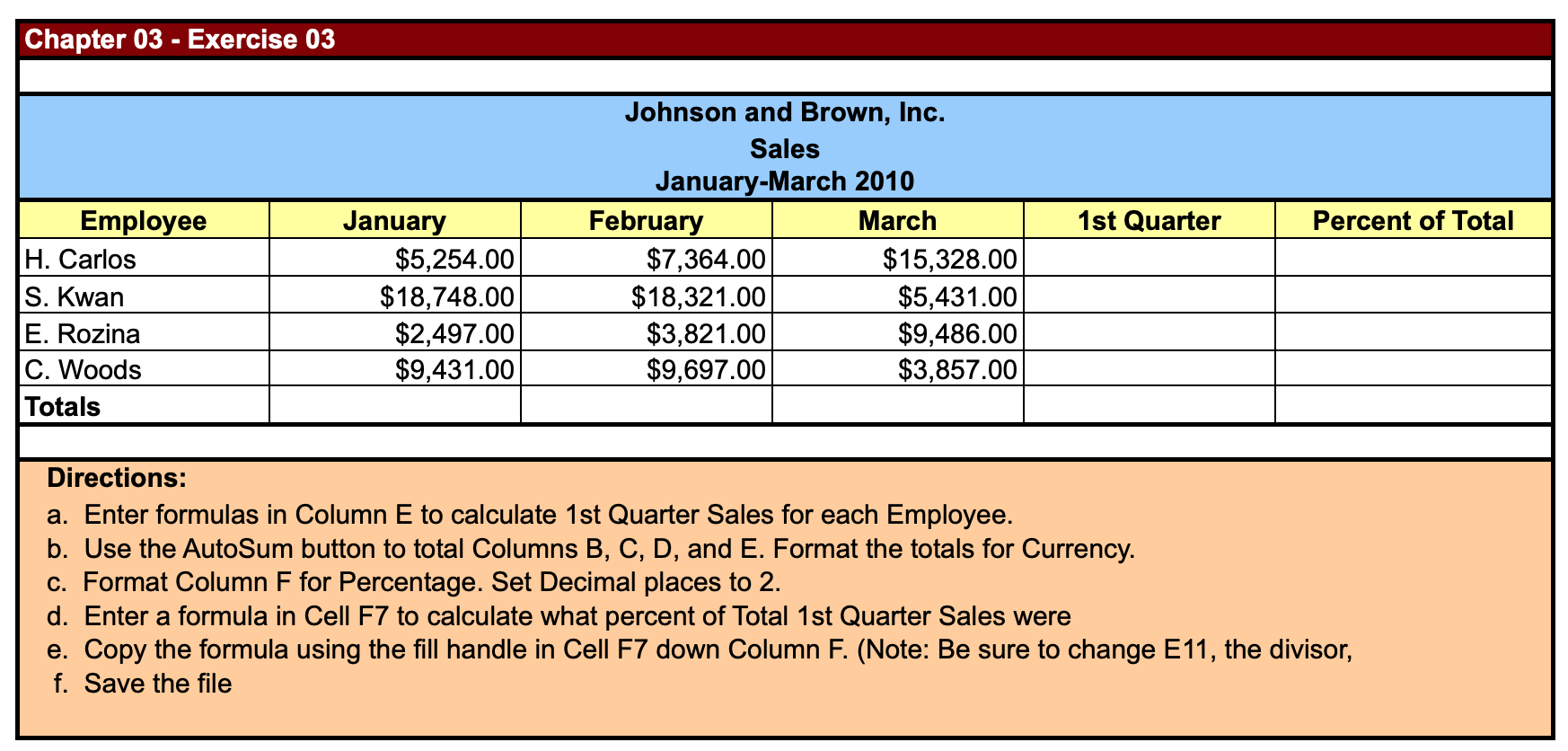
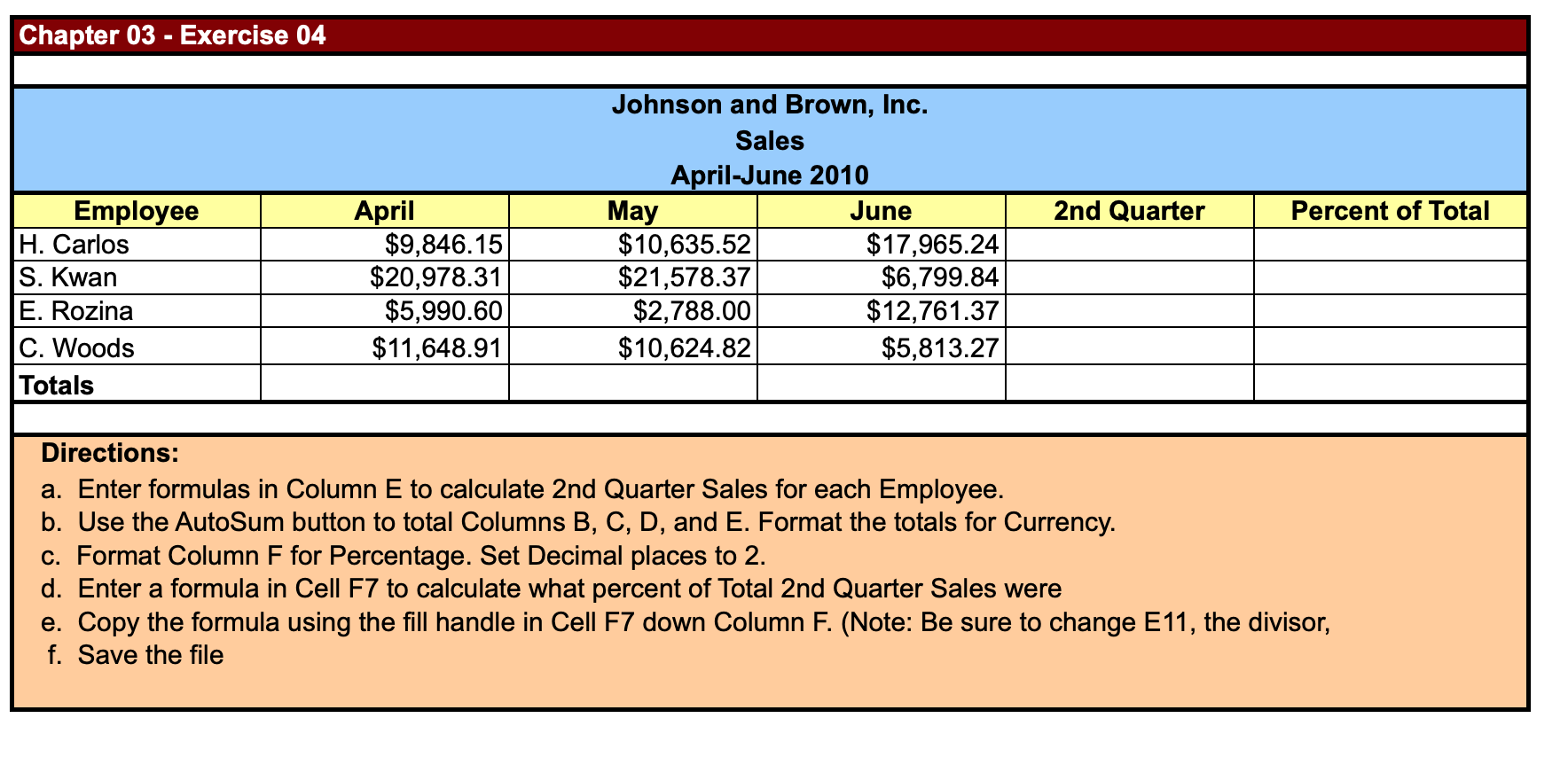
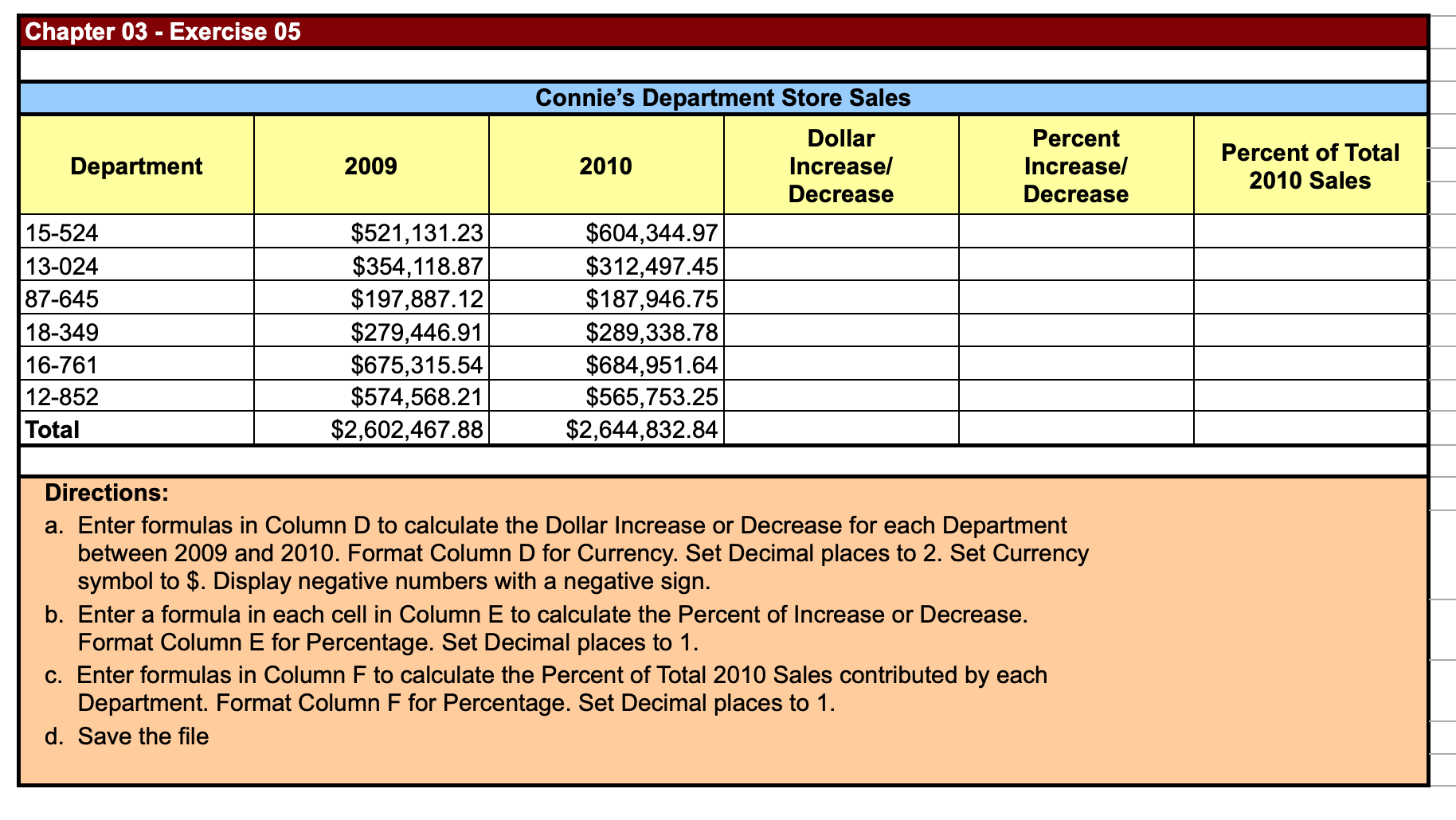
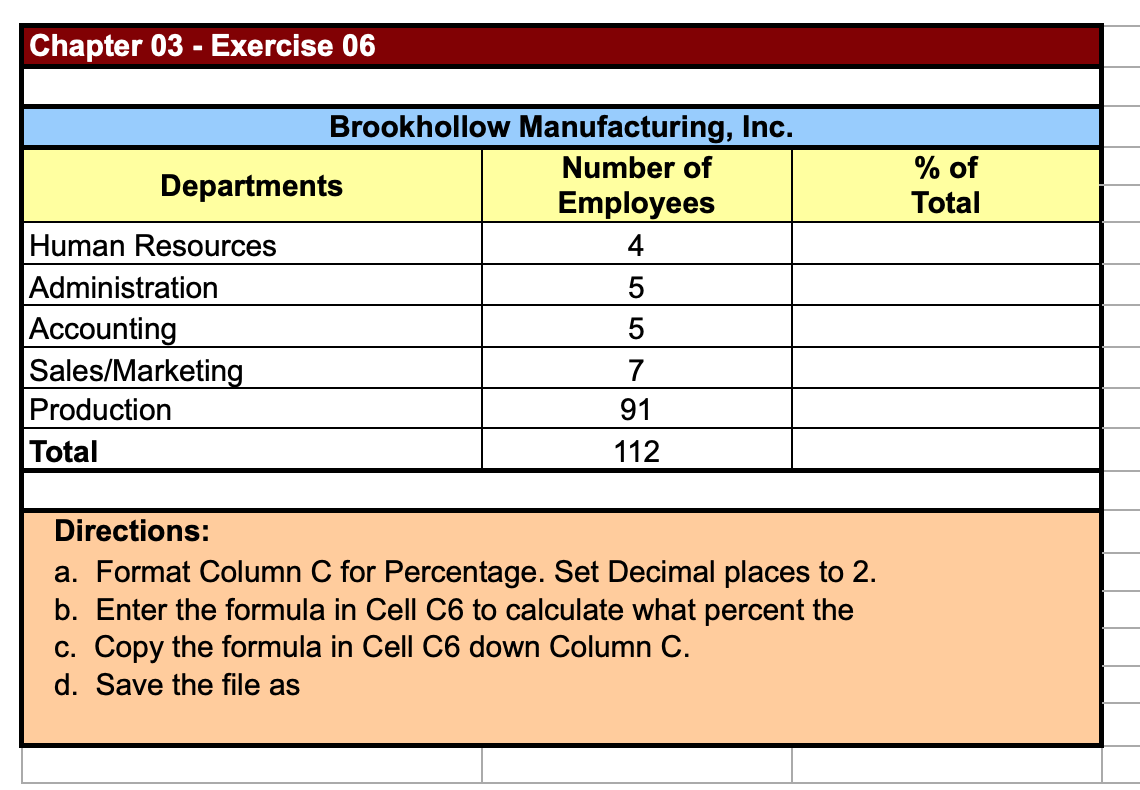
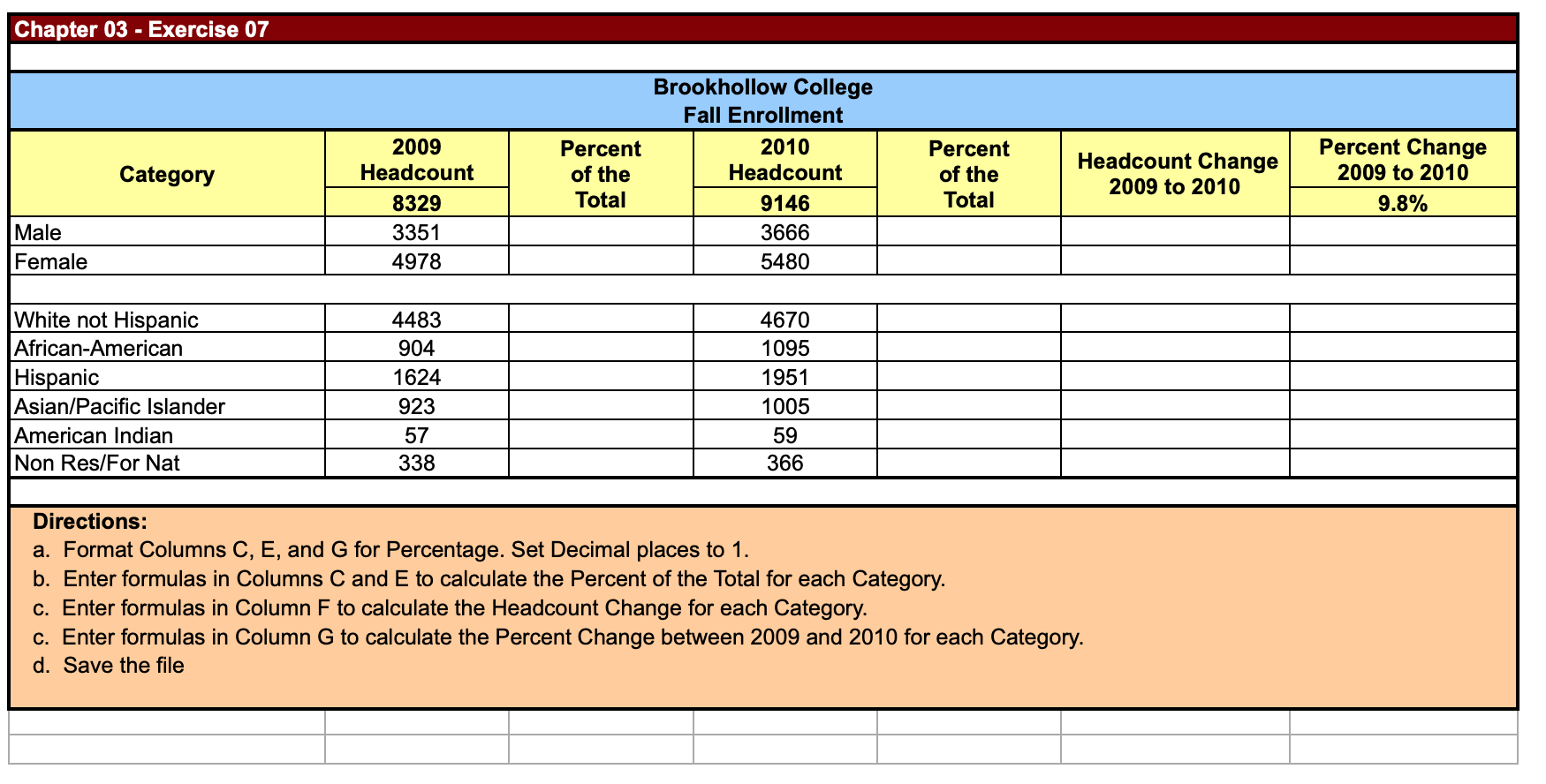
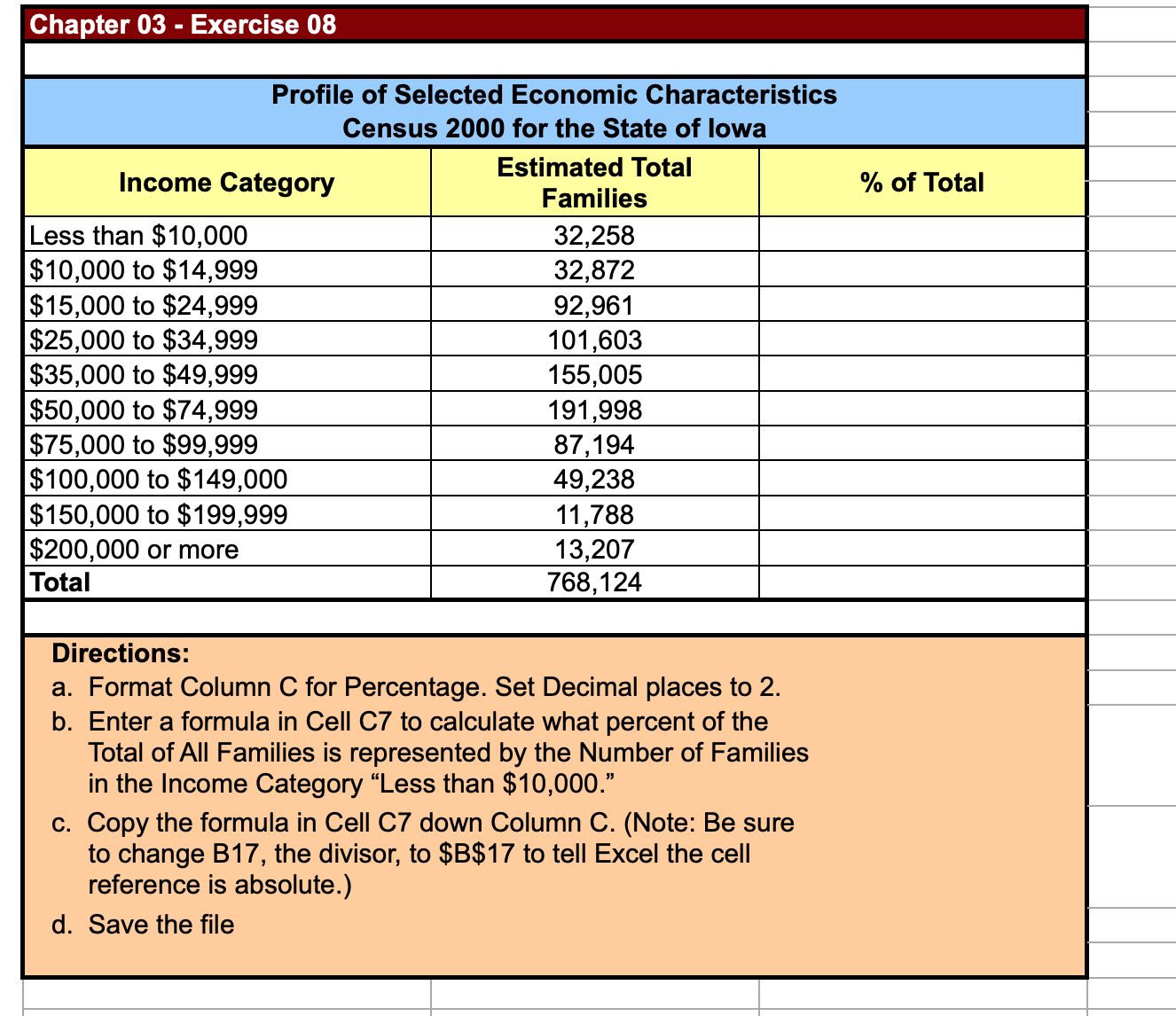
Chapter 03 - Exercise 01 1. Format the following percents as decimals using two decimal places. 108.00% I 31.00% 2.24% 78.60% 2. Format the following decimals as percents using two decimal places. 13.2% 16.8% 23.5% 30.0% 68.4% 4. Format the following fractions as percents using two decimal places. 5/3 4/9 1/5 2/7 Directions: a. Use the Format Cell command to format each row as directed above. b. Save the le Chapter 03 - Exercise 02 1. Format the following percents as decimals to the nearest hundredth. 81% 131% 3.65% 108.60% 2. Format the following decimals as percents to the nearest tenth. 1.35 0.89 0.56 0 M 3. Format the following percents as fractions using up to three digits. 66% 25% 18.4% 98% 4. Format the following fractions as percents to the nearest hundredth. 7/12 9/20 11/15 1/60 Directions: a. Use the Format Cell command to format each row as directed above. b. Save the le Chapter 03 - Exercise 03 Johnson and Brown, Inc. Sales January-March 2010 Employee January February March 1st Quarter Percent of Total H. Carlos $5,254.00 $7,364.00 $15,328.00 S. Kwan $18,748.00 $18,321.00 $5,431.00 E. Rozina $2,497.00 $3,821.00 $9,486.00 C. Woods $9,431.00 $9,697.00 $3,857.00 Totals Directions: a. Enter formulas in Column E to calculate 1st Quarter Sales for each Employee. b. Use the AutoSum button to total Columns B, C, D, and E. Format the totals for Currency. c. Format Column F for Percentage. Set Decimal places to 2. d. Enter a formula in Cell F7 to calculate what percent of Total 1st Quarter Sales were e. Copy the formula using the fill handle in Cell F7 down Column F. (Note: Be sure to change E11, the divisor, f. Save the fileChapter 03 - Exercise 04 Johnson and Brown, Inc. Sales April-June 2010 Employee April May June 2nd Quarter Percent of Total H. Carlos $9,846.15 $10,635.52 $17,965.24 S. Kwan $20,978.31 $21,578.37 $6,799.84 E. Rozina $5,990.60 $2,788.00 $12,761.37 C. Woods $11,648.91 $10,624.82 $5,813.27 Totals Directions: a. Enter formulas in Column E to calculate 2nd Quarter Sales for each Employee. b. Use the AutoSum button to total Columns B, C, D, and E. Format the totals for Currency. c. Format Column F for Percentage. Set Decimal places to 2. d. Enter a formula in Cell F7 to calculate what percent of Total 2nd Quarter Sales were e. Copy the formula using the fill handle in Cell F7 down Column F. (Note: Be sure to change E11, the divisor, f. Save the fileChapter 03 - Exercise 05 Connie's Department Store Sales Dollar Increase] Decrease Percent Increase] Decrease Percent of Total 2010 Sales 15-524 $521,131.23 $604,344.97 13-024 $354,118.87 $312,497.45 $197,887.12 $187,946.75 $279,446.91 $289,338.78 $675,315.54 $684,951.64 $574,568.21 $565, 753.25 $2,602,467.88 $2,644,832.84 Directions: a. Enter formulas in Column D to calculate the Dollar Increase or Decrease for each Department between 2009 and 2010. Format Column D for Currency. Set Decimal places to 2. Set Currency symbol to $. Display negative numbers with a negative sign. b. Enter a formula in each cell in Column E to calculate the Percent of Increase or Decrease. Format Column E for Percentage. Set Decimal places to 1. c. Enter formulas in Column F to calculate the Percent of Total 2010 Sales contributed by each Department. Format Column F for Percentage. Set Decimal places to 1. d. Save the le Chapter 03 - Exercise 06 Brookhollow Manufacturing, Inc. Departments Number of % of Employees Total Human Resources 4 Administration 5 Accounting 5 Sales/Marketing 7 Production 91 Total 112 Directions: a. Format Column C for Percentage. Set Decimal places to 2. b. Enter the formula in Cell C6 to calculate what percent the c. Copy the formula in Cell C6 down Column C. d. Save the file asChapter 03 - Exercise 07 Brookhollow College Fall Enrollment 2009 Percent 2010 Percent Percent Change Category Headcount of the Headcount of the Headcount Change 2009 to 2010 2009 to 2010 8329 Total 9146 Total 9.8% Male 3351 3666 Female 4978 5480 White not Hispanic 4483 4670 African-American 904 1095 Hispanic 1624 1951 Asian/Pacific Islander 923 1005 American Indian 57 59 Non Res/For Nat 338 366 Directions: a. Format Columns C, E, and G for Percentage. Set Decimal places to 1. b. Enter formulas in Columns C and E to calculate the Percent of the Total for each Category. c. Enter formulas in Column F to calculate the Headcount Change for each Category. c. Enter formulas in Column G to calculate the Percent Change between 2009 and 2010 for each Category. d. Save the fileChapter 03 - Exercise 08 Profile of Selected Economic Characteristics Census 2000 for the State of Iowa Directions: a. Format Column C for Percentage. Set Decimal places to 2. b. Enter a formula in Cell C? to calculate what percent of the Total of All Families is represented by the Number of Families in the Income Category \"Less than $10,000.\" c. Copy the formula in Cell C? down Column C. (Note: Be sure to change B17, the divisor, to $B$17 to tell Excel the cell reference is absolute.) d. Save the le









 Study Help