







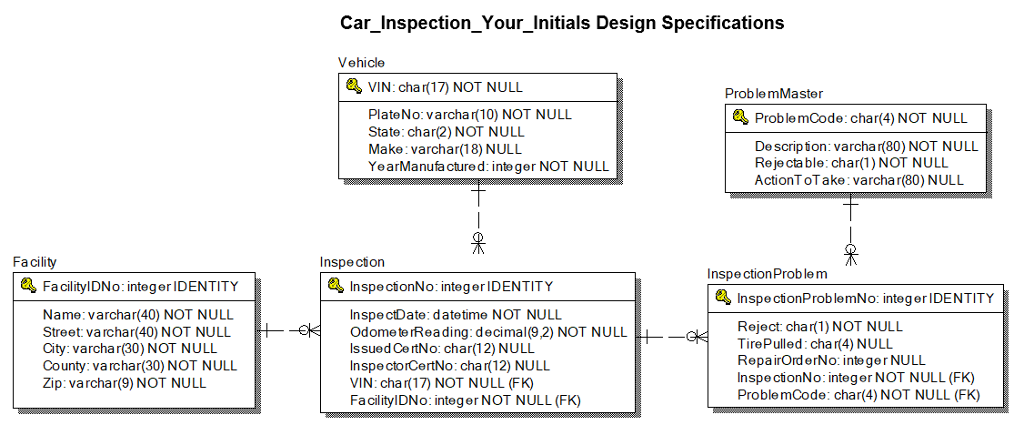
Question: Chapter 11 Lab Creating and Maintaining a Database and Tables (Car Inspector Database Creation Lab) - See Diagram Below Exercise Instructions Use the SQL Server
| Chapter 11 Lab Creating and Maintaining a Database and Tables (Car Inspector Database Creation Lab) - See Diagram Below |
|
|
| ||||||
|
|
|
|
|
|
|
|
|
|
|
Exercise Instructions
Use the SQL Server Management Studio to complete this lab. Submit SQL file.
Create a SQL script file named Car_Inspection_DB_Script_Your_initials.SQL (John Doe would name it Car_Inspeciton_DB_Script_JD.SQL). When executed this script is to create a database named Car_Inspection_Your_Initials that contains the objects described in this document.
Additional Design Specifications
Facility table
FacilityIDNo- In addition to setting it up as a primary key, define it as an integer IDENTITY column.
Vehicle table
State Use a check constraint to limit the values allowed (only allow valid two position state codes).
Inspection table
InspectionNo - In addition to setting it up as a primary key, define it as an integer IDENTITY column.
VIN - Use foreign key constraint (references) to enforce the referential integrity.
FacilityIDNo - Use foreign key constraint (references) to enforce the referential integrity.
OdometerReading - Use a check constraint to limit the range of OdometerReading values (allow zero to one million).
InspectionProblem table
InspectionProblemNo - in addition to setting it up as a primary key, define it as an integer IDENTITY column.
InspectionNo - Use foreign key constraint (references) to enforce the referential integrity.
ProblemCode - Use foreign key constraint (references) to enforce the referential integrity.
TirePulled Use a check constraint to limit the values allowed (only allow LF, RF, LR, RR).
Reject Use a check constraint to limit the values allowed (only allow Y, N).
ProblemMaster table
Rejectable Use a check constraint to limit the values allowed (only allow Y, N).
Car InspectionYour Initials Design Specifications Vehicle VIN: char( 17) NOT NULL ProblemMaster PlateNo: varcha r 10) NOT NULL State: char(2) NOT NULL Make varchar(18) NULL YearManufa ctured: integer NOT NULL ProblemCode: char(4) NOT NULU De scrip ion: varchar(80) NOT NULL Reje cta ble:char(1) NOT NULL ActionT oTake varchar(80) NULL Facility Inspecion Inspe ctionProblem Fa cilitylDNo: integer IDENTITY InspecionNo: integerIDENTITY Inspe cionProblemNo: integerIDENTITY Name: varchar(40) NOT NULL Street: varchar(40) NOT NULIL City: varchar(30) NOT NULL County: va rchar(30) NOT NULL Zip: varchar(9) NOT NULL Inspe ctDate: datetime NOT NULL OdometeIReading:decial(9,2) NOT NULL Issued CertNo: char(12) NULIL Inspe ctorCertNo: cha r(12) NULL VIN: cha r(17) NOT NULL (FK) FacilitylDNo: integer NOT NULL (FK) Reject: char(1) NOT NULL TirePulled: char(4) NULL RepairOrd erNo: inte ger NULL Inspe ctionNo: integer NOT NULL (FK) ProblemCode: char(4) NOT NULL (FK)
Step by Step Solution
There are 3 Steps involved in it

Get step-by-step solutions from verified subject matter experts
 Study Help