







Question: CHAPTER 13 - Microsoft Word (Product Activation Failed) Table Tool File Home Insert Page Layout References Mailings Review View Design Layout iRuler One Page 1)
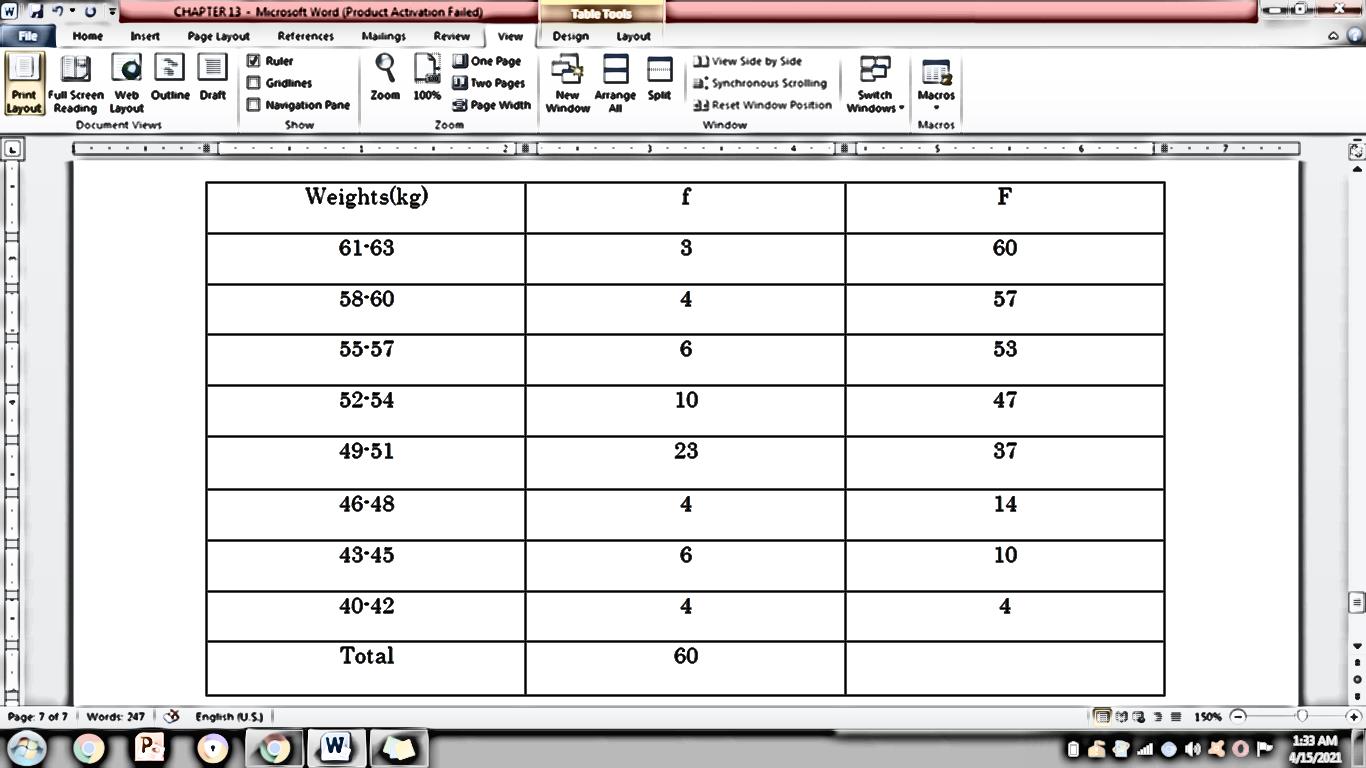
CHAPTER 13 - Microsoft Word (Product Activation Failed) Table Tool File Home Insert Page Layout References Mailings Review View Design Layout iRuler One Page 1) View Side by Side LO Gridlines J. Two Pages . Synchronous Scrolling Print Full Screen Web Outline Draft Zoom 100% New Arrange Split Switch Macros Page Width Window All 34 Reset Window Position Layout Reading Layout Navigation Pane Windows " Zoom Macros Document Views Show Window Weights(kg) F 61-63 60 58-60 4 57 55-57 6 53 52-54 10 47 49-51 23 37 46-48 4 14 43-45 6 10 40-42 4 Total 60 Page: 7 of 7 | Words 247 3 English (US) | 1:33 AM PO W 4/15/2021
Step by Step Solution
There are 3 Steps involved in it
1 Expert Approved Answer
Step: 1 Unlock

Question Has Been Solved by an Expert!
Get step-by-step solutions from verified subject matter experts
Step: 2 Unlock
Step: 3 Unlock
 Study Help