







Question: Chapter 2 Opening the Books Required If it is not already displayed, select [General Fund] in the Current accounting entity window and the [Accounts] tab.
Chapter 2 Opening the Books
Required
If it is not already displayed, select [General Fund]in the "Current accounting entity" window and the [Accounts] tab. Clicking on the [Accounts] tab allows you to see the chart of accounts that will be used for the [General Fund]. A different chart of accounts is provided for each of the accounting entities. Next, select the [Journal] tab and click the [Add new entry] button and then click on[Select account or search by account name or number] in the Account column. You will see the same general ledger accounts that were listed when you clicked on the [Accounts] tab. (Note: For purposes of this exercise, date suffixes are omitted from the Expenditures and Encumbrances accounts as expenditures occur only from a single years appropriations.) You will not use all of the accounts listed for this project.
-
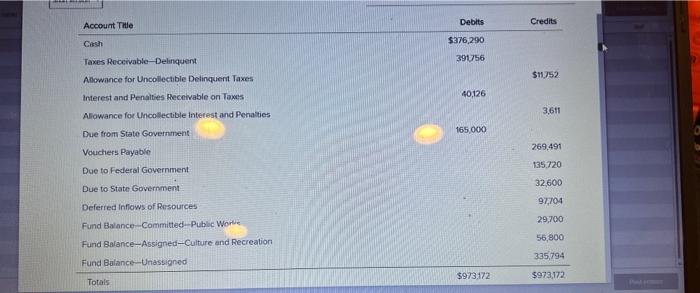
The trial balance for the General Fund of the City of Smithville as of December 31, 2019, follows. Select the [Journal] tab and create a journal entry to enter the balance sheet accounts and amounts shown in the trial balance. To create an entry start by clicking on [Add new entry]. Select or type the desired account name from the drop down list in the [Account] column. Be sure to enter 2019 from the dropdown in the [Year] column and enter the paragraph number from these instructions in the [Add description] field in the [Description]column of the [Journal]. For this entry you should enter 2-b. Select the appropriate accounts individually and insert the appropriate amounts. (Note: You should enter all dollar amounts without dollar signs, commas, and decimal points. For all entries, it is vitally important that the correct year be selected.)
You enter each account and amount one line at a time by clicking [Add]. The [Add] button will not be active if information for the entry is missing (e.g., the transaction description is missing).
The year and transaction description need only be entered for the first line of the journal entry; it will remain selected for the rest of the accounts. When you have completed entering all account data and amounts, verify your entries, including date and paragraph numbers. When you are sure that your entries are correct, click [Post entries] to post the items to the general ledger of the General Fund.
CITY OF SMITHVILLE
General Fund Post-Closing Trial Balance
As of December 31, 2019CHECK IMAGE BELOW Select [Reports>Trial Balances>Post-Closing Trial Balance] and print or save as a .pdf file the post-closing trial balance for year 2019. Retain the printed trial balance in your personal cumulative folder until the due date assigned by your instructor for the project, or submit a saved version of the trial balance electronically if directed to do so by your instructor.
Select [Governmental Activities, Government-wide Level] in the "Current accounting entity"dropdown field and the [Accounts] tab. You will see most of the accounts included in the preceding trial balance, plus many other accounts that will be used in the various chapters of the City of Smithville project.
-
Select the [Journal] tab and create a journal entry to enter the statement of net position (i.e., balance sheet) accounts and amounts shown in the following trial balance. It is necessary to enter these items in the accounts of the governmental activities category at the government-wide level as the general journal and general ledger for governmental activities comprise a separate "set of books" from those for the General Fund. Be sure to enter 2019 from the dropdown menu in the [Year] column and enter 2-d in the [Add description] field in the [Description] column. Select each account individually and insert the appropriate debit or credit amount for each account. When you have completed entering the initial data, verify the accuracy and click [Post entries] to post the entry to the governmental activities, government-wide general ledger.
CITY OF SMITHVILLE
Governmental Activities Government-wide Level
Post-Closing Trial Balance
As of December 31, 2019Account Title Debits Credits Cash $376,290 Taxes ReceivableDelinquent 391,756 Allowance for Uncollectible Delinquent Taxes $11,752 Interest and Penalties Receivable on Taxes 40,126 Allowance for Uncollectible Interest and Penalties 3,611 Due from State Government 165,000 Internal Receivables from Business-type Activities 12,000 Inventory of Supplies 66,000 Land 4,180,000 Infrastructure 9,862,000 Accumulated DepreciationInfrastructure 2,713,944 Buildings 6,296,000 Accumulated DepreciationBuildings 1,731,000 Equipment 3,556,800 Accumulated DepreciationEquipment 1,765,480 Vouchers Payable 272,187 Due to Federal Government 135,720 Due to State Government 32,600 Internal Payables to Business-type Activities 6,400 Net PositionNet Investment in Capital Assets 17,684,376 Net PositionRestricted for Public Safety 15,000 Net PositionUnrestricted 573,902 Totals $24,945,972 $24,945,972 Select [Reports>Trial Balances>Post-Closing Trial Balance] and print the trial balance for 2019, or submit a saved .pdf version of the trial balance electronically if directed to do so by your instructor. Retain in your cumulative file until the due date for your project or the time specified by your instructor.
Step by Step Solution
There are 3 Steps involved in it

Get step-by-step solutions from verified subject matter experts
 Study Help