







Question: Chapter 4 Case Problem 3: SNICK'S BOARD SHOP Snick's Board Shop owned the fixed assets shown below as of December 31, 2018: Asset # Date
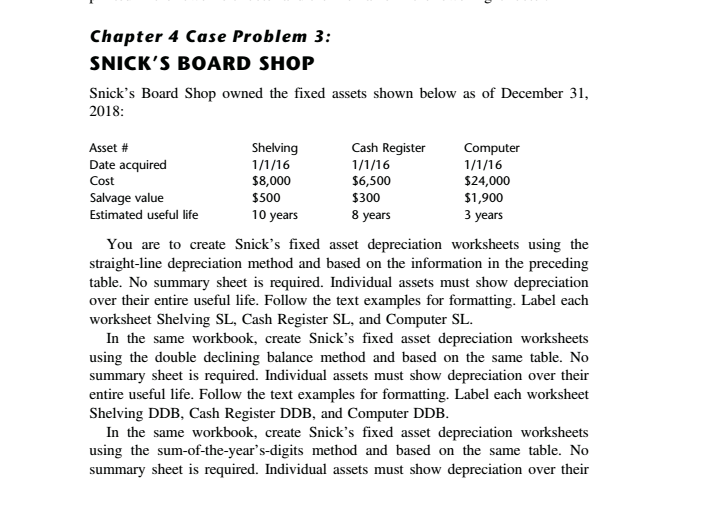
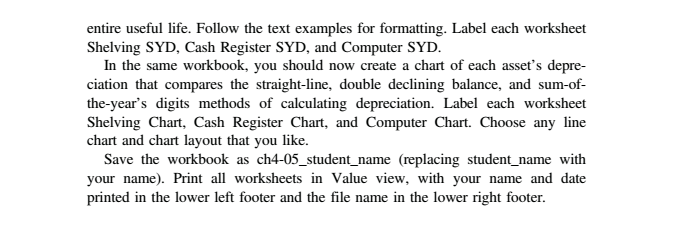
Chapter 4 Case Problem 3: SNICK'S BOARD SHOP Snick's Board Shop owned the fixed assets shown below as of December 31, 2018: Asset # Date acquired Cost Salvage value Estimated useful life Shelving 1/1/16 $8,000 $500 10 years Cash Register 1/1/16 $6,500 $300 8 years Computer 1/1/16 $24,000 $1,900 3 years You are to create Snick's fixed asset depreciation worksheets using the straight-line depreciation method and based on the information in the preceding table. No summary sheet is required. Individual assets must show depreciation over their entire useful life. Follow the text examples for formatting. Label each worksheet Shelving SL, Cash Register SL, and Computer SL. In the same workbook, create Snick's fixed asset depreciation worksheets using the double declining balance method and based on the same table. No summary sheet is required. Individual assets must show depreciation over their entire useful life. Follow the text examples for formatting. Label each worksheet Shelving DDB, Cash Register DDB, and Computer DDB In the same workbook, create Snick's fixed asset depreciation worksheets using the sum-of-the-year's-digits method and based on the same table. No summary sheet is required. Individual assets must show depreciation over their entire useful life. Follow the text examples for formatting. Label each worksheet Shelving SYD, Cash Register SYD, and Computer SYD. In the same workbook, you should now create a chart of each asset's depre- ciation that compares the straight-line, double declining balance, and sum-of- the-year's digits methods of calculating depreciation. Label each worksheet Shelving Chart, Cash Register Chart, and Computer Chart. Choose any line chart and chart layout that you like. Save the workbook as ch4-05_student_name (replacing student_name with your name). Print all worksheets in Value view, with your name and date printed in the lower left footer and the file name in the lower right footer
Step by Step Solution
There are 3 Steps involved in it

Get step-by-step solutions from verified subject matter experts
 Study Help