







Question: $$ Chapter 4 inpatient Bed Occupancy Exercise 4 . 2 ch 4 . Percentage of Occupancy Use the information in the following table to calculate
$$
Chapter inpatient Bed Occupancy
Exercise
ch Percentage of Occupancy
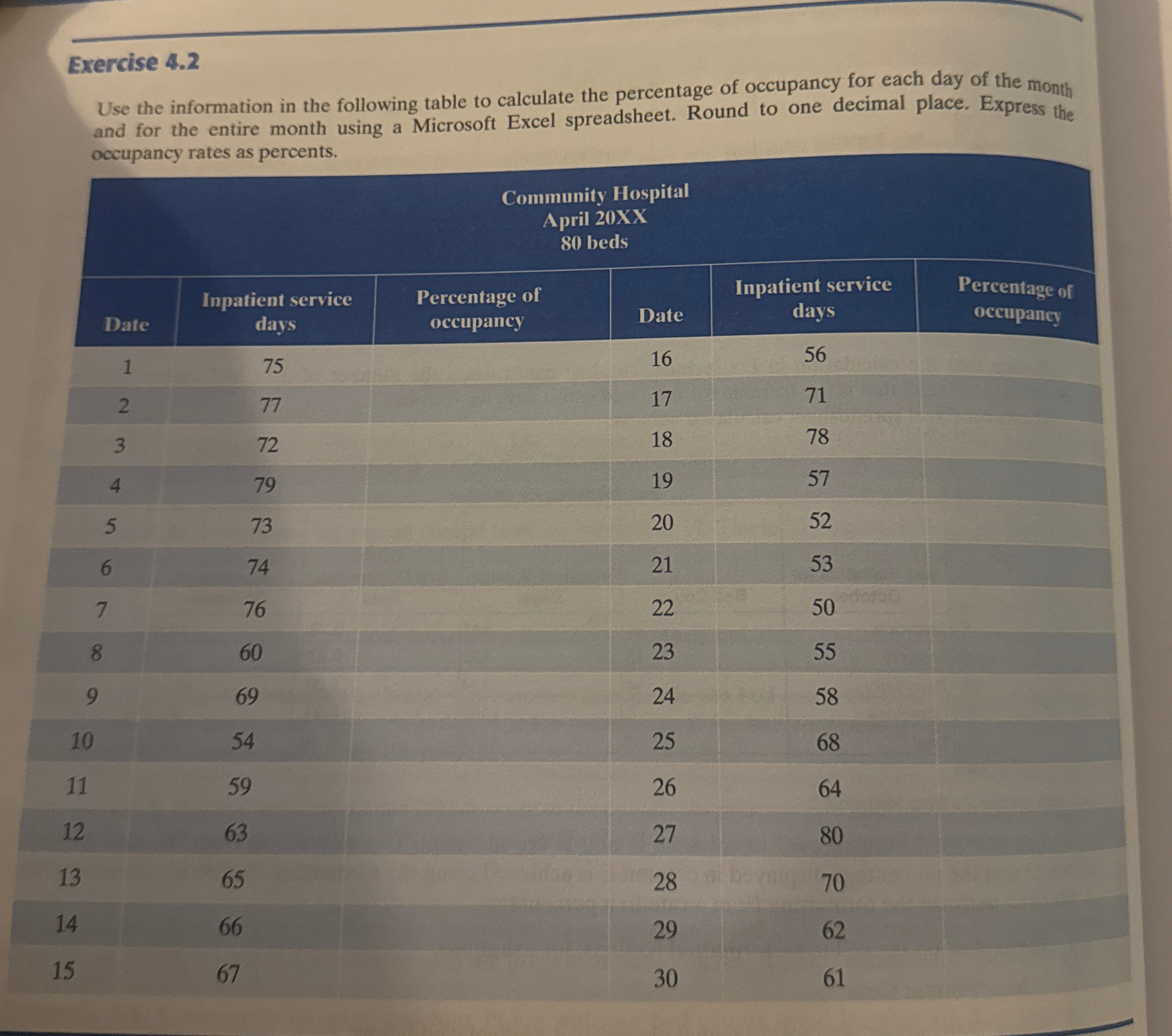
Use the information in the following table to calculate the percentage of occupancy for each day of the month and for the entire month using a Microsoft Excel spreadsheet. Round to one decimal place. Express the occupancy rates as percents.
tabletableCommunity HospitalApril XX bedsDatetableInpatient servicedaystablePercentage ofoccupancyDate,tableInpatient servicedaystablePercentage ofoccupancyhe information in the following table to calculate the percentage of occupancy for each day of the mont and for the entire month using a Microsoft Excel spreadsheet. Round to one decimal place. Express the occupancy rates as percents. Please use excel and complete the table and and questions in these exercise You are encouraged to use excel formulas in excel to assist you with the calculation.
Step by Step Solution
There are 3 Steps involved in it
1 Expert Approved Answer
Step: 1 Unlock

Question Has Been Solved by an Expert!
Get step-by-step solutions from verified subject matter experts
Step: 2 Unlock
Step: 3 Unlock
 Study Help