







Question: Chapter 6: Applying Excel NAME Instructions: Data Unit sales Selling price per unit Variable expenses per unit Fixed expenses 1. Use Formulas or Cell References
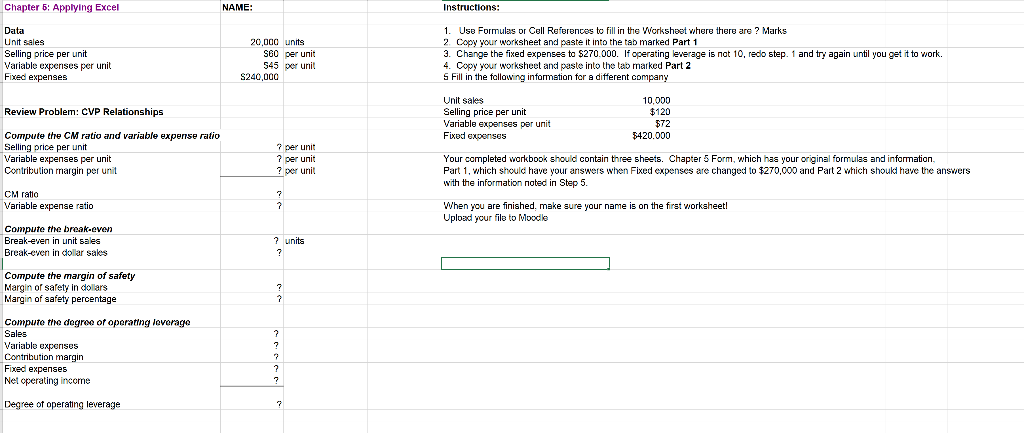
Chapter 6: Applying Excel NAME Instructions: Data Unit sales Selling price per unit Variable expenses per unit Fixed expenses 1. Use Formulas or Cell References to fill i the Worksheet where there are? Marks 2. Copy your worksheet and paste it into the tab marked Part 1 3. Change the fixed expenses ta 5270.000. If operating leverage is nat 10, redo step. 1 and try again until you get it to work. 4. Copyyour worksheet and paste into the tab marked Part 2 S Fill in the following 20000 units S60 per unit 545 per unit S240,000d g information for a different company Unit sales Selling price per unit Variable expenses per unit Fixed expenses 10,000 $120 572 $420.000 Review Proble: CVP Relationships ompute the CM ratio and variable Selling price per unit Variable expenses per unit Contribution margin per unit expense ratio per unit rper unit ? per urnit Your completed rkbook should contain three sheets. ChapterS Form, which has your original formulas and infarmation, Part 1, which shoulc have your answers when Fixed expenses are changed to $270,0o0 and Part 2 which shoukd have the answers with the information noted in Step 5. CM ratio Variable expense ratio When you are finish ed, make aure you r name is on the first worksheet Upload your file to Mooce Compute the break-even Break-een in unit sales Break-eve in dollar saks ? units Compute the margin of safety Margin of sarety in dollars Margin of safety percentage Compute the degro or operating leverago Sales Variable expernses Contibution margin Fixed expenses Net cperating inccme Degree of operating leverage
Step by Step Solution
There are 3 Steps involved in it

Get step-by-step solutions from verified subject matter experts
 Study Help