







Question: CHAPTER 6, EXERCISE COUNT BY DIRECTIONS & OUTPUT: a. Write an application that counts by three from 3 through 300 inclusive, and that starts a
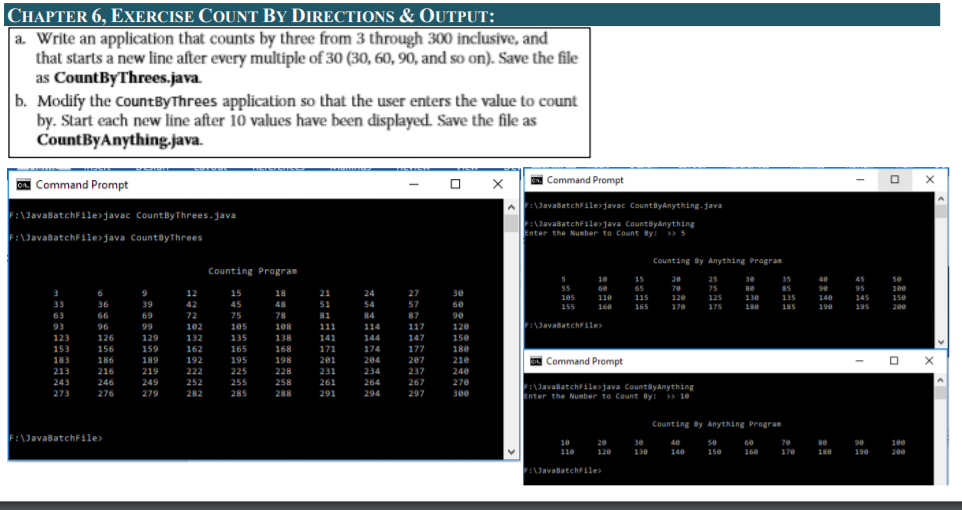
CHAPTER 6, EXERCISE COUNT BY DIRECTIONS & OUTPUT: a. Write an application that counts by three from 3 through 300 inclusive, and that starts a new line after every multiple of 30 (30, 60, 90, and so on). Save the file as CountBy Threes.java. b. Modify the CountByThrees application so that the user enters the value to count by. Start each new line after 10 values have been displayed. Save the file as CountByAnything.java. Command Prompt X A. Command Prompt F:\JavaBatchFilejavac CountByAnything.java F:\JavaBatchFile>javac CountByThrees.java F:\JavaBatchFile>java CountByThrees WavasatchFiles Java CountyAnything Enter the Number to Count By: >> 5 Counting By Anything Program Counting Program 34 18 48 55 105 155 be 110 15 65 15 165 20 70 120 170 25 75 125 175 Be 35 85 135 185 90 140 198 45 95 145 195 100 150 200 188 F:\JavaatchFile> 3 33 63 93 123 153 183 213 243 273 6 36 66 96 126 156 186 216 246 276 9 39 69 99 129 159 189 219 249 279 12 42 72 102 132 162 192 222 252 282 15 45 75 105 135 165 195 225 255 285 108 138 168 198 228 258 288 21 51 81 111 141 171 201 231 261 291 24. 54 84 114 144 174 284 234 264 294 27 57 87 117 147 177 2e7 237 267 297 3e 68 90 120 150 180 210 248 278 300 Command Prompt X F:\JavaBatchFilesjava County Anything Enter the Number to Count By: >> 10 Counting By Anything Progras F:\JavaBatchFile> :\ 30 19 20 110 120 48 140 50 150 90 190 160 170 200 FilhavabatchFile>
Step by Step Solution
There are 3 Steps involved in it

Get step-by-step solutions from verified subject matter experts
 Study Help