







Question: Chapter 6 How to code subqueries Exercise Save a TEXT COPY of the query 1. Write a SELECT statement that returns the same result set
Chapter 6 How to code subqueries Exercise
Save a TEXT COPY of the query 1. Write a SELECT statement that returns the same result set as this SELECT statement, but dont use a join. Instead, use a subquery in a WHERE clause that uses the IN keyword. SELECT DISTINCT CategoryName FROM Categories c JOIN Products p ON c.CategoryID = p.CategoryID ORDER BY CategoryName
2. Write a SELECT statement that answers this question: Which products have a list price thats greater than the average list price for all products? Return the ProductName and ListPrice columns for each product. Sort the results by the ListPrice column in descending sequence.
3. Write a SELECT statement that returns the CategoryName column from the Categories table. Return one row for each category that has never been assigned to any product in the Products table. To do that, use a subquery introduced with the NOT EXISTS operator.
4. Write a SELECT statement that returns three columns: EmailAddress, OrderID, and the order total for each customer. To do this, you can group the result set by the EmailAddress and OrderID columns. In addition, you must calculate the order total from the columns in the OrderItems table. Write a second SELECT statement that uses the first SELECT statement in its FROM clause. The main query should return two columns: the customers email address and the largest order for that customer. To do this, you can group the result set by the EmailAddress column.
5. Write a SELECT statement that returns the name and discount percent of each product that has a unique discount percent. In other words, dont include products that have the same discount percent as another product. Sort the results by the ProductName column.
6. Use a correlated subquery to return one row per customer, representing the customers oldest order (the one with the earliest date). Each row should include these three columns: EmailAddress, OrderID, and OrderDate.
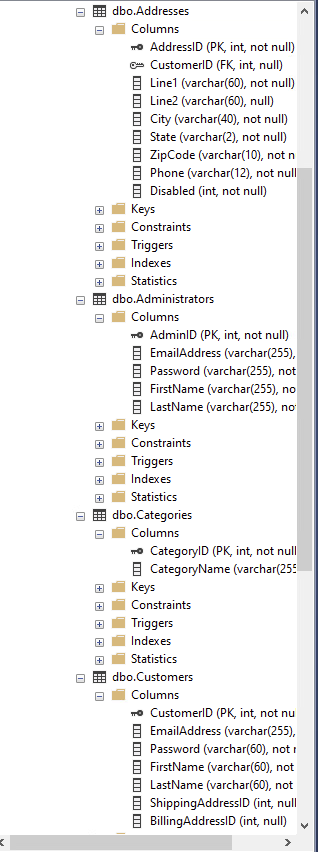
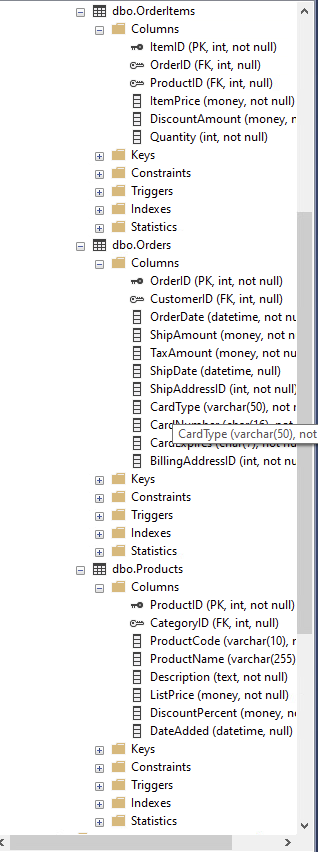
dbo.Addresses Columns mo AddressID (PK, int, not null) Q CustomerlD (FK, int, null) Line1 (varchar(60), not null) Line2 (varchar (60), null) City (varchar(40), not null) State (varchar(2), not null) ZipCode (varchar(10), not n Phone (varchar(12), not null Disabled (int, not null) Keys Constraints Triggers Indexes Statistics dbo.Administrators Columns 7o AdminID ( PK, int, not null) EmailAddress (varchar(255), Password (varchar(255), not FirstName (varchar(255), no LastName (varchar(255), no Keys Constraints Triggers Indexes Statistics dbo.Categories Columns mo CategorylD (PK, int, not null CategoryName (varchar(25: Keys Constraints Triggers Indexes Statistics dbo.Customers Columns To CustomerID (PK, int, not nu EmailAddress (varchar(255), Password (varchar (60), not FirstName (varchar (60), not LastName (varchar(60), not ShippingAddressID (int, null BillingAddressID (int, null) dbo.Orderltems Columns mo ItemID (PK, int, not null) or OrderlD (FK, int, null) ProductlD (FK, int, null) ItemPrice (money, not null) DiscountAmount (money, r Quantity (int, not null) Keys Constraints Triggers Indexes Statistics dbo.Orders Columns mo OrderlD (PK, int, not null) Q (ustomerlD (FK, int, null) OrderDate (datetime, not nu ShipAmount (money, not n TaxAmount (money, not nu ShipDate (datetime, null) ShipAddresslD (int, not null] CardType (varchar(50), not I Card CardType (varchar(50), not BillingAddressID (int, not nu Keys Constraints Triggers Indexes Statistics dbo.Products Columns o ProductID (PK, int, not null) ow CategorylD (FK, int, null) ProductCode (varchar(10), r ProductName (varchar(255) Description (text, not null) ListPrice (money, not null) DiscountPercent (money, n DateAdded (datetime, null) Keys Constraints Triggers Indexes Statistics
Step by Step Solution
There are 3 Steps involved in it

Get step-by-step solutions from verified subject matter experts
 Study Help