







Question: Chapter 7 Assignment Turn in the Ssat to answer the following questions (I do not need the Name: tables, bust the soL) 1. Write SQL
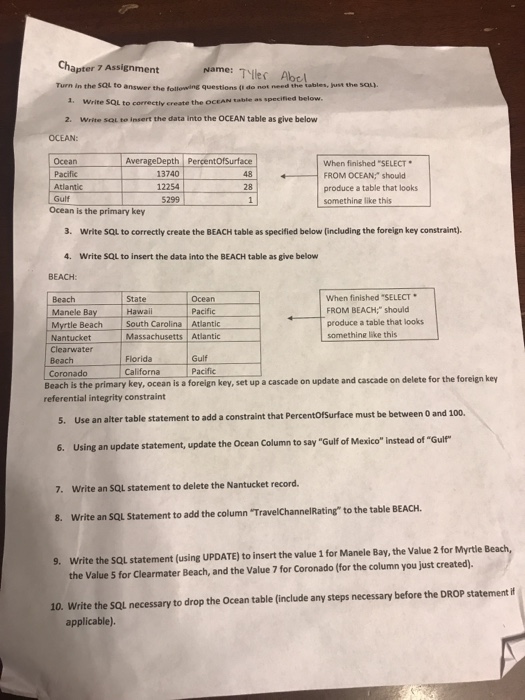
Chapter 7 Assignment Turn in the Ssat to answer the following questions (I do not need the Name: tables, bust the soL) 1. Write SQL to correctly create the OCEAN table as specified below. 2. Write SQL to insert the data into the OCEAN table as give below AverageDepth PercentOfSurface Ocean Pacific Atlantic Gulf 13740 12254 5299 when finished "SELECT " FROM OCEAN," should produce a table that looks somethine like this - 28 Ocean is the primary key 3. Write SQu to correctly create the BEACH table as specified below (including the foreign key constraint). 4. Write SQL to insert the data into the BEACH table as give beloww BEACH: Beach Ocean Pacific South Carolina Atlantic when finished "SELECT . FROM BEACH should produce a table that looks somethine like this State Manele BayHawa Myrtle Beach Nantucket Clearwater Beach Massachusetts Atlantic Florida Californa key, ocean is a foreign key, set up a cascade on update and cascade on delete for the foreign key Gulf Pacific Coronado Beach is the primary referential integrity constraint an alter table statement to add a constraint that PercentOfsurface must be between 0 and 100 6. Using an update statement, update the Ocean Column to say "Gulf of Mexico" instead of "Guir 7. Write an SQL statement to delete the Nantucket record 8. Write an sQl Statement to add the column "TravelChannelRating to the table BEACH Write the SQL statement (using UPDATE) to insert the value 1 for Manele Bay, the Value 2 for Myrtle the Value 5 for Clearmater Beach, and the Value 7 for Coronado (for the column you just created). 9. 10. Write the SQL necessary to drop the Ocean table (include any steps necessary before the DROP statement i applicable)
Step by Step Solution
There are 3 Steps involved in it

Get step-by-step solutions from verified subject matter experts
 Study Help