







Question: Chapter 8: Applying Excel: Exercise (Part 2 of 2) 2. Change all of the numbers in the data area of your worksheet so that it
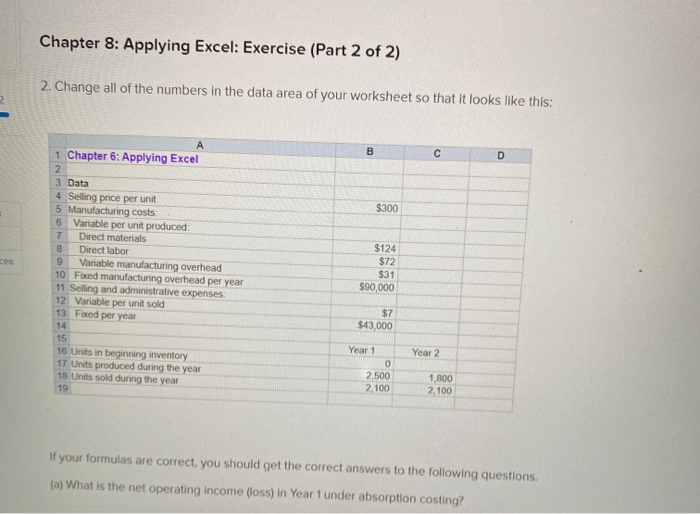
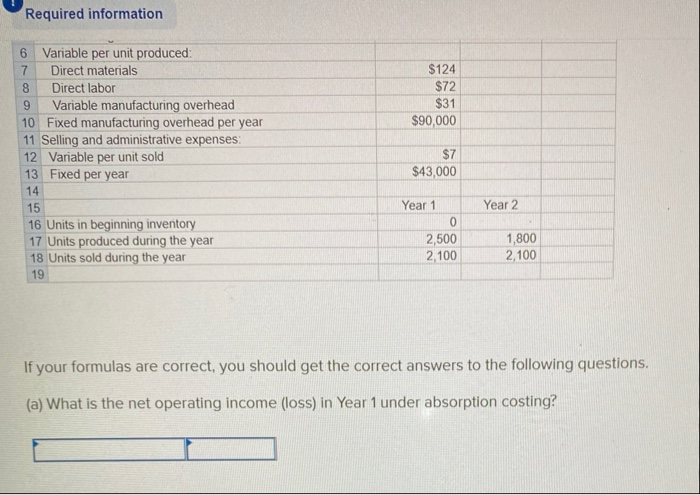
Chapter 8: Applying Excel: Exercise (Part 2 of 2) 2. Change all of the numbers in the data area of your worksheet so that it looks like this: B D $300 1 Chapter 6: Applying Excel 2 3 Data 4 Selling price per unit 5 Manufacturing costs 6 Variable per unit produced 7 Direct materials 8 Direct labor 9 Variable manufacturing overhead 10 Foxed manufacturing overhead per year 11 Selling and administrative expenses 12 Variable per unit sold 13 Fored per year 14 15 16 Units in beginning inventory 17 Units produced during the year 18 Units sold during the year 19 $124 $72 $31 $90,000 $7 $43,000 Year 2 Year 1 0 2,500 2,100 1,800 2.100 If your formulas are correct, you should get the correct answers to the following questions (a) What is the net operating income (loss) In Year 1 under absorption costing? Required information 7 $124 $72 $31 $90,000 6 Variable per unit produced: Direct materials 8 Direct labor 9 Variable manufacturing overhead 10 Fixed manufacturing overhead per year 11 Selling and administrative expenses: 12 Variable per unit sold 13 Fixed per year 14 15 16 Units in beginning inventory 17 Units produced during the year 18 Units sold during the year 19 $7 $43,000 Year 2 Year 1 0 2,500 2,100 1,800 2,100 If your formulas are correct, you should get the correct answers to the following questions. (a) What is the net operating income (loss) in Year 1 under absorption costing
Step by Step Solution
There are 3 Steps involved in it

Get step-by-step solutions from verified subject matter experts
 Study Help