







Question: Chapter 8 Homework Answer the questions below. In doing this homework, you dont have to use a DBMS. If you didnt create MSU Corporation datanase
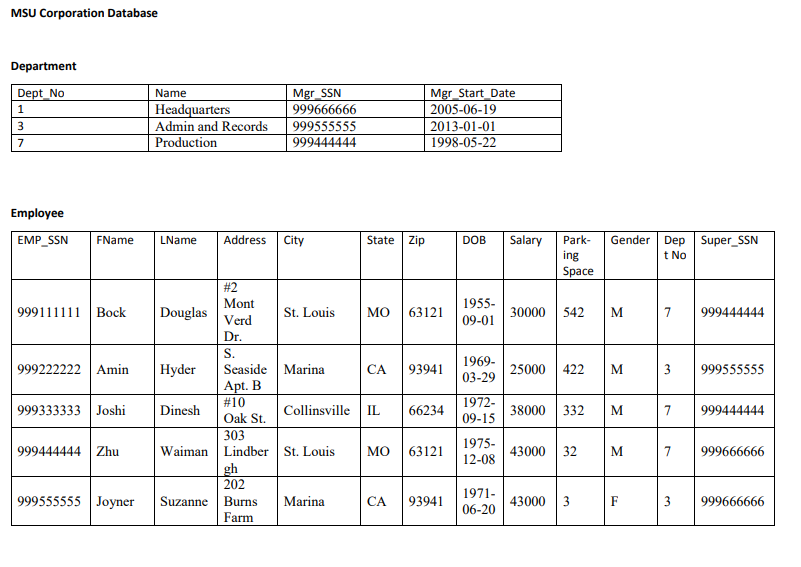
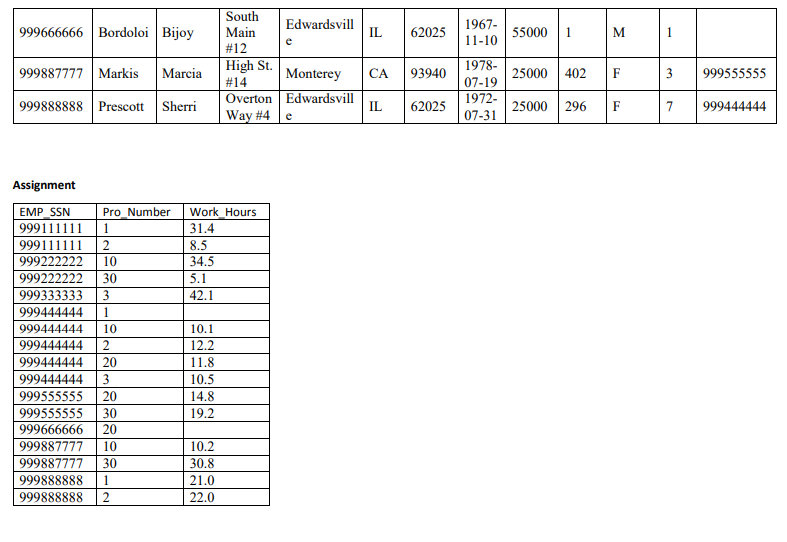
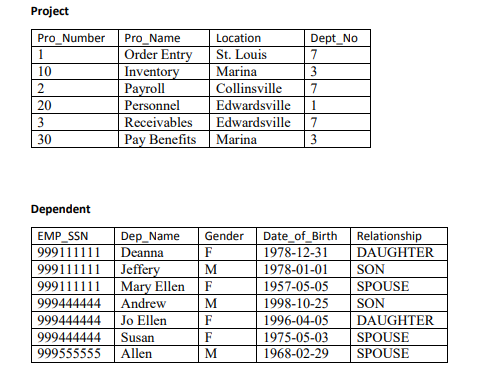
Chapter 8 Homework Answer the questions below. In doing this homework, you dont have to use a DBMS. If you didnt create MSU Corporation datanase to do Chapter 7 homework, you can use the table information in MSU Corporation Database document attached. If you want to create the database now, use MSUCorporationDatabase script attached. Then, you may test your SQL statements with the database. Submission: Your answer document MUST show SQL statement for each question (No query results required). Copy and paste SQL statements Microsoft Word or PDF file and submit the Word or PDF file o Put question #, too. Due: Nov. 11 (Sunday) 11:59 PM I strongly recommend you start this homework earlier since it will take time to do. Before answer questions, have a clear understanding of table structures and relationships between tables There will be NO extension or make-up given. Note: When you join tables, you may use old-style join which is covered in Chapter 7. You may read page 323 if you dont know what is old-style join. You can use any database software (MySQL, Oracle, SQL Server, etc.) to do this homework. I do not recommend any single-user DBMS (e.g., MS Access) because they are NOT 100% compliant to SQL standards. If you dont have any DBMS, I recommend you use MySQL since you can download it free of charge. For download, installation, and tutorials information of MySQL, refer Week 11&12 Materials and Resources folder. Answer the following questions. Use the operator and/or statement asked. Otherwise, you will have zero (0) point for the question.
1. Change the Salary column in the Employee table to reject nulls.
2. Change the length of the CITY column in the Employee table to 50 characters.
3. Change the department name in the Department table to Administration for the department name entitled Admin and Records.
4. Add a department in the Department table. You choose the data for the new department.
5. Delete the new department you added in #4.
6. Add foreign key constraints to Assignment table.
7. Change the column name Date_of_Birth to DOB in Dependent table.
8. Create a new table structure named dept_Locations with dept_no and location fields. You also have to put primary and foreign key constraints so that this table is connected to department table.
9. Drop the new table you created in #8.
10.Create a new table named employee_dependent table with a SELECT statement. The new table will contain the following data: employee SSN, employee first and last name, employee address, dependent name, the relationship to employee. Note: You have to use SELECT statement.
11.Create an index named LNAMEINDEX based on the field (attribute) LNAME in employee table.
12.Create a view which contains the following information: employee SSN, employee first and last name, and project name assigned to each employee. You have to use 3 tables to create this view.
13.Create a database named CBT.
MSU Corporation Database Department Mgr Start Date 2005-06-19 2013-01-01 1998-05-22 t No Name Headquarters Admin and Records 999555555 Production Mgr SSN 999666666 999444444 Employee EMP SSN FName Nme Address City State Zip DOB Salary Park Gender Dep |Super SSN t No ing Space 99Bock Dougl 1955 09-01 30000 542M St. Louis MO 63121 7 999444444 Dr 1969- 03-29 999222222Amin HyderSeaside Marina CA93941 Collinsville IL 66234 Waiman Lindber St. Louis MO 63121 3999555555 7 999444444 7 999666666 25000 422 M Apt. B #10 Oak St. 303 999333333 Joshi Dinesh 38000 332 M 09-15 1975 12-08 43000 32 999444444 Zhu 202 999555555 Joyner 1971 06-20 430003 CA 93941 Suzanne Burns Marina arm
Step by Step Solution
There are 3 Steps involved in it

Get step-by-step solutions from verified subject matter experts
 Study Help