







Question: Chapter 8 Project Project Name: Chpt8_Project Class Name: Chpt8_Project Write a program that determines how many credits 10 students need to graduate. Step 1. Create
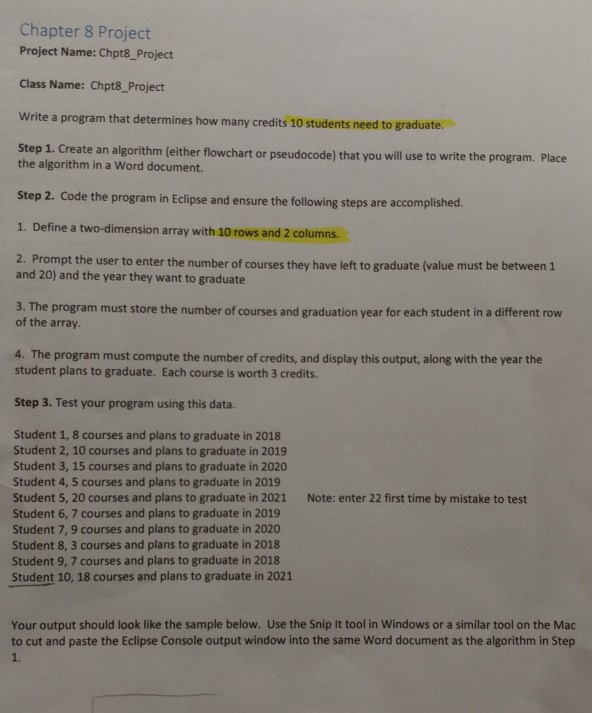
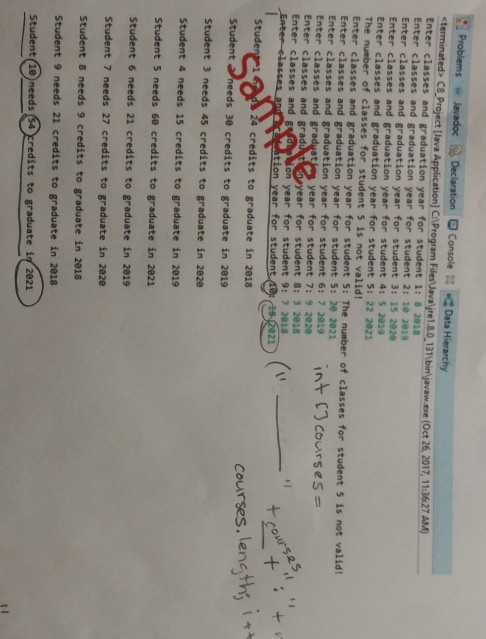
Chapter 8 Project Project Name: Chpt8_Project Class Name: Chpt8_Project Write a program that determines how many credits 10 students need to graduate. Step 1. Create an algorithm (either flowchart or pseudocode) that you will use to write the program. Place the algorithm in a Word document. Step 2. Code the program in Eclipse and ensure the following steps are accomplished. 1. Define a two-dimension array with 10 rows and 2 columns. 2. Prompt the user to enter the number of courses they have left to graduate (value must be between 1 and 20) and the year they want to graduate 3. The program must store the number of courses and graduation year for each student in a different row of the array. 4. The program must compute the number of credits, and display this output, along with the year the student plans to graduate. Each course is worth 3 credits. Step 3. Test your program using this data. Student 1, 8 courses and plans to graduate in 2018 Student 2, 10 courses and plans to graduate in 2019 Student 3, 15 courses and plans to graduate in 2020 Student 4, 5 courses and plans to graduate in 2019 Student 5, 20 courses and plans to graduate in 2021 Student 6, 7 courses and plans to graduate in 2019 Student 7, 9 courses and plans to graduate in 2020 Student 8, 3 courses and plans to graduate in 2018 Student 9, 7 courses and plans to graduate in 2018 Note: enter 22 first time by mistake to test Student 10, 18 courses and plans to graduate in 2021 Your output should look like the sample below. Use the Snip It tool in Windows or a similar tool on the Mac to cut and paste the Eclipse Console output window into the same Word document as the algorithm in Step 1
Step by Step Solution
There are 3 Steps involved in it

Get step-by-step solutions from verified subject matter experts
 Study Help