







Question: Chapters 5 & 6 Homework For this week, you will be executing some of the commands from the reading and lab, Chapter 5 In your
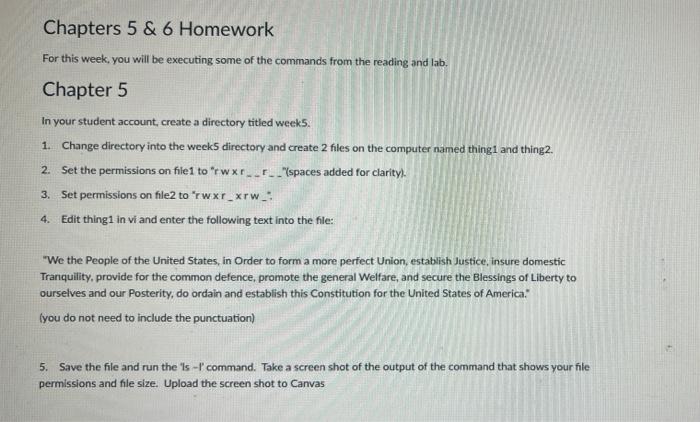
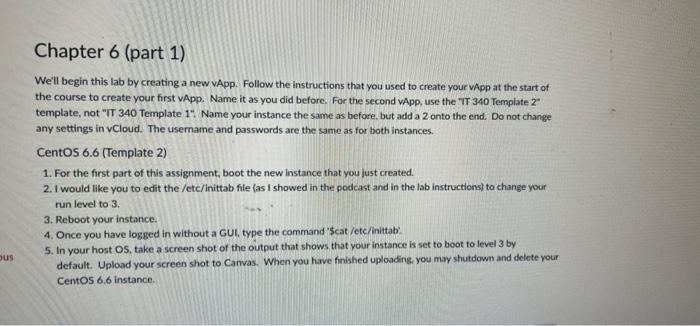
Chapters 5 & 6 Homework For this week, you will be executing some of the commands from the reading and lab, Chapter 5 In your student account create a directory titled weeks. 1. Change directory into the weeks directory and create 2 files on the computer named thing and thing2. 2. Set the permissions on file 1 to "rwxr____'spaces added for clarity). 3. Set permissions on file to rwxr-xrw_: 4. Edit thingi in vi and enter the following text into the file: "We the People of the United States, in order to form a more perfect Union, establish Justice, insure domestic Tranquility, provide for the common defence, promote the general Welfare, and secure the Blessings of Liberty to ourselves and our Posterity, do ordain and establish this Constitution for the United States of America. you do not need to include the punctuation) 5. Save the file and run the 's-1'command. Take a screen shot of the output of the command that shows your file permissions and file size. Upload the screen shot to Canvas Chapter 6 (part 1) We'll begin this lab by creating a new App. Follow the instructions that you used to create your App at the start of the course to create your first vApp. Name it as you did before. For the second App, use the "IT 340 Template 2 template, not "IT 340 Template 11 Name your instance the same as before but add a 2 onto the end. Do not change any settings in vCloud. The username and passwords are the same as for both instances. CentOS 6.6 (Template 2) 1. For the first part of this assignment, boot the new instance that you just created. 2. I would like you to edit the /etc/inittab file (as I showed in the podcast and in the lab instructions to change your run level to 3 3. Reboot your instance. 4. Once you have logged in without a GUI, type the command "Scat /etc/inittab 5. In your host OS, take a screen shot of the output that shows that your instance is set to boot to level 3 by default. Upload your screen shot to Canvas. When you have finished uploading you may shutdown and delete your CentOS 6.6 instance bus
Step by Step Solution
There are 3 Steps involved in it

Get step-by-step solutions from verified subject matter experts
 Study Help