







Question: Chris: But we really need to know that the interface works. I thought this usability testing technique would help us prove we have a good
Chris: But we really need to know that the interface works. I thought this usability testing technique would help us prove we have a good design.
Amy systems analyst: It would, Chris, but there are other ways, too. I assumed we'd do a thorough walkthrough with our users and present the interface to them at a meeting. We can project each interface screen so that the users can see it and give us their reaction. This is probably the most efficient way to get the users' response to our work.
Heather: That's true, but Id sure like to see the users sit down and work with the system. I've always learned a lot by watching what they do seeing where they get confused, and hearing their comments and feedback.
Ryan systems analyst: It seems to me that we ve put so much work into this interface design that all we really need to do is review it ourselves. Let's just make a list of the design principles we're most concerned about and check it ourselves to make sure we ve followed them consistently. If we have, we should be fine.
We want to get moving on the implementation, you know.
Mark: These are all good ideas. It seems like we ve all got a different view of how to evaluate the inte
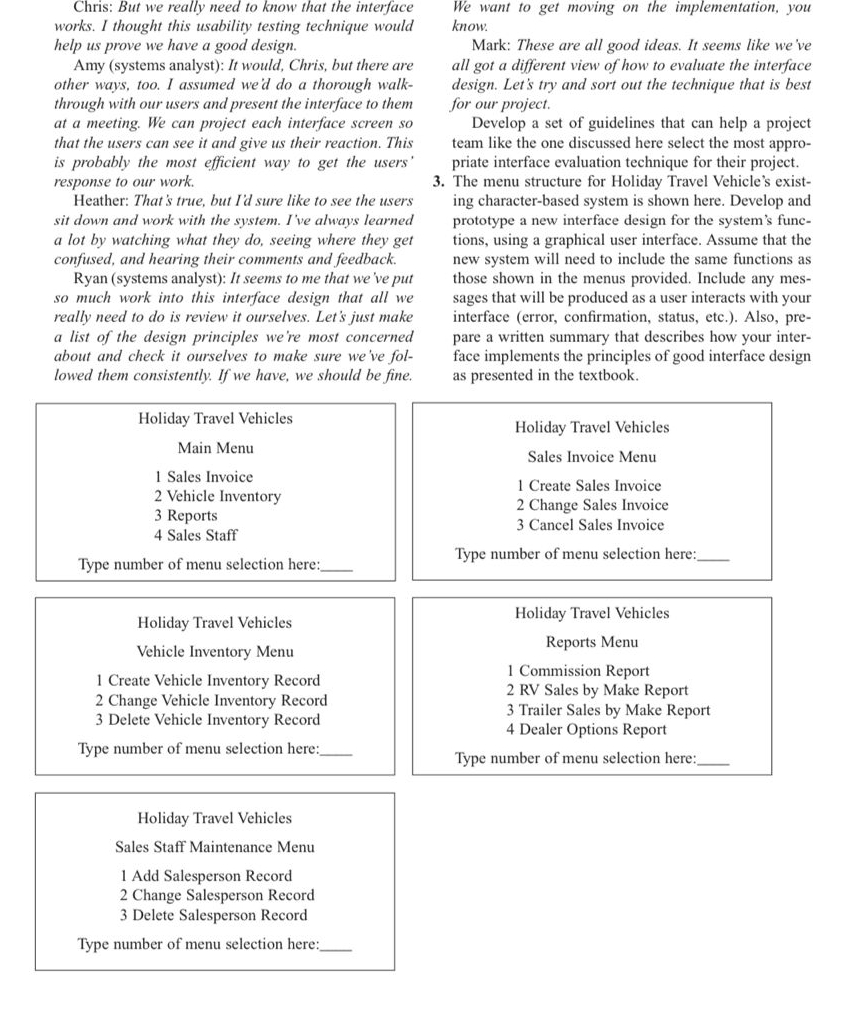
The menu structure for Holiday Travel Vehicle's existing characterbased system is shown here. Develop and prototype a new interface design for the system's functions, using a graphical user interface. Assume that the new system will need to include the same functions as those shown in the menus provided. Include any messages that will be produced as a user interacts with your interface error confirmation, status, etc. Also, prepare a written summary that describes how your interface implements the principles of good interface design as presented in the textbook.
Holiday Travel Vehicles
Main Menu
Sales Invoice
Vehicle Inventory
Reports
Sales Staff
Type number of menu selection here:
Holiday Travel Vehicles
Vehicle Inventory Menu
Create Vehicle Inventory Record
Change Vehicle Inventory Record
Delete Vehicle Inventory Record
Type number of menu selection here:
Holiday Travel Vehicles
Sales Staff Maintenance Menu
Add Salesperson Record
Change Salesperson Record
Delete Salesperson Record
Type number of menu selection here:
Holiday Travel Vehicles
Sales Invoice Menu
Create Sales Invoice
Change Sales Invoice
Cancel Sales Invoice
Type number of menu selection here:
Holiday Travel Vehicles
Reports Menu
Commission Report
RV Sales by Make Report
Trailer Sales by Make Report
Dealer Options Report
Type number of menu selection here:
Step by Step Solution
There are 3 Steps involved in it
1 Expert Approved Answer
Step: 1 Unlock

Question Has Been Solved by an Expert!
Get step-by-step solutions from verified subject matter experts
Step: 2 Unlock
Step: 3 Unlock
 Study Help