







Question: Chrome File Edit View History People Window Help Evolve Content Player Not Secure: www.pathway2code.com/LessonPageTel.aspx Hello Foysal Ahmed Leout SetName: Assign 1.1-Star World: Graphics New Method:
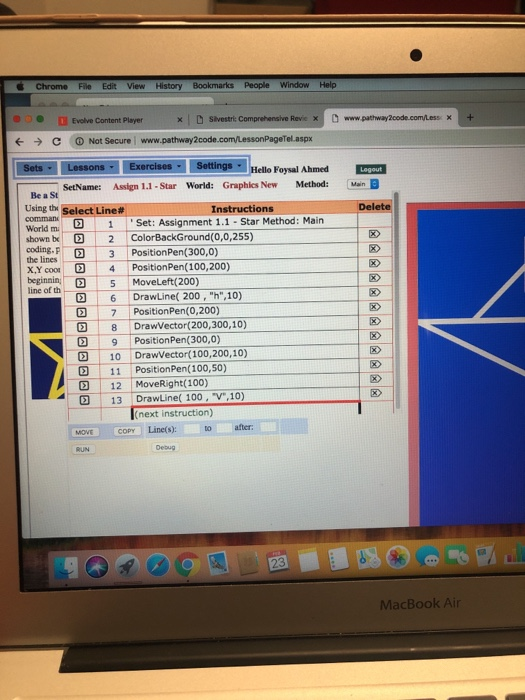
Chrome File Edit View History People Window Help Evolve Content Player Not Secure: www.pathway2code.com/LessonPageTel.aspx Hello Foysal Ahmed Leout SetName: Assign 1.1-Star World: Graphics New Method: Main B Be a St Using the Select Line# World m 1 'Set: Assignment 1.1 - Star Method: Main Instructions Delete coding.P 3 PositionPen(300,0) XYo 4 Position Pen(100,200) beginnith-D-5 HoveLeft(200) line of 2 6DrawLine( 200, "h",10) 0 7 PositionPen(0,200) Drawvector(200.300,10) 9 Position Pen(300,0 D 10 DrawVector( 100,200,10) 13 DrawLine( 100, "v",10 MOVECOPY Line(s): to after 2 11 Position Pen(100,50) 12 | MoveRight(100) 2 next instruction) Debug MacBook Air Chrome File Edit View History People Window Help Evolve Content Player Not Secure: www.pathway2code.com/LessonPageTel.aspx Hello Foysal Ahmed Leout SetName: Assign 1.1-Star World: Graphics New Method: Main B Be a St Using the Select Line# World m 1 'Set: Assignment 1.1 - Star Method: Main Instructions Delete coding.P 3 PositionPen(300,0) XYo 4 Position Pen(100,200) beginnith-D-5 HoveLeft(200) line of 2 6DrawLine( 200, "h",10) 0 7 PositionPen(0,200) Drawvector(200.300,10) 9 Position Pen(300,0 D 10 DrawVector( 100,200,10) 13 DrawLine( 100, "v",10 MOVECOPY Line(s): to after 2 11 Position Pen(100,50) 12 | MoveRight(100) 2 next instruction) Debug MacBook Air
Step by Step Solution
There are 3 Steps involved in it

Get step-by-step solutions from verified subject matter experts
 Study Help