



Question: CIS440 EXAM02 APACHE2/WEB CONTENT INSTALLATION/CONFIGURATION NAME: NOTE: Download the following files from BB: ecandydotcom.tar .searchc.tar.gz NOTE: The ecandydotcom/index.html USERID is to be edited. 1. Display
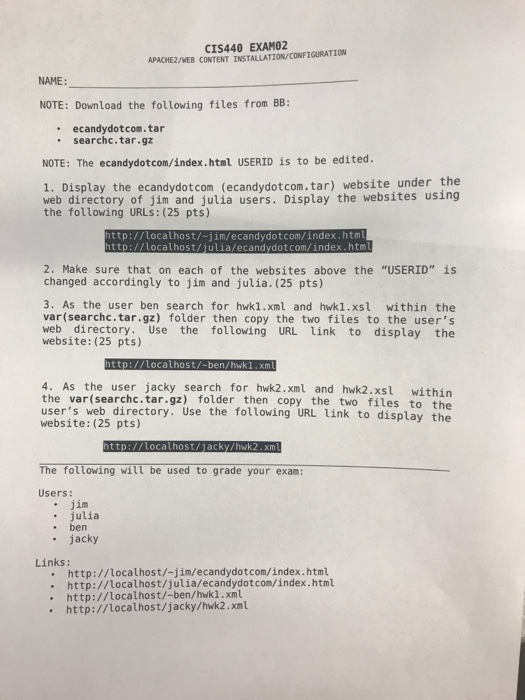
CIS440 EXAM02 APACHE2/WEB CONTENT INSTALLATION/CONFIGURATION NAME: NOTE: Download the following files from BB: ecandydotcom.tar .searchc.tar.gz NOTE: The ecandydotcom/index.html USERID is to be edited. 1. Display the ecandydotcom (ecandydot.com.tar) website under the web directory of jim and julia users. Display the websites using the following URLs: (25 pts) http://locathost/-jim/ecandydotcom/index.htm http: ocalhost/ ia/ecandydotcom/index.htm 2. Make sure that on each of the websites above the "USERID" is changed accordingly to jim and julia. (25 pts) 3. As the user ben search for hwk1.xml and hwkl.xsl within the var(searchc.tar.gz) folder then copy the two files to the user's web directory. Use the following URL link to display the website: (25 pts) 4. As the user jacky search for hwk2.xml and hwk2.xsl within the var(searchc.tar.gz) folder then copy the two files to the user's web directory. Use the following URL link to display the website: (25 pts) The following will be used to grade your exam: Users: .jim . julia . ben . jacky Links: . http://localhost/-jim/ecandydotcom/index.html http://localhost/julia/ecandydotcom/index.html http://localhost/-ben/hwk1.xml http://localhost/jacky/hwk2.xml CIS440 EXAM02 APACHE2/WEB CONTENT INSTALLATION/CONFIGURATION NAME: NOTE: Download the following files from BB: ecandydotcom.tar .searchc.tar.gz NOTE: The ecandydotcom/index.html USERID is to be edited. 1. Display the ecandydotcom (ecandydot.com.tar) website under the web directory of jim and julia users. Display the websites using the following URLs: (25 pts) http://locathost/-jim/ecandydotcom/index.htm http: ocalhost/ ia/ecandydotcom/index.htm 2. Make sure that on each of the websites above the "USERID" is changed accordingly to jim and julia. (25 pts) 3. As the user ben search for hwk1.xml and hwkl.xsl within the var(searchc.tar.gz) folder then copy the two files to the user's web directory. Use the following URL link to display the website: (25 pts) 4. As the user jacky search for hwk2.xml and hwk2.xsl within the var(searchc.tar.gz) folder then copy the two files to the user's web directory. Use the following URL link to display the website: (25 pts) The following will be used to grade your exam: Users: .jim . julia . ben . jacky Links: . http://localhost/-jim/ecandydotcom/index.html http://localhost/julia/ecandydotcom/index.html http://localhost/-ben/hwk1.xml http://localhost/jacky/hwk2.xml
Step by Step Solution
There are 3 Steps involved in it

Get step-by-step solutions from verified subject matter experts