







Question: CIS440 PROJECT All scripts below must work under the ubuntu-16.04.4-desktop-1386. iso live environment. All seripts should be located under the cis448pro ject directory as shown
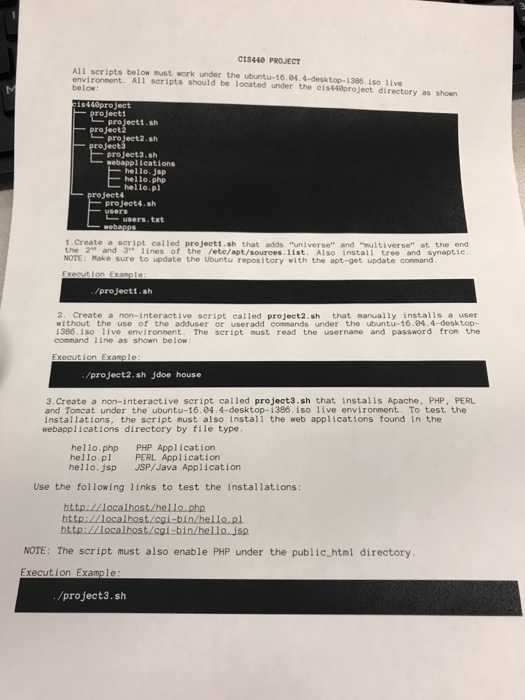
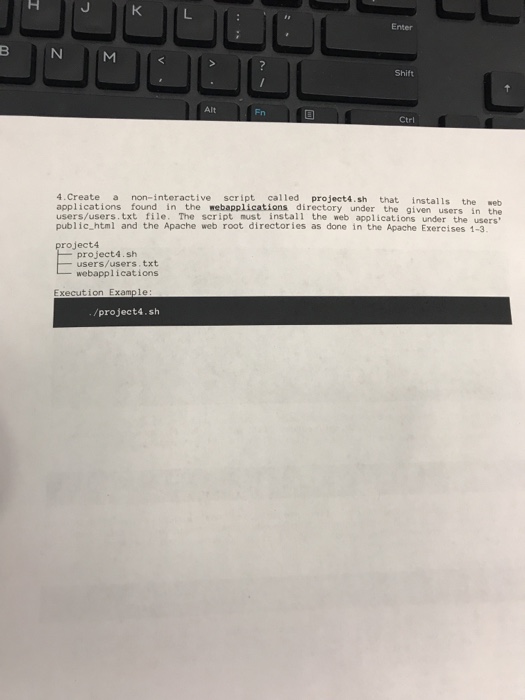
CIS440 PROJECT All scripts below must work under the ubuntu-16.04.4-desktop-1386. iso live environment. All seripts should be located under the cis448pro ject directory as shown below project1.sh pro project3.sh proj sh webappl ications hello.jsp hello.php hello.pl project4 project4.sh users. txt t.Create a script called projecti.sh that adds "universe" and "nultiverse" at the end the 2" and 3* lines of the /ete/apt/sources.11st. Also install tree and synaptie /project1.sh 2. Create a non-interactive seript called project2.sh that manually installs a user without the use of the adduser or useradd commands under the ubuntu-16.84.4-desktop- 1396. iso live environment. The seript must read the usernane and password from the command line as shown below: project2.sh jdoe house 3.Create a non-interactive script called project3.sh that installs Apache, PHP, PERL and Tomcat under the ubuntu-16.04.4-desktop-1386. iso live environment. To test the installations, the script nust also install the web applications found in the webapplications directory by file type hello.php PHP Application hello.pl PERL Application hello.jsp JSP/Java Application Use the following links to test the installations NOTE: The script must also enable PHP under the public html directory Execution Example /project3.sh
Step by Step Solution
There are 3 Steps involved in it

Get step-by-step solutions from verified subject matter experts
 Study Help