







Question: CISCO CCNA Exploration LAN Switching and Wireless: Basic Switch Concepts and Configuration Lab 2.5.1: Basic Switch Configuration Cisco Networking Academy Mind Wide Open Lab 2.5.1:
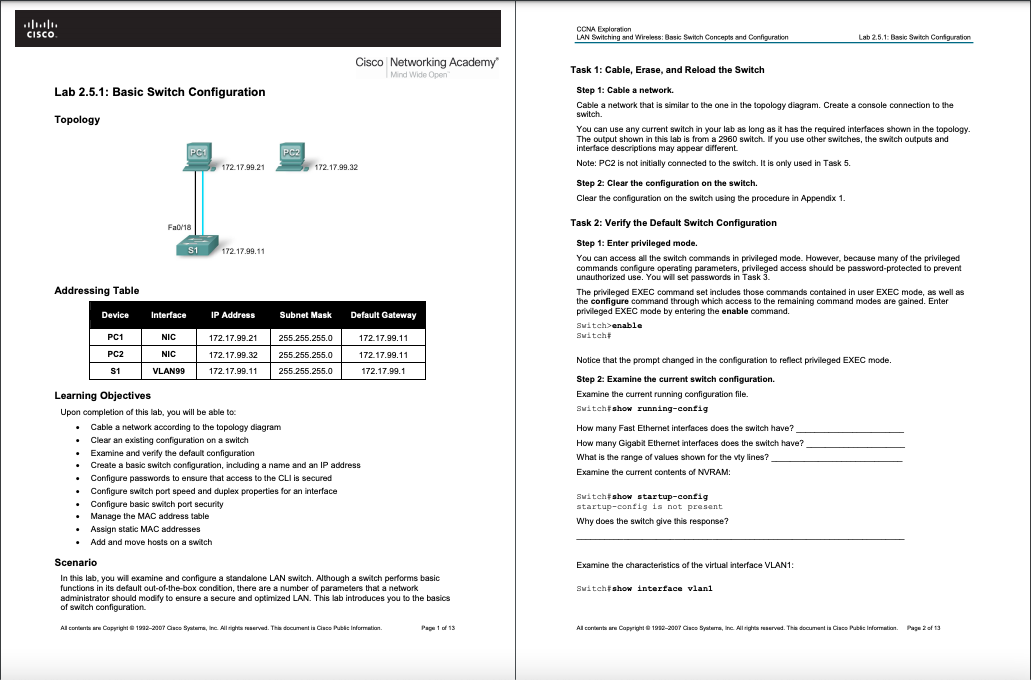
CISCO CCNA Exploration LAN Switching and Wireless: Basic Switch Concepts and Configuration Lab 2.5.1: Basic Switch Configuration Cisco Networking Academy Mind Wide Open Lab 2.5.1: Basic Switch Configuration Topology Task 1: Cable, Erase, and Reload the Switch Step 1: Cable a network. 1: a Cable a network that is similar to the one in the topology diagram. Create a console connection to the switch. You can use any current switch in your lab as long as it has the required interfaces shown in the topology The output shown in this lab is from a 2960 switch. If you use other switches, the switch outputs and interface descriptions may appear different Note: PC2 is not initially connected to the switch. It is only used in Task 5. Step 2: Clear the configuration on the switch. Clear the configuration on the switch using the procedure in Appendix 1. PC1 PC2 172.17.99.21 172 1799.32 Fa0/10 S1 172 17.99.11 Task 2: Verify the Default Switch Configuration Step 1: Enterprivileged mode. You can access all the switch commands in privileged mode. However, because many of the privileged commands configure operating parameters, privileged access should be password-protected to prevent unauthorized use. You will set passwords in Task 3. The privileged EXEC command set includes those commands contained in user EXEC mode, as well as the configure command through which access to the remaining command modes are gained. Enter privileged EXEC mode by entering the enable command. Switch>enable Switch# Addressing Table Device Interface IP Address Subnet Mask Default Gateway PC1 NIC PC2 172. 17.99.21 172.17.99.32 172. 17.99.11 255.255.255.0 255.255.255.0 172. 17.99.11 172.17.99.11 NIC S1 VLAN99 255.255.255.0 172.17.99.1 Notice that the prompt changed in the configuration to reflect privileged EXEC mode. Step 2: Examine the current switch configuration. Examine the current running configuration file. Switch#show running-config How many Fast Ethernet interfaces does the switch have? How many Gigabit Ethernet interfaces does the switch have? What is the range of values shown for the ty lines? Examine the current contents of NVRAM: Learning Objectives Upon completion of this lab, you will be able to Cable a network according to the topology diagram Clear an existing configuration on a switch Examine and verify the default configuration Create a basic switch configuration, including a name and an IP address Configure passwords to ensure that access to the CLI is secured Configure switch port speed and duplex properties for an interface Configure basic switch port security Manage the MAC address table Assign static MAC addresses Add and move hosts on a switch a Scenario In this lab, you wil examine and configure a standalone LAN switch. Although a switch performs basic functions in its default out-of-the-box condition, there are a number of parameters that a network administrator should modify to ensure a secure and optimized LAN. This lab introduces you to the basics of switch configuration Switch#show startup-config - startup-config is not present Why does the switch give this response? Examine the characteristics of the virtual interface VLAN1: Switch#show interface vlani Alcore Copyright 1992-2001 Case Sture, Inc. All right reserved. The document in Chaco Public Information Paper1/15 Alcore Copyright 1992-2008 Case Sture, Inc. All right reserved. The document in Chaco Public Information Page 2 of 13 CISCO CCNA Exploration LAN Switching and Wireless: Basic Switch Concepts and Configuration Lab 2.5.1: Basic Switch Configuration Cisco Networking Academy Mind Wide Open Lab 2.5.1: Basic Switch Configuration Topology Task 1: Cable, Erase, and Reload the Switch Step 1: Cable a network. 1: a Cable a network that is similar to the one in the topology diagram. Create a console connection to the switch. You can use any current switch in your lab as long as it has the required interfaces shown in the topology The output shown in this lab is from a 2960 switch. If you use other switches, the switch outputs and interface descriptions may appear different Note: PC2 is not initially connected to the switch. It is only used in Task 5. Step 2: Clear the configuration on the switch. Clear the configuration on the switch using the procedure in Appendix 1. PC1 PC2 172.17.99.21 172 1799.32 Fa0/10 S1 172 17.99.11 Task 2: Verify the Default Switch Configuration Step 1: Enterprivileged mode. You can access all the switch commands in privileged mode. However, because many of the privileged commands configure operating parameters, privileged access should be password-protected to prevent unauthorized use. You will set passwords in Task 3. The privileged EXEC command set includes those commands contained in user EXEC mode, as well as the configure command through which access to the remaining command modes are gained. Enter privileged EXEC mode by entering the enable command. Switch>enable Switch# Addressing Table Device Interface IP Address Subnet Mask Default Gateway PC1 NIC PC2 172. 17.99.21 172.17.99.32 172. 17.99.11 255.255.255.0 255.255.255.0 172. 17.99.11 172.17.99.11 NIC S1 VLAN99 255.255.255.0 172.17.99.1 Notice that the prompt changed in the configuration to reflect privileged EXEC mode. Step 2: Examine the current switch configuration. Examine the current running configuration file. Switch#show running-config How many Fast Ethernet interfaces does the switch have? How many Gigabit Ethernet interfaces does the switch have? What is the range of values shown for the ty lines? Examine the current contents of NVRAM: Learning Objectives Upon completion of this lab, you will be able to Cable a network according to the topology diagram Clear an existing configuration on a switch Examine and verify the default configuration Create a basic switch configuration, including a name and an IP address Configure passwords to ensure that access to the CLI is secured Configure switch port speed and duplex properties for an interface Configure basic switch port security Manage the MAC address table Assign static MAC addresses Add and move hosts on a switch a Scenario In this lab, you wil examine and configure a standalone LAN switch. Although a switch performs basic functions in its default out-of-the-box condition, there are a number of parameters that a network administrator should modify to ensure a secure and optimized LAN. This lab introduces you to the basics of switch configuration Switch#show startup-config - startup-config is not present Why does the switch give this response? Examine the characteristics of the virtual interface VLAN1: Switch#show interface vlani Alcore Copyright 1992-2001 Case Sture, Inc. All right reserved. The document in Chaco Public Information Paper1/15 Alcore Copyright 1992-2008 Case Sture, Inc. All right reserved. The document in Chaco Public Information Page 2 of 13
Step by Step Solution
There are 3 Steps involved in it

Get step-by-step solutions from verified subject matter experts
 Study Help