







Question: CIT239 Java Programming Lab 17a. Hex Dump Due Date You must demonstrate the solution for this lab exercise to the instructor by Sunday, April 23,
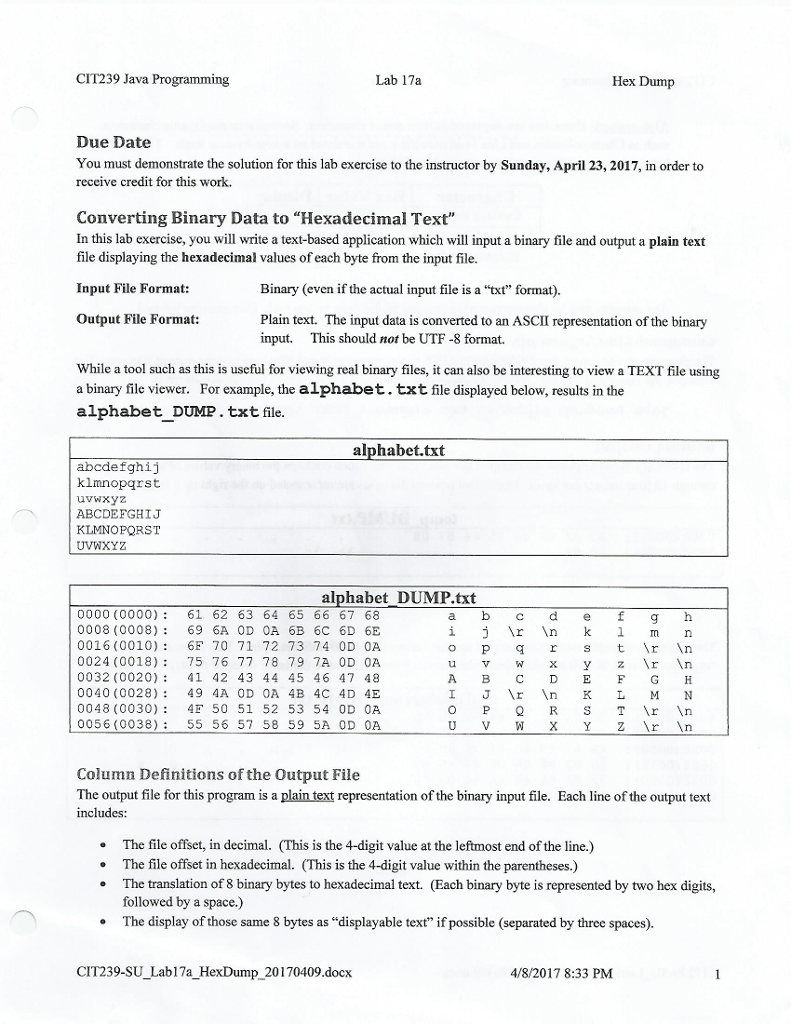
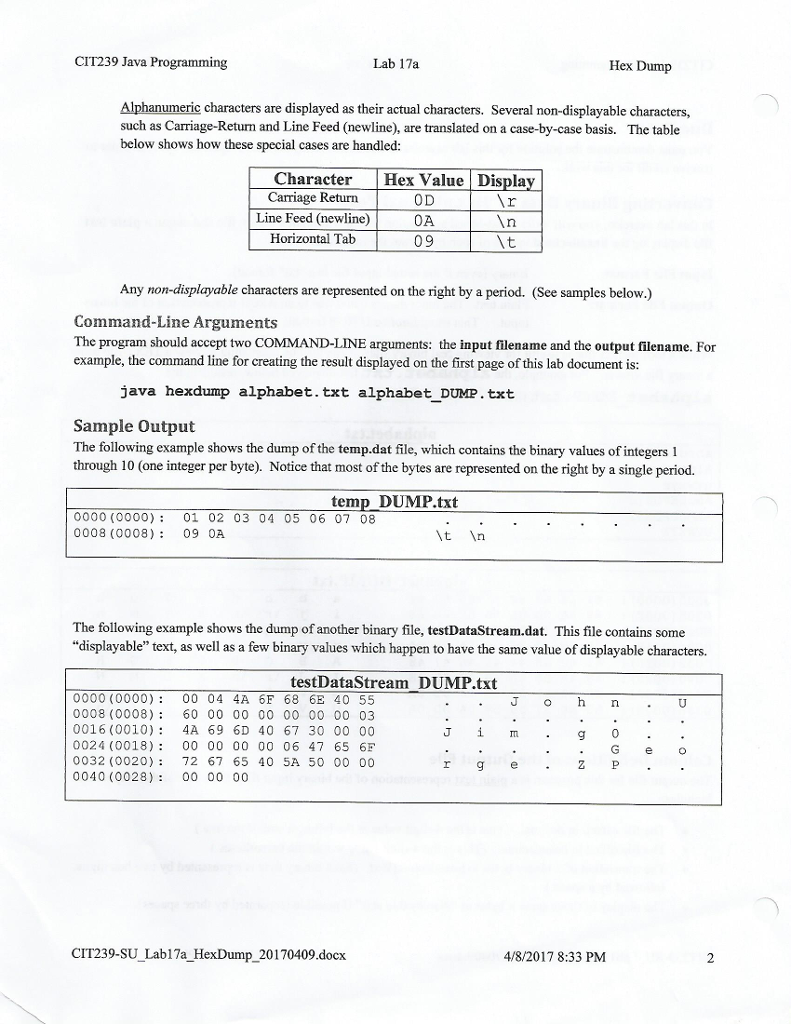
CIT239 Java Programming Lab 17a. Hex Dump Due Date You must demonstrate the solution for this lab exercise to the instructor by Sunday, April 23, 2017, in order to receive credit for this work. Converting Binary Data to "Hexadecimal Text" In this lab exercise, you will write a text-based application which will input a binary file and output a plain text file displaying the hexadecimal values of each byte from the input file Input File Format: Binary (even if the actual input file is a "txt" format) Plain text. The input data is converted to an ASCII representation of the binary output File Format: input. This should not be UTF-8 format. While a tool such as this is useful for viewing real binary files, it can also be interesting to view a TEXT file using a binary file viewer. For example, the alphabet.txt file displayed below, results in the alphabet DUMP. txt file alphabet.txt abcdef ghi j klmnopqrst ABCDEFG HI J KLMNOPORST UVWXYZ alphabet DUMP txt 0000 (0000 61 62 63 64 65 66 67 68 0008 (0008 69 6A OD OA 6B 6C 6D 6E In 0016 (0010) 6 70 71 72 73 74 0D 0A t In 0024 (0018) 75 76 77 78 79 7A 0D 0A z Nr In 0032 (0020) 41 42 43 44 45 46 47 48 0040 (0028 49 4A OD 0A 4B 4C 4D 4E Ar In 0048 (0030) 4F 50 51 52 53 54 0D 0A O P Q R S T Ar An 0056 (0038) 55 56 57 58 59 5A 0D 0A Mr An Column Definitions of the Output File The output file for this program is a plain text representation of the binary input file. Each line of the output text includes: The file offset, in decimal. This is the 4-digit value at the leftmost end of the line.) The file offset in hexadecimal. (This is the 4-digit value within the parentheses.) The translation of 8 binary bytes to hexadecimal text. (Each binary byte is represented by two hex digits, followed by a space.) The display of those same 8 bytes as "displayable text" if possible (separated by three spaces CIT239-SU Lab17a HexDump 20170409 docx 4/8/2017 8:33 PM CIT239 Java Programming Lab 17a. Hex Dump Due Date You must demonstrate the solution for this lab exercise to the instructor by Sunday, April 23, 2017, in order to receive credit for this work. Converting Binary Data to "Hexadecimal Text" In this lab exercise, you will write a text-based application which will input a binary file and output a plain text file displaying the hexadecimal values of each byte from the input file Input File Format: Binary (even if the actual input file is a "txt" format) Plain text. The input data is converted to an ASCII representation of the binary output File Format: input. This should not be UTF-8 format. While a tool such as this is useful for viewing real binary files, it can also be interesting to view a TEXT file using a binary file viewer. For example, the alphabet.txt file displayed below, results in the alphabet DUMP. txt file alphabet.txt abcdef ghi j klmnopqrst ABCDEFG HI J KLMNOPORST UVWXYZ alphabet DUMP txt 0000 (0000 61 62 63 64 65 66 67 68 0008 (0008 69 6A OD OA 6B 6C 6D 6E In 0016 (0010) 6 70 71 72 73 74 0D 0A t In 0024 (0018) 75 76 77 78 79 7A 0D 0A z Nr In 0032 (0020) 41 42 43 44 45 46 47 48 0040 (0028 49 4A OD 0A 4B 4C 4D 4E Ar In 0048 (0030) 4F 50 51 52 53 54 0D 0A O P Q R S T Ar An 0056 (0038) 55 56 57 58 59 5A 0D 0A Mr An Column Definitions of the Output File The output file for this program is a plain text representation of the binary input file. Each line of the output text includes: The file offset, in decimal. This is the 4-digit value at the leftmost end of the line.) The file offset in hexadecimal. (This is the 4-digit value within the parentheses.) The translation of 8 binary bytes to hexadecimal text. (Each binary byte is represented by two hex digits, followed by a space.) The display of those same 8 bytes as "displayable text" if possible (separated by three spaces CIT239-SU Lab17a HexDump 20170409 docx 4/8/2017 8:33 PM
Step by Step Solution
There are 3 Steps involved in it

Get step-by-step solutions from verified subject matter experts
 Study Help