







Question: Clarification about the Command - Line Interface ( CLI ) for the project. To clarify, the interface must strictly be command - line based, meaning
Clarification about the CommandLine Interface CLI for the project.
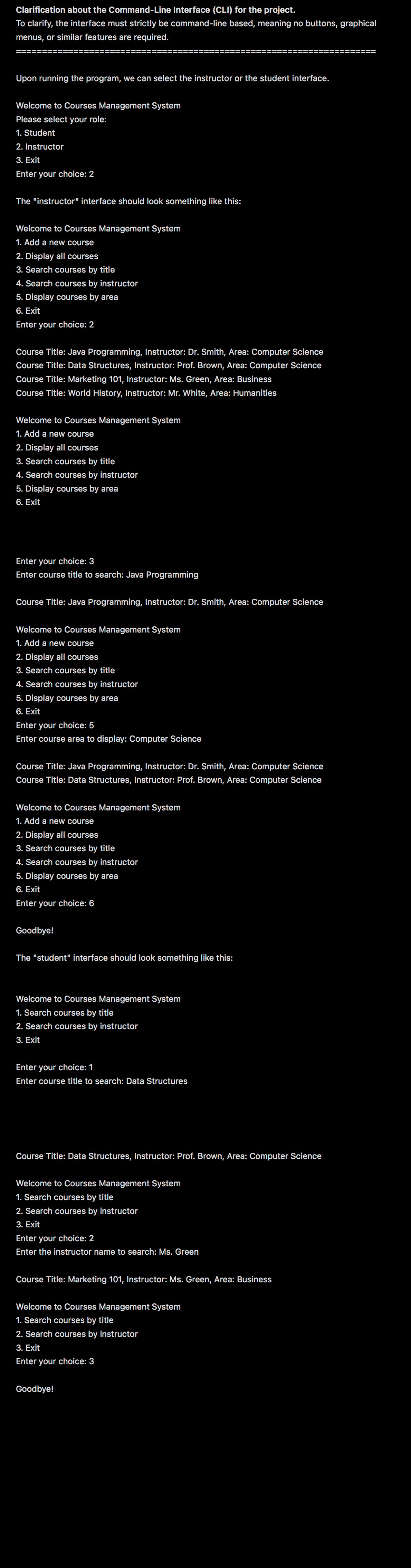
To clarify, the interface must strictly be commandline based, meaning no buttons, graphical menus, or similar features are required.
Upon running the program, we can select the instructor or the student interface.
Welcome to Courses Management System
Please select your role:
Student
Instructor
Exit
Enter your choice:
The "instructor" interface should look something like this:
Welcome to Courses Management System
Add a new course
Display all courses
Search courses by title
Search courses by instructor
Display courses by area
Exit
Enter your choice:
Course Title: Java Programming, Instructor: Dr Smith, Area: Computer Science Course Title: Data Structures, Instructor: Prof. Brown, Area: Computer Science Course Title: Marketing Instructor: Ms Green, Area: Business Course Title: World History, Instructor: Mr White, Area: Humanities
Welcome to Courses Management System
Add a new course
Display all courses
Search courses by title
Search courses by instructor
Display courses by area
Exit
Enter your choice:
Enter course title to search: Java Programming
Course Title: Java Programming, Instructor: Dr Smith, Area: Computer Science
Welcome to Courses Management System
Add a new course
Display all course
Search courses by title
Search courses by instructor
Display courses by area
Exit
Enter your choice:
Enter course area to display: Computer Science
Course Title: Java Programming, Instructor: Dr Smith, Area: Computer Science Course Title: Data Structures, Instructor: Prof. Brown, Area: Computer Science
Welcome to Courses Management System
Add a new course
Display all courses
Search courses by title
Search courses by instructor
Display courses by area
Exit
Enter your choice:
Goodbye!
The "student" interface should look something like this:
Welcome to Courses Management System
Search courses by title
Search courses by instructor
Exit
Enter your choice:
Enter course title to search: Data Structures
Course Title: Data Structures, Instructor: Prof. Brown, Area: Computer Science
Welcome to Courses Management System
Search courses by title
Search courses by instructor
Exit
Enter your choice:
Enter the instructor name to search: Ms Green
Course Title: Marketing Instructor: Ms Green, Area: Business
Welcome to Courses Management System
Search courses by title
Search courses by instructor
Exit
Enter your choice:
Goodbye!
Step by Step Solution
There are 3 Steps involved in it
1 Expert Approved Answer
Step: 1 Unlock

Question Has Been Solved by an Expert!
Get step-by-step solutions from verified subject matter experts
Step: 2 Unlock
Step: 3 Unlock
 Study Help