







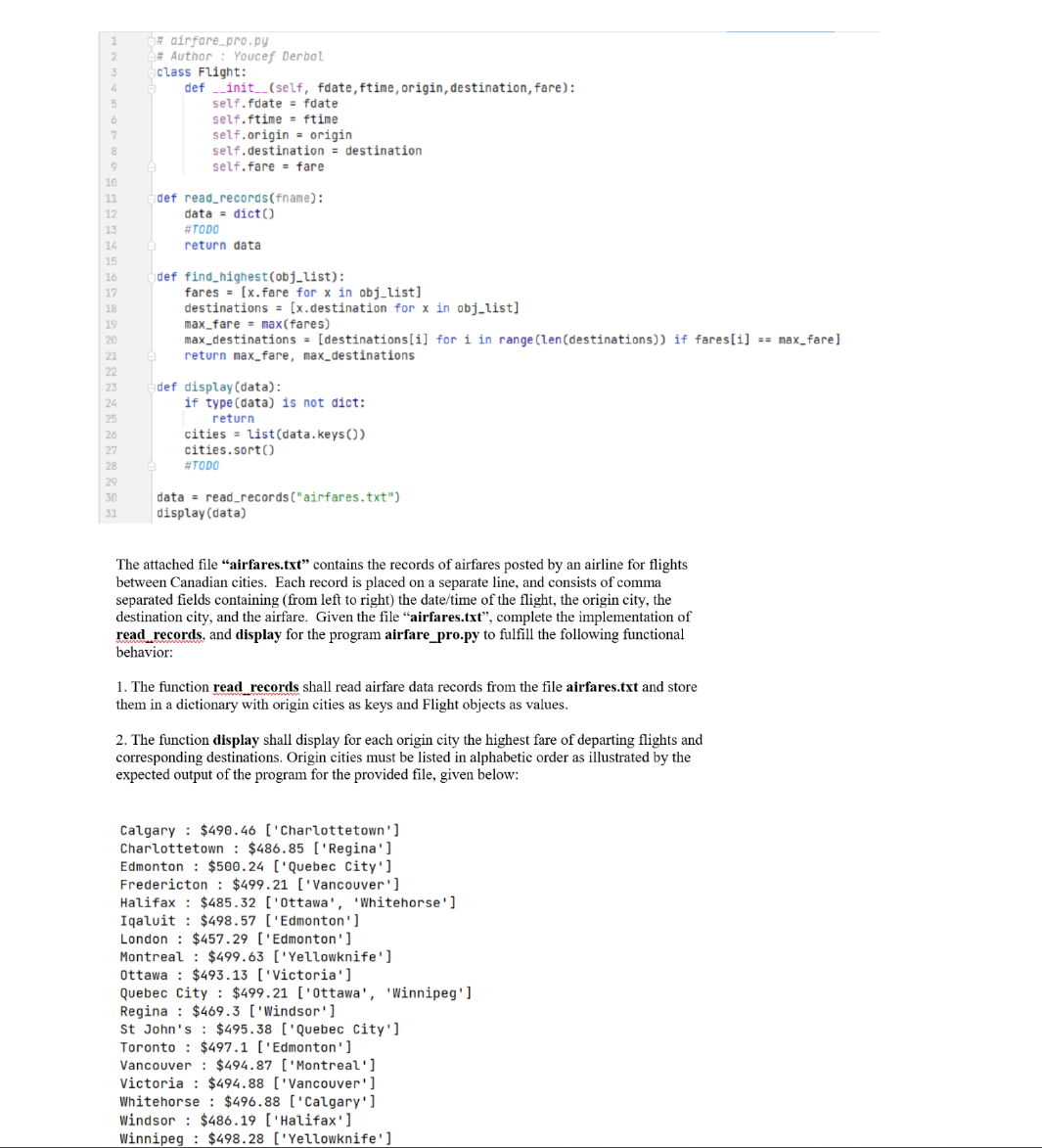
Question: class Flight: self.fdate = fdate self.origin = origin self.fare = fare def read _ records ( fname ) :#TODOdef find _ highest ( obj _
class Flight: self.fdate fdate self.origin origin self.fare fare
def readrecordsfname:#TODOdef findhighestobjlist:destinations xdestination for x in objlistmaxdestinations destinationsi for i in rangelendestinations if faresi maxfaredef displaydata: returncities.sortdata readrecordsairfarestxt
displaydataThe attached file "airfares.txt contains the records of airfares posted by an airline for flights
between Canadian cities. Each record is placed on a separate line, and consists of comma
separated fields containing from left to right the datetime of the flight, the origin city, the
destination city, and the airfare. Given the file "airfares.txt complete the implementation of
readrecords, and display for the program airfarepro.py to fulfill the following functional
behavior:
The function readrecords shall read airfare data records from the file airfares.txt and store
them in a dictionary with origin cities as keys and Flight objects as values.
The function display shall display for each origin city the highest fare of departing flights and
corresponding destinations. Origin cities must be listed in alphabetic order as illustrated by the
expected output of the program for the provided file, given below:Charlottetown : $Regina
Edmonton : $Quebec City'
Fredericton : $Vancouver
Halifax : $Ottawa 'Whitehorse'
Iqaluit : $Edmonton
London : $Edmonton
Montreal : $Yellowknife
Ottawa : $Victoria
Quebec City : $ttawa', 'Winnipeg'
Regina : $Windsor
St John's : $Quebec City'
Toronto : $Edmonton
Vancouver : $Montreal
Victoria : $Vancouver
Whitehorse : $Calgary
Windsor : $Halifax
Winnipeg : $Yellowknife
Step by Step Solution
There are 3 Steps involved in it
1 Expert Approved Answer
Step: 1 Unlock

Question Has Been Solved by an Expert!
Get step-by-step solutions from verified subject matter experts
Step: 2 Unlock
Step: 3 Unlock
 Study Help