







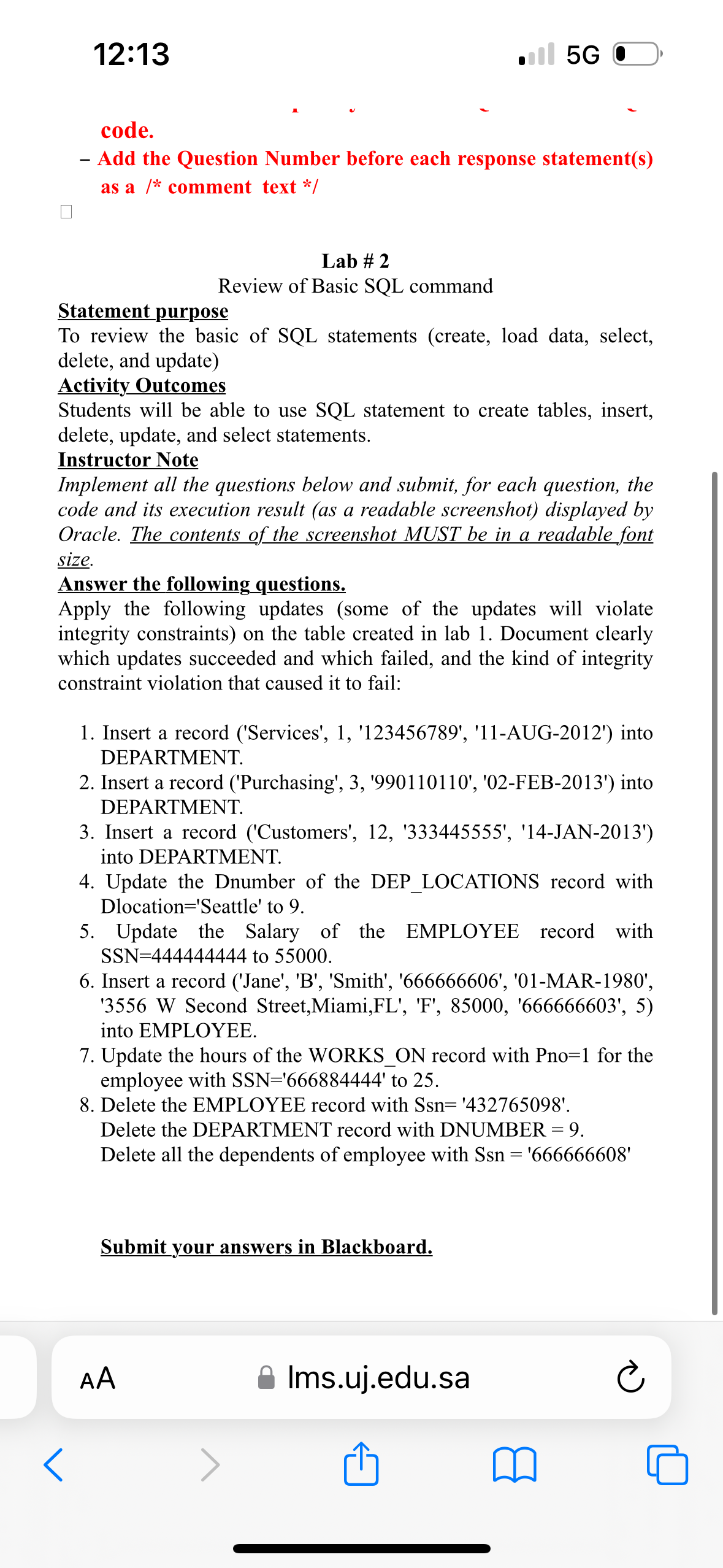
Question: code. Add the Question Number before each response statement ( s ) as a ? ? * * comment text * / Lab # 2
code.
Add the Question Number before each response statements
as a comment text
Lab #
Review of Basic SQL command
Statement purpose
To review the basic of SQL statements create load data, select,
delete, and update
Activity Outcomes
Students will be able to use SQL statement to create tables, insert,
delete, update, and select statements.
Instructor Note
Implement all the questions below and submit, for each question, the
code and its execution result as a readable screenshot displayed by
Oracle. The contents of the screenshot MUST be in a readable font
size.
Answer the following questions.
Apply the following updates some of the updates will violate
integrity constraints on the table created in lab Document clearly
which updates succeeded and which failed, and the kind of integrity
constraint violation that caused it to fail:
Insert a record ServicesAUG into
DEPARTMENT.
Insert a record PurchasingFEB into
DEPARTMENT.
Insert a record CustomersJAN
into DEPARTMENT.
Update the Dnumber of the DEPLOCATIONS record with
Dlocation'Seattle' to
Update the Salary of the EMPLOYEE record with
to
Insert a record JaneB 'Smith', MAR
W Second Street,Miami,FLF
into EMPLOYEE.
Update the hours of the WORKSON record with Pno for the
employee with to
Delete the EMPLOYEE record with
Delete the DEPARTMENT record with DNUMBER
Delete all the dependents of employee with
Submit your answers in Blackboard.
AA
Ims.ujedu.sa
Step by Step Solution
There are 3 Steps involved in it
1 Expert Approved Answer
Step: 1 Unlock

Question Has Been Solved by an Expert!
Get step-by-step solutions from verified subject matter experts
Step: 2 Unlock
Step: 3 Unlock
 Study Help