







Question: Code asked is MatLab code Compute and plot the motion of the robot shown by concatenating 3D transformation matrices obtained by calling the function get_transformation_matrix_3D()
Code asked is MatLab code
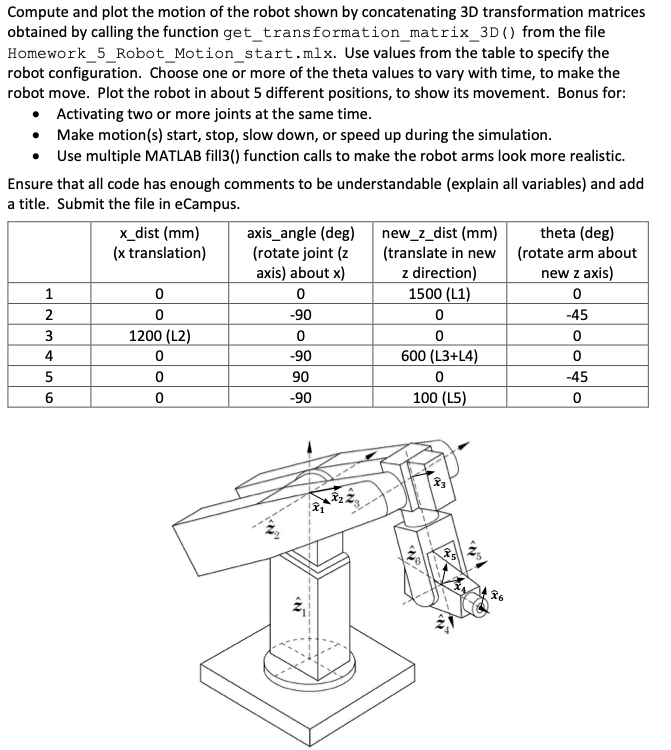
Compute and plot the motion of the robot shown by concatenating 3D transformation matrices obtained by calling the function get_transformation_matrix_3D() from the file Homework 5 Robot Motion start.mlx. Use values from the table to specify the robot configuration. Choose one or more of the theta values to vary with time, to make the robot move. Plot the robot in about 5 different positions, to show its movement. Bonus for: Activating two or more joints at the same time. Make motion(s) start, stop, slow down, or speed up during the simulation. Use multiple MATLAB fill3() function calls to make the robot arms look more realistic. Ensure that all code has enough comments to be understandable (explain all variables) and add a title. Submit the file in eCampus. x_dist (mm) axis_angle (deg) new_z_dist (mm) theta (deg) (x translation) (rotate joint (z (translate in new (rotate arm about axis) about x) z direction) new z axis) 1500 (L1) -90 -45 1200 (L2) 600 (L3+L4) 90 -45 0 -90 100 (L5) 0 0 -90 0 Compute and plot the motion of the robot shown by concatenating 3D transformation matrices obtained by calling the function get_transformation_matrix_3D() from the file Homework 5 Robot Motion start.mlx. Use values from the table to specify the robot configuration. Choose one or more of the theta values to vary with time, to make the robot move. Plot the robot in about 5 different positions, to show its movement. Bonus for: Activating two or more joints at the same time. Make motion(s) start, stop, slow down, or speed up during the simulation. Use multiple MATLAB fill3() function calls to make the robot arms look more realistic. Ensure that all code has enough comments to be understandable (explain all variables) and add a title. Submit the file in eCampus. x_dist (mm) axis_angle (deg) new_z_dist (mm) theta (deg) (x translation) (rotate joint (z (translate in new (rotate arm about axis) about x) z direction) new z axis) 1500 (L1) -90 -45 1200 (L2) 600 (L3+L4) 90 -45 0 -90 100 (L5) 0 0 -90 0
Step by Step Solution
There are 3 Steps involved in it

Get step-by-step solutions from verified subject matter experts
 Study Help