







Question: CODE: #define BUZZER 12 #define PHOTORESISTOR A0 int PSensorValue=0; int Threshold=900; void setup() { pinMode(BUZZER,OUTPUT); pinMode(PHOTORESISTOR,INPUT); Serial.begin(9600); } void loop() { PSensorValue=analogRead(PHOTORESISTOR); Serial.println(PSensorValue); if(PSensorValue>900){ digitalWrite(BUZZER,HIGH);
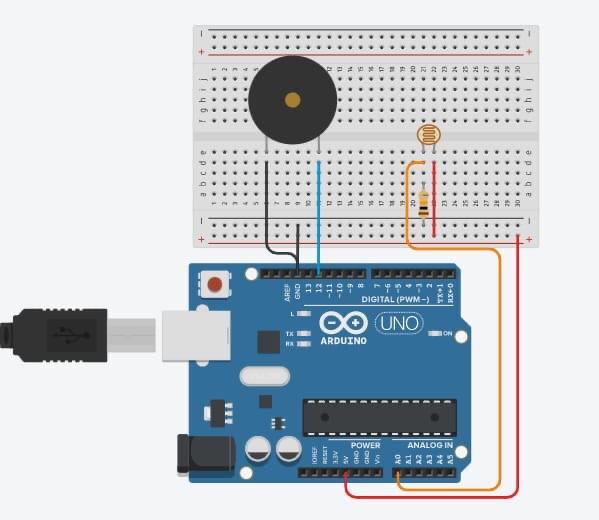
CODE:
#define BUZZER 12
#define PHOTORESISTOR A0
int PSensorValue=0;
int Threshold=900;
void setup() {
pinMode(BUZZER,OUTPUT);
pinMode(PHOTORESISTOR,INPUT);
Serial.begin(9600);
}
void loop() {
PSensorValue=analogRead(PHOTORESISTOR);
Serial.println(PSensorValue);
if(PSensorValue>900){
digitalWrite(BUZZER,HIGH);
}else{digitalWrite(BUZZER,LOW);}
}
I want that when the Psensor value is >900 the buzzer should wait 30s to turn ON, and when the value is less than 900 the buzzer should IMMEDIATELY turn OFF.
(In the code below, the problem is that when the Psensor value is less than 900 the buzzer wait 30s to turn off)
Thank you!!
BESNA 19h apg R16 DIGITAL (PWM-) Tex. 10 O UNO KA ARDUINO POWER ANALOG IN
Step by Step Solution
There are 3 Steps involved in it
1 Expert Approved Answer
Step: 1 Unlock

Question Has Been Solved by an Expert!
Get step-by-step solutions from verified subject matter experts
Step: 2 Unlock
Step: 3 Unlock
 Study Help