







Question: Code: //DLLDriver public class DLLDriver { public static void main(String[] args) { DLList myList = new DLList(Isaac); DLLNode friend1 = new DLLNode(Mikey); DLLNode friend2 =
Code:
//DLLDriver
public class DLLDriver { public static void main(String[] args) { DLList myList = new DLList("Isaac"); DLLNode friend1 = new DLLNode("Mikey"); DLLNode friend2 = new DLLNode("Julia"); myList.addNode(friend1); myList.addNode(friend2); myList.addNode(new DLLNode("Tim")); myList.addNode(new DLLNode("Jon")); // Testing reverse method 1 System.out.println(myList.toString()); String val = myList.reverseListString(); System.out.println(val); System.out.println(); // Testing reverse method 2 System.out.println(myList.toString()); myList.reverseListv2(); System.out.println(myList.toString()); System.out.println(); } }//DLList.java
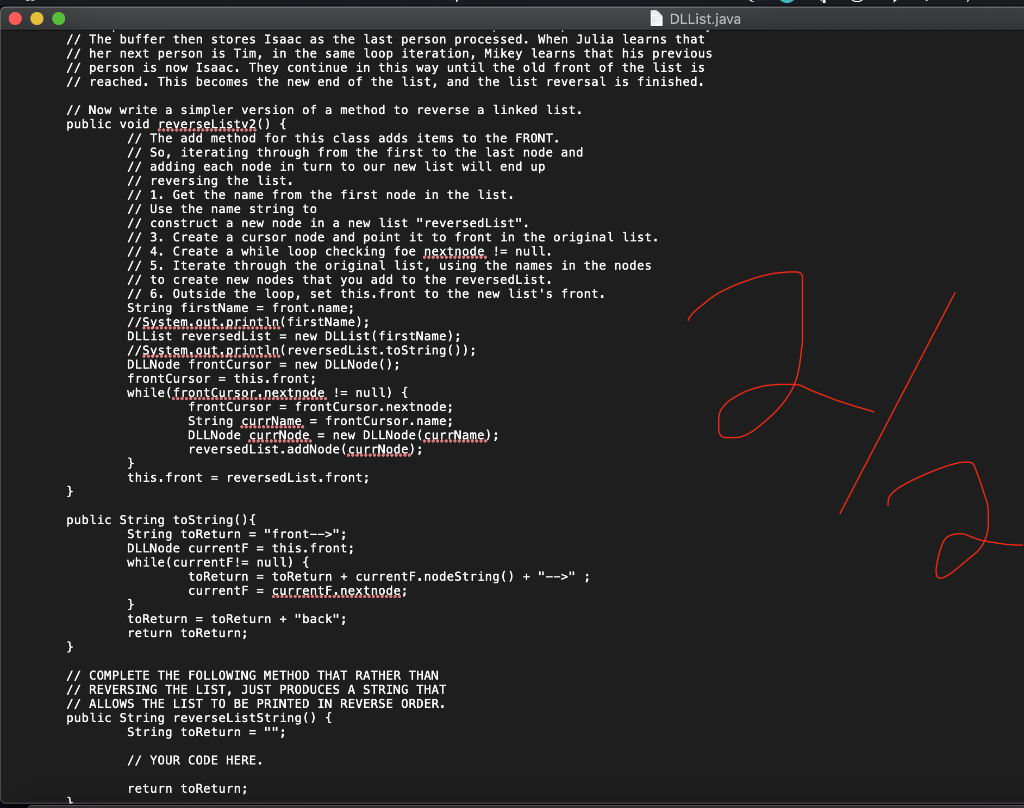
public class DLList { private DLLNode front; private DLLNode rear; public DLList(String name) { this.front = new DLLNode(name); this.rear = front; this.front.setNext(null); this.front.setPrev(null); } public void reverseListv2(){ String firstName = front.getValue(); DLList reversedList = new DLList(firstName); DLLNode frontCursor = new DLLNode(); frontCursor = this.front; this.rear = frontCursor; while (frontCursor.getNext()!= null){ frontCursor = frontCursor.getNext(); String currName = frontCursor.getValue(); DLLNode currNode = new DLLNode(currName); reversedList.addNodeFront(currNode); } this.front = reversedList.front; } private void addNodeFront(DLLNode currNode) { front.setPrev(currNode); currNode.setNext(front); front = currNode; } @Override public String toString() { String toReturn = "front-->"; DLLNode currentF = this.front; while (currentF!=null){ toReturn = toReturn + currentF.nodeString() + "--->"; currentF = currentF.getNext(); } toReturn = toReturn + "back"; return toReturn; } public void addNode(DLLNode node) { if(front==null){ front = new DLLNode(node.getValue()); rear = front; } else{ DLLNode tmp = front; while (tmp.getNext()!=null){ tmp = tmp.getNext(); } node.setPrev(tmp); tmp.setNext(node); } } public String reverseListString(){ String toReturn = ""; toReturn = go(front)+"-->back"; return toReturn; } private String go(DLLNode node) { if(node==null){ return "front"; }else{ return go(node.getNext()) +"--->" + node.nodeString(); } } } //DLLNode
public class DLLNode { private String value; private DLLNode next; private DLLNode prev; public DLLNode(String value) { this.value = value; this.next = null; this.prev = null; } public DLLNode() { this.value = null; this.next = null; this.next = null; } public DLLNode getPrev() { return prev; } public void setPrev(DLLNode prev) { this.prev = prev; } public String getValue() { return value; } public void setValue(String value) { this.value = value; } public DLLNode getNext() { return next; } public void setNext(DLLNode next) { this.next = next; } public String nodeString() { return "DLLNode{" + "value='" + value + '\'' + ", next=" + next + ", prev=" + prev + '}'; } }![Code: //DLLDriver public class DLLDriver { public static void main(String[] args) {](https://dsd5zvtm8ll6.cloudfront.net/si.experts.images/questions/2024/09/66f16756dfcd6_66266f16756555bd.jpg)
There are a lot of code files associated with this last HW.
Linked lists are an important, but tricky topic in computer science. What I have tried to do with this code is show you how linked lists works, while also demonstrating how using classes and helper methods help break up complex tasks into smaller, more manageable ones, while also making your code easier to read, understand, and modify or maintain.
To start:
SUBMIT ONLY YOUR COMPLETED METHODS -- NOT ALL THE SUPPORTING CODE FILES (I already have them all!) You can submit them in a file titled HW4.java
In addition to the two code files mentioned above, please also submit a text document that answers the following:
1. After looking over the code in Exercise 1, please broadly explain that the code in the driver class does.
2. After looking over the code in Exercise 2, please broadly explain that the code in the driver class does.
3. What is your opinion of the two driver class files? Which did you prefer reading?
4. Please make linked list box and arrow diagrams to explain how the
addNode(DLLNode newNode) and toString() methods in the DLList.java class work.
5. Spend 3 hours or so working on the two methods you've been asked to complete. After that time, if you have completed the methods, explain how they work -- with box-and-arrow diagrams. If you were NOT able to get them to work, explain what you tried to do. Use box-and-arrow diagrams to show what you were trying to make happen. In either case, comment on the experience of working with linked list and node classes.
NOTE: ALL OF THE CODE FILES ARE AVAILABLE IN THIS ZIPPED FOLDER: HW4.zip
Final Note: Note get too stressed out about linked lists. If they click for you, have fun with them. We'll have some more practice exercises next week that will be shorter. You'll see them again.
// Driver Class for the DOUBLY-LINKED LIST public class DLLDriver { public static void main(String[] args) { DLList myList = new DLList("Isaac"); DLLNode friend1 = new DLLNode ("Mikey"); DLLNode friend2 = new DLLNode("Julia"); myList.addNode(friend1); myList.addNode (friend2); myList.addNode(new DLLNode("Tim")); myList.addNode(new DLLNode("Jon")); // Testing reverse method 1 System.out.println(myList.toString()); myList.reverseListv1(); System.out.println(myList.toString()); System.out.println(); // Testing reverse method 2 System.out.println(myList.toString()); myList.reverselistv2(); System.out.println(myList.toString()); System.out.println(); } } DLList.java // The buffer then stores Isaac as the last person processed. When Julia learns that 1/ her next person is Tim, in the same loop iteration, Mikey learns that his previous // person is now Isaac. They continue in this way until the old front of the list is // reached. This becomes the new end of the list, and the list reversal is finished. // Now write a simpler version of a method to reverse a linked list. public void reverselistv20) { // The add method for this class adds items to the FRONT. // So, iterating through from the first to the last node and // adding each node in turn to our new list will end up // reversing the list. // 1. Get the name from the first node in the list. // Use the name string to // construct a new node in a new list "reversedList". 1/ 3. Create a cursor node and point it to front in the original list. // 4. Create a while loop checking foe nextnade. != null. 1/ 5. Iterate through the original list, using the names in the nodes // to create new nodes that you add to the reversedList. // 6. Outside the loop, set this. front to the new list's front. String firstName = front.name; 1/System.out.println(firstName); DLList reversedList = new DLList(firstName); 1/System.out.println(reversedlist.toString()); DLLNode frontCursor = new DLLNode(); frontCursor = this.front; while( frontCursor.nextnode != null) { frontCursor = frontCursor.nextnode; String currName = frontCursor.name; DLLNode cur.Node = new DLLNode(currName); reversedList.addNode(cur.Node); } this. front = reversedList.front; } public String toString() { String toReturn = "front-->"; DLLNode currentF = this.front; while(currentF!= null) { toReturn = toReturn + currentF.nodeString() + "-->" ; current F = current..nextnode; toReturn = toReturn + "back"; return toReturn; } // COMPLETE THE FOLLOWING METHOD THAT RATHER THAN // REVERSING THE LIST, JUST PRODUCES A STRING THAT // ALLOWS THE LIST TO BE PRINTED IN REVERSE ORDER. public String reverseListString() { String toReturn = ""; // YOUR CODE HERE. return toReturn
Step by Step Solution
There are 3 Steps involved in it

Get step-by-step solutions from verified subject matter experts
 Study Help