







Question: CODE GIVEN IN C++ : #include #include // random number #include // for time #include #include #include using namespace std; double getAverage( int *array, int
CODE GIVEN IN C++ :
#include
#include
#include
#include
#include
#include
using namespace std;
double getAverage(int *array, int numElements){
int sum = 0;
for (int index = 0; index
sum += array[index];
}
return (((double) sum)umElements);
}
int main(){
int numElements;
cout
cin >> numElements;
int maxValue;
cout
cin >> maxValue;
double totalAveragingTime = 0;
srand(time(NULL));
using namespace std::chrono;
int numIterations = 1000;
for (int iteration = 1; iteration
int *array = new int[numElements];
for (int index = 0; index
array[index] = rand() % (1 + maxValue);
}
high_resolution_clock::time_point t1 = high_resolution_clock::now();
double average = getAverage(array, numElements);
high_resolution_clock::time_point t2 = high_resolution_clock::now();
durationdouble, std::milli> segregateTime_milli = t2 - t1;
totalAveragingTime += segregateTime_milli.count();
//duration
//totalAveragingTime += averageTime_nano.count();
delete[] array;
}
cout
return 0;
}
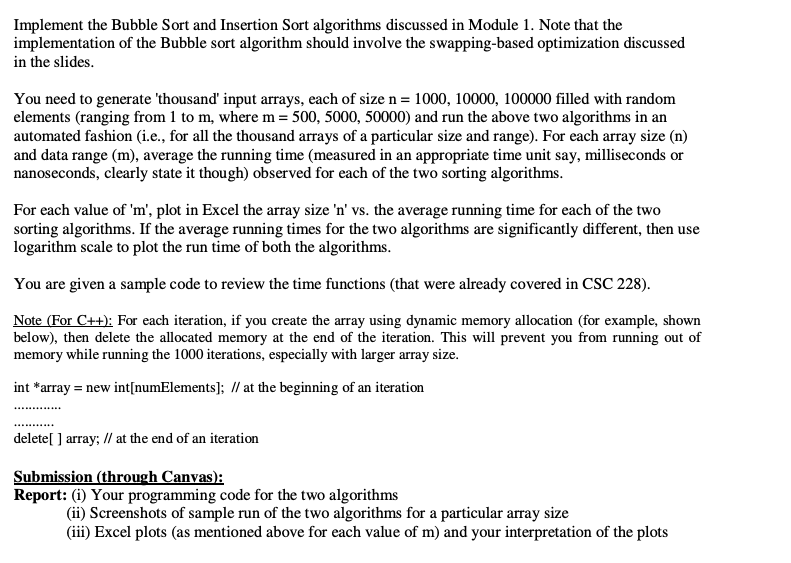
Implement the Bubble Sort and Insertion Sort algorithms discussed in Module 1. Note that the implementation of the Bubble sort algorithm should involve the swapping-based optimization discussed in the slides. You need to generate 'thousand' input arrays, each of size n= 1000, 10000, 100000 filled with random elements (ranging from 1 to m, where m= 500, 5000, 50000) and run the above two algorithms in an automated fashion (i.e., for all the thousand arrays of a particular size and range). For each array size (n) and data range (m), average the running time (measured in an appropriate time unit say, milliseconds or nanoseconds, clearly state it though) observed for each of the two sorting algorithms. For each value of 'm', plot in Excel the array size 'n' vs. the average running time for each of the two sorting algorithms. If the average running times for the two algorithms are significantly different, then use logarithm scale to plot the run time of both the algorithms. You are given a sample code to review the time functions that were already covered in CSC 228). Note (For C++): For each iteration, if you create the array using dynamic memory allocation (for example, shown below), then delete the allocated memory at the end of the iteration. This will prevent you from running out of memory while running the 1000 iterations, especially with larger array size. int *array = new int[numElements]; // at the beginning of an iteration delete[] array; // at the end of an iteration Submission (through Canvas): Report: (i) Your programming code for the two algorithms (ii) Screenshots of sample run of the two algorithms for a particular array size (iii) Excel plots (as mentioned above for each value of m) and your interpretation of the plots Implement the Bubble Sort and Insertion Sort algorithms discussed in Module 1. Note that the implementation of the Bubble sort algorithm should involve the swapping-based optimization discussed in the slides. You need to generate 'thousand' input arrays, each of size n= 1000, 10000, 100000 filled with random elements (ranging from 1 to m, where m= 500, 5000, 50000) and run the above two algorithms in an automated fashion (i.e., for all the thousand arrays of a particular size and range). For each array size (n) and data range (m), average the running time (measured in an appropriate time unit say, milliseconds or nanoseconds, clearly state it though) observed for each of the two sorting algorithms. For each value of 'm', plot in Excel the array size 'n' vs. the average running time for each of the two sorting algorithms. If the average running times for the two algorithms are significantly different, then use logarithm scale to plot the run time of both the algorithms. You are given a sample code to review the time functions that were already covered in CSC 228). Note (For C++): For each iteration, if you create the array using dynamic memory allocation (for example, shown below), then delete the allocated memory at the end of the iteration. This will prevent you from running out of memory while running the 1000 iterations, especially with larger array size. int *array = new int[numElements]; // at the beginning of an iteration delete[] array; // at the end of an iteration Submission (through Canvas): Report: (i) Your programming code for the two algorithms (ii) Screenshots of sample run of the two algorithms for a particular array size (iii) Excel plots (as mentioned above for each value of m) and your interpretation of the plots
Step by Step Solution
There are 3 Steps involved in it

Get step-by-step solutions from verified subject matter experts
 Study Help