







Question: Code help in VB please for Chapter 20 exercise 12. 2:17 PM Clearly. Visual.Basic.pdf INTERMEDIATE12. Carrington Sales employs 10 salespeople. The sales made by the
Code help in VB please for Chapter 20 exercise 12.
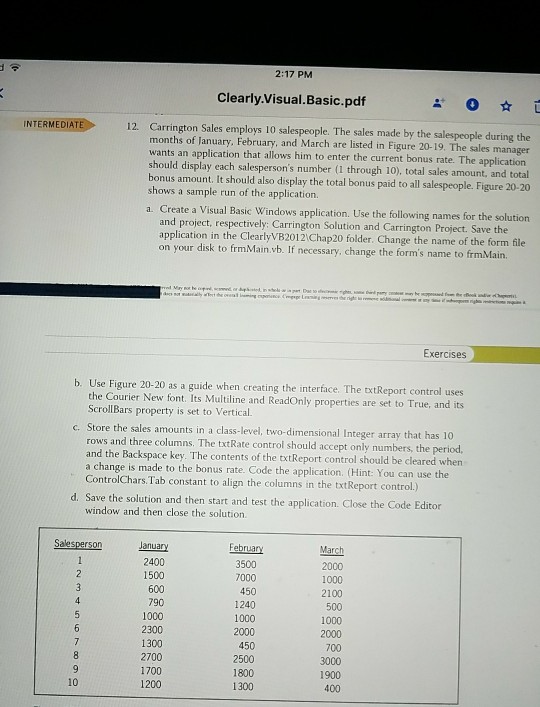
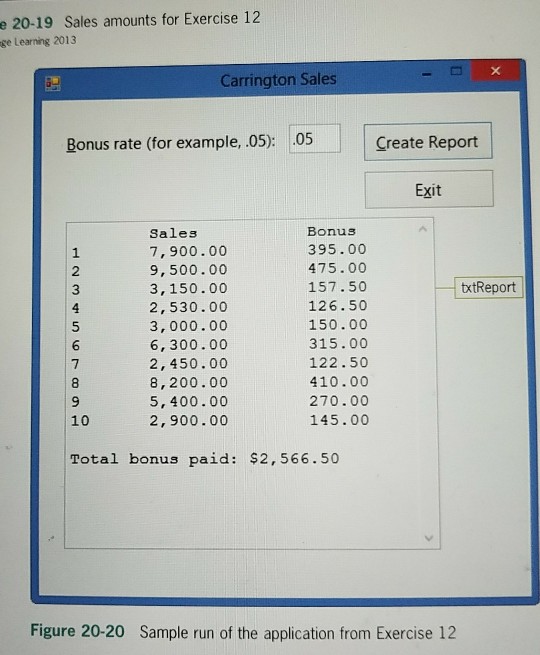
2:17 PM Clearly. Visual.Basic.pdf INTERMEDIATE12. Carrington Sales employs 10 salespeople. The sales made by the salespeople during the months of January. February, and March are listed in Figure 20-19. The sales manager wants an application that allows him to enter the current bonus rate. The application should display each salesperson's number (1 through 10), total sales amount, and total bonus amount. It should also display the total bonus paid to all salespeople. Figure 20-20 shows a sample run of the application. a. Create a Visual Basic Windows application. Use the following names for the solution and project, respectively: Carrington Solution and Carrington Project. Save the application in the ClearlyVB2012 Chap20 folder. Change the name of the form file on your disk to frmMain.vb. If necessary, change the form's name to frmMain. Exercises b. Use Figure 20-20 as a guide when creating the interface. The txt Report control uses the Courier New font. Its Multiline and ReadOnly properties are set to True, and its ScrollBars property is set to Vertical. c. Store the sales amounts in a class-level, two-dimensional Integer array that has 10 rows and three columns. The txtRate control should accept only numbers, the period. and the Backspace key. The contents of the txtReport control should be cleared when a change is made to the bonus rate. Code the application. (Hint: Y ControlChars.Tab constant to align the columns in the txtReport control.) d. Save the solution and then start and test the application. Close the Code Editor window and then close the solution March 2000 1000 2100 500 1000 2000 700 Salesperson Januay 2400 February 3500 7000 450 1240 1000 600 790 1000 2300 1300 2700 1700 1200 450 2500 1800 1300 1900 400 10
Step by Step Solution
There are 3 Steps involved in it

Get step-by-step solutions from verified subject matter experts
 Study Help