







Question: CODE: import java.util.stream.IntStream; public class LimitedList { // Overview: a LimitedList is a First-In, First-Out data structure with a user-defined size limit // A typical
 CODE:
CODE:
import java.util.stream.IntStream;
public class LimitedList
{
// Overview: a LimitedList is a First-In, First-Out data structure with a user-defined size limit
// A typical List is [], [o1], or [o1, o2], where neither o1 nor o2
// are ever null. Older items are listed before newer ones.
//State Variables
private final Object[] items; //Allows LimitedList to be any object type
private final int[] item_ids;
private int size, older, newest;
private final int limit;
public LimitedList (int userLimit)
{
if (userLimit
{
throw new IllegalArgumentException ("LimitedList.constructor");
}
this.limit = userLimit;
items = new Object[this.limit];
item_ids = new int[this.limit];
size = 0;
older = 0;
newest = 0;
}
public void addToList (Object o, int id)
throws NullPointerException, IllegalStateException
{ // Modifies: LimitedList itself
// Effects: If argument is null throw NullPointerException
// else if this is full or id already exists, throw IllegalStateException,
// else make o the newest item of the LimitedList
if (o == null)
{
throw new NullPointerException ("LimitedList.addToList");
}
else if (size == limit)
{
throw new IllegalStateException ("LimitedList.addToList");
}
else if( IntStream.of(item_ids).anyMatch(x -> x == id) ) //Determines if id is a repeat
{
throw new IllegalStateException ("LimitedList.addToList");
}
else
{
size++;
items[newest] = o;
item_ids[newest] = id;
newest = (newest + 1) % limit;
}
}
public Object removeFromList () throws IllegalStateException
{ // Modifies: LimitedList itself
// Effects: If list is empty, throw IllegalStateException,
// else remove and return oldest item in LimitedList
if (size == 0)
{
throw new IllegalStateException ("LimitedList.removeFromList");
}
else
{
size--;
Object o = items[ (older % limit) ];
items[older] = null;
item_ids[size] = 0;
older = (older + 1) % limit;
return o;
}
}
//[Client requested functionality]
public Object peekAtList (int id) throws IllegalStateException
{ // Modifies: LimitedList itself
// Effects: If list or id is empty, throw IllegalStateException,
// else return the requested item based on the ID
if (size == 0 || id == 0)
{
throw new IllegalStateException ("LimitedList.peekAtList");
}
else
{
for(int i = 0; i
if(item_ids[i] == id)
{
return items[i];
}
}
}
throw new IllegalStateException ("LimitedList.peekAtList");
}
//Hint: These might be useful characteristics
public boolean isEmpty()
{
return (size == 0);
}
public boolean isFull()
{
return (size == limit);
}
}
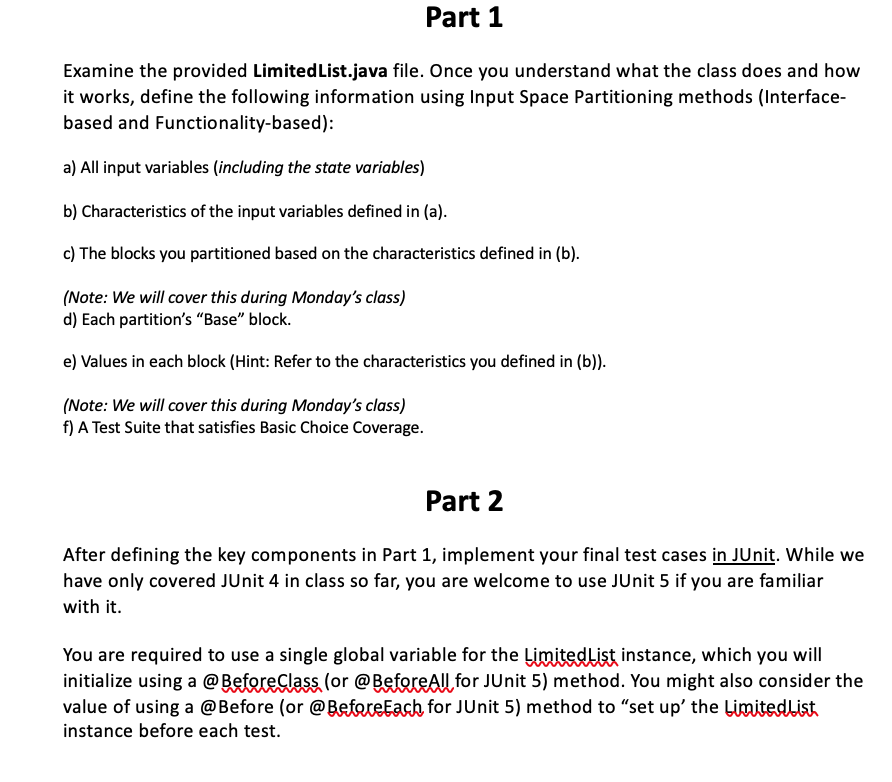
Part 1 Examine the provided Limited List.java file. Once you understand what the class does and how it works, define the following information using Input Space Partitioning methods (Interface- based and Functionality-based): a) All input variables (including the state variables) b) Characteristics of the input variables defined in (a). c) The blocks you partitioned based on the characteristics defined in (b). (Note: We will cover this during Monday's class) d) Each partition's "Base" block. e) Values in each block (Hint: Refer to the characteristics you defined in (b)). (Note: We will cover this during Monday's class) f) A Test Suite that satisfies Basic Choice Coverage. Part 2 After defining the key components in Part 1, implement your final test cases in JUnit. While we have only covered JUnit 4 in class so far, you are welcome to use JUnit 5 if you are familiar with it. You are required to use a single global variable for the Limited List instance, which you will initialize using a @BeforeClass (or @Before All for JUnit 5) method. You might also consider the value of using a @Before (or @BeforeEach for JUnit 5) method to "set up the Limited List instance before each test. Part 1 Examine the provided Limited List.java file. Once you understand what the class does and how it works, define the following information using Input Space Partitioning methods (Interface- based and Functionality-based): a) All input variables (including the state variables) b) Characteristics of the input variables defined in (a). c) The blocks you partitioned based on the characteristics defined in (b). (Note: We will cover this during Monday's class) d) Each partition's "Base" block. e) Values in each block (Hint: Refer to the characteristics you defined in (b)). (Note: We will cover this during Monday's class) f) A Test Suite that satisfies Basic Choice Coverage. Part 2 After defining the key components in Part 1, implement your final test cases in JUnit. While we have only covered JUnit 4 in class so far, you are welcome to use JUnit 5 if you are familiar with it. You are required to use a single global variable for the Limited List instance, which you will initialize using a @BeforeClass (or @Before All for JUnit 5) method. You might also consider the value of using a @Before (or @BeforeEach for JUnit 5) method to "set up the Limited List instance before each test
Step by Step Solution
There are 3 Steps involved in it

Get step-by-step solutions from verified subject matter experts
 Study Help