







Question: Code in C# using Microsofy Visual Studio. northwind.mdf . northwind _ log . ldf OrderDetailsMaintenance.zip 1 . Include the two above files in the root
Code in C# using Microsofy Visual Studio. northwind.mdf
northwindlogldf
OrderDetailsMaintenance.zip
Include the two above files in the root of your OrderDetailsMaintenance project.
Make sure to mark them as "Content" and "Copy Always" or "Copy if newer" in the properties window of those two files.
Run the ScaffoldDbContext command to create a context class as well as a class to encapsulate the Orders objects from the associated table in the mdf file. Make sure to include the parameters for Tables Customers only worry about the attributes associated with the text boxes, you don't need to worry about any other rows from the table
Once you have ran the command, include an app.config file and add a connection string element. Make sure to copy the connection string from your Context class to your app.config. Then edit your context to grab the connection string from the app.config ConfigurationManagerConnectionStringNorthwindConnectionString
Code the Find button to Find the customer id and populate the details in the below text boxes.
If no order is found, display a message box.
Code the exit button
Code the Save button to update its attributes and call Update and SaveChanges on that particular entity.
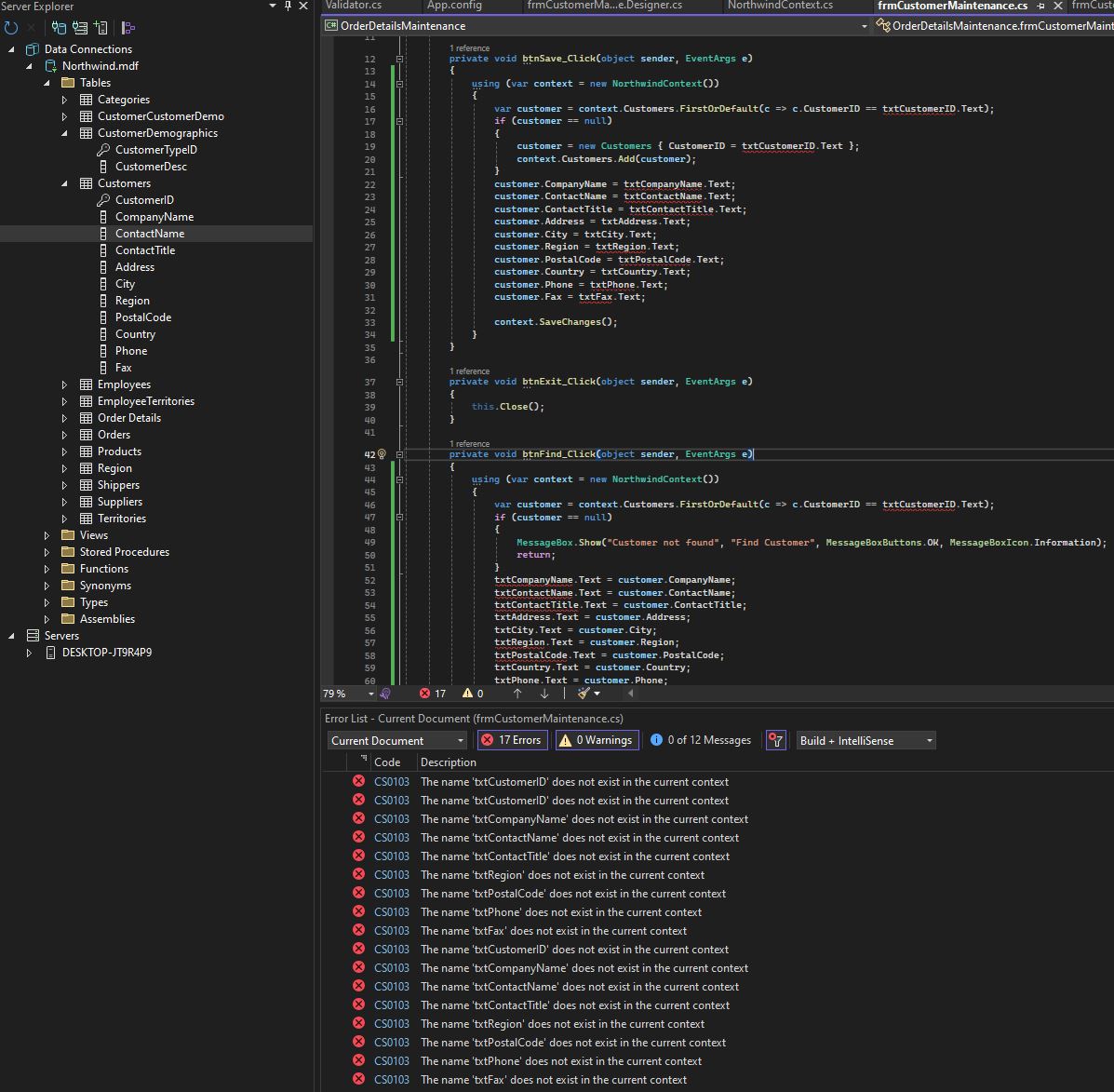
Note: If you close the program, reopen it and search for the entity you recently updated. You may not see the changes depending on how you setup the mdf file in your project because it copies a new version to the bin directory each time you run the program So if you don't see your changes, don't be alarmed. PLEASE GET THE RIGHT CODING FOR THE FIND BUTTON and SAVE BUTTON RELATING TO THE DATABASE Northwind.mdf The code must match or it will not excute correctly at all. PLEASE AND THANK YOU. I found a other solution where this code shown: using var context new NorthwindContext
var customer context.Customers.FirstOrDefaultc cCustomerID txtCustomerID.Text;
if customer null
MessageBox.ShowCustomer not found", "Find Customer", MessageBoxButtons.OK MessageBoxIcon.Information;
return;
txtCompanyName.Text customer.CompanyName;
txtContactName.Text customer.ContactName;
txtContactTitle.Text customer.ContactTitle;
txtAddress.Text customer.Address;
txtCity.Text customer.City;
txtRegion.Text customer.Region;
txtPostalCode.Text customer.PostalCode;
txtCountry.Text customer.Country;
txtPhone.Text customer.Phone;
txtFax.Text customer.Fax;
THIS WAS IN INCORRECT CODE I Had ERROR
Step by Step Solution
There are 3 Steps involved in it
1 Expert Approved Answer
Step: 1 Unlock

Question Has Been Solved by an Expert!
Get step-by-step solutions from verified subject matter experts
Step: 2 Unlock
Step: 3 Unlock
 Study Help