







Question: Code in C++ Write a program that asks the user for a file name and displays the number of characters, words, and lines in that
Code in C++
Write a program that asks the user for a file name and displays the number of characters, words, and lines in that file. Then have the program ask for the name of the next file. When the user enters a file that doesnt exist (such as the empty string), the program should exit.
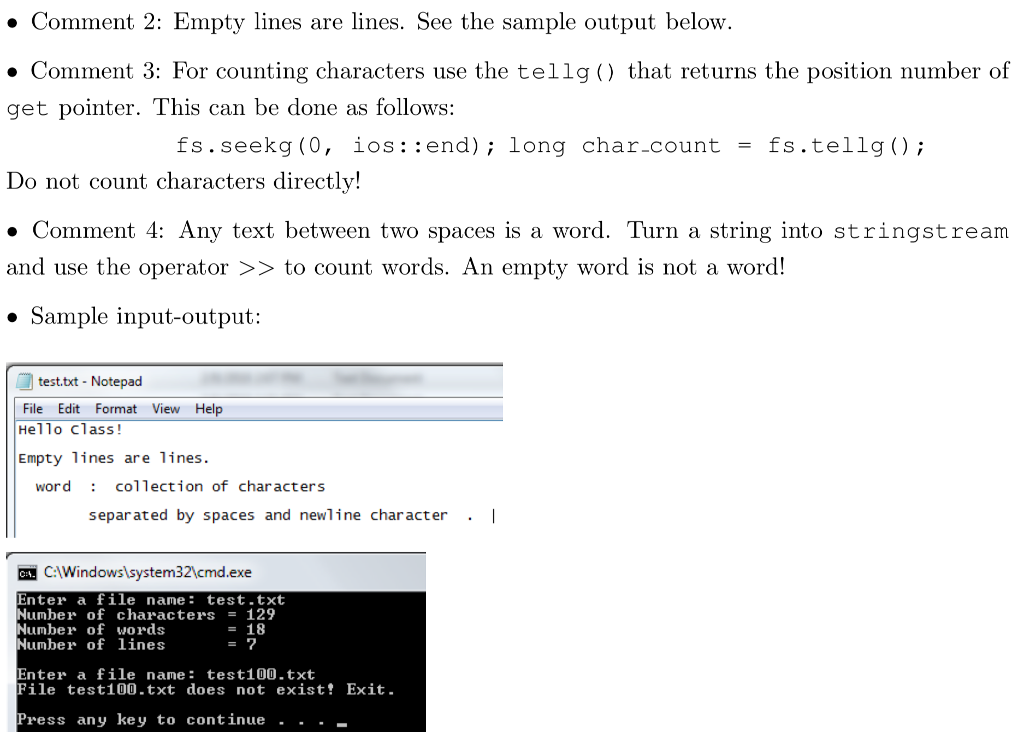
This is what I have so far. I just need help with the code to count words and characters, which must satisfy the above conditions.
#include
#include
#include
using namespace std;
int main() {
string filename;
cout
cin >> filename;
ifstream infile;
infile.open(filename);
if(infile.fail()) {
cout
return 1;}
else {
int count = 0;
int lines = 0;
int characters = 0;
int words = 0;
//Counting the number of words
// Counting the number of characters
//Counting the number of lines
string line;
while(getline(infile, line)) ++lines;
string word;
while (infile >> word) {
++count;}
cout
cout
cout
}
infile.close();
return 0;
}
. Comment 2: Empty lines are lines. See the sample output below. . Comment 3: For counting characters use the tellg () that returns the position number of get pointer. This can be done as follows: fs. Seekg(0, 10s: :end); long char-count = fs.telig(); Do not count characters directly! . Comment 4: Any text between two spaces is a word. Turn a string into stringstream and use the operator >> to count words. An empty word is not a word! Sample input-output: test.txt - Notepad File Edit Format View Help Hello class Empty 1ines are lines. word collection of characters separated by spaces and newline character . I C:Windowslsystem32\cmd.exe Enter a file name: test.txt Number of characters129 Number oF WOrds Number of lines = 18 Enter a file name: test100.txt File test100.txt does not exist! Exit. Press any key to continue.. . _
Step by Step Solution
There are 3 Steps involved in it

Get step-by-step solutions from verified subject matter experts
 Study Help