







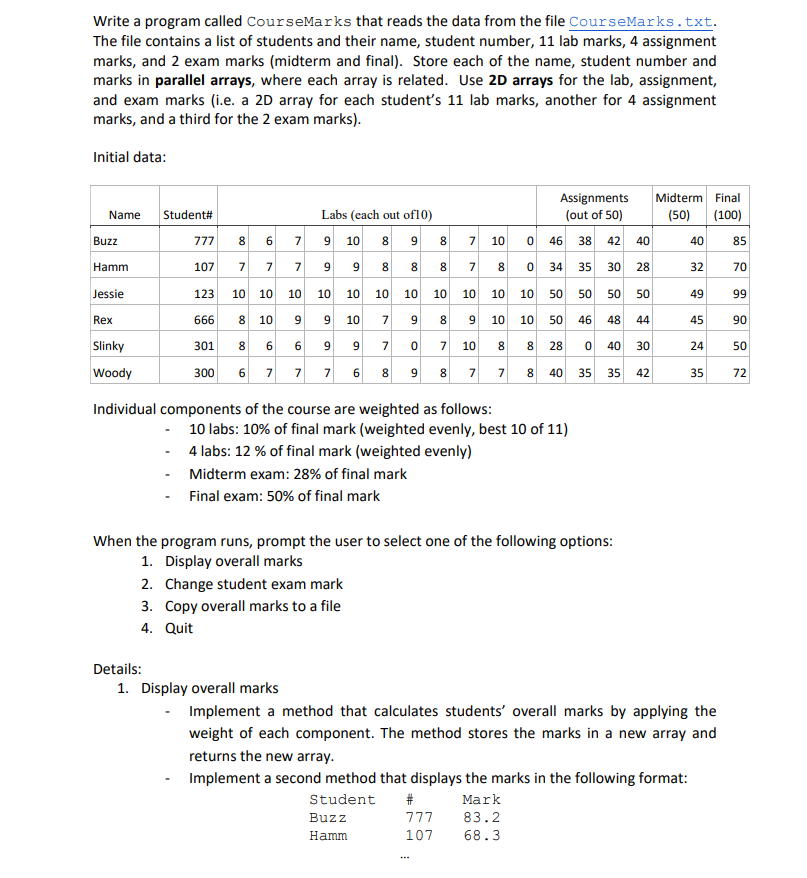
Question: CODE IN JAVA CourseMarks.txt Write a program called CourseMarks that reads the data from the file CourseMarks.txt. The file contains a list of students and
CODE IN JAVA
CourseMarks.txt
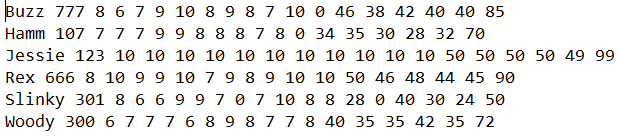
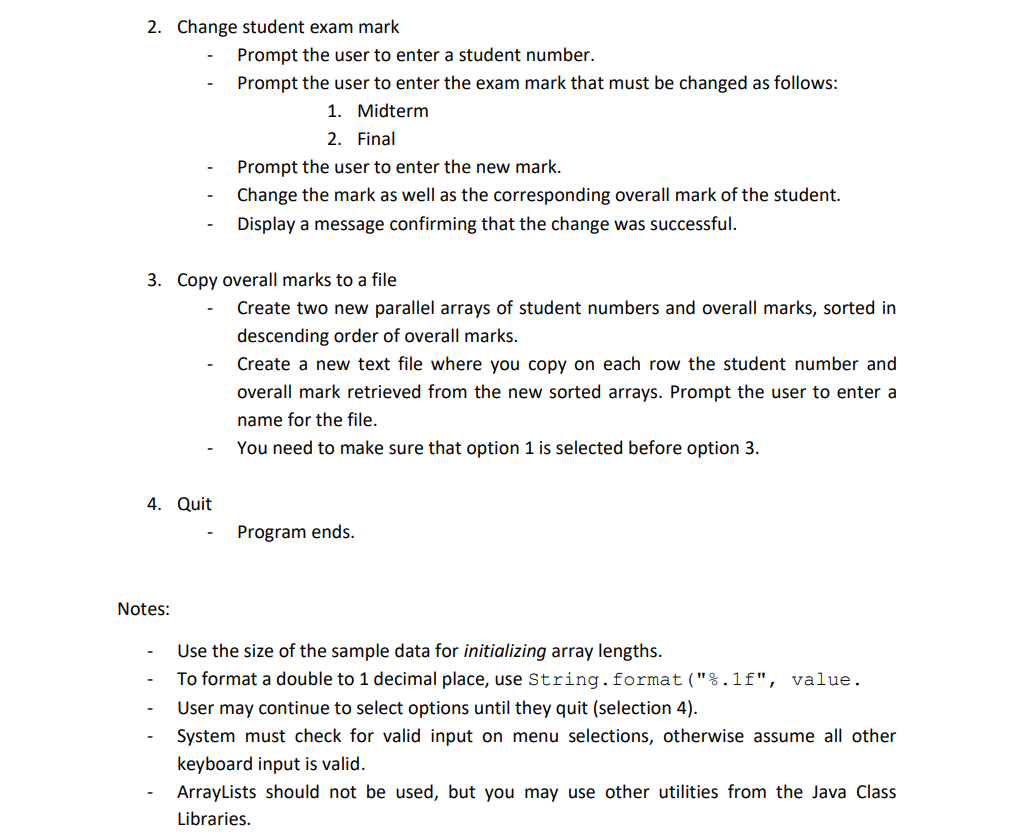
Write a program called CourseMarks that reads the data from the file CourseMarks.txt. The file contains a list of students and their name, student number, 11 lab marks, 4 assignment marks, and 2 exam marks (midterm and final). Store each of the name, student number and marks in parallel arrays, where each array is related. Use 2D arrays for the lab, assignment, and exam marks (i.e. a 2D array for each student's 11 lab marks, another for 4 assignment marks, and a third for the 2 exam marks). Initial data: Name Student# Assignments (out of 50) Midterm Final (50) (100) Buzz 777 8 6 7 Labs (each out of 10) 10 898 7 9 9 7 10 0 46 38 42 40 40 85 Hamm 107 7 7 00 7 8 0 34 35 30 28 32 70 Jessie 123 10 10 10 10 10 10 10 10 10 10 10 50 50 50 50 49 99 Rex 666 10 9 9 10 7 9 00 8 9 10 10 50 46 48 44 45 90 8 8 301 6 6 9 9 7 0 7 10 8 00 28 0 40 30 24 50 Slinky Woody 300 6 7 7 7 6 8 9 8 7 7 00 40 35 35 42 35 72 Individual components of the course are weighted as follows: 10 labs: 10% of final mark (weighted evenly, best 10 of 11) 4 labs: 12 % of final mark (weighted evenly) Midterm exam: 28% of final mark Final exam: 50% of final mark When the program runs, prompt the user to select one of the following options: 1. Display overall marks 2. Change student exam mark 3. Copy overall marks to a file 4. Quit Details: 1. Display overall marks Implement a method that calculates students' overall marks by applying the weight of each component. The method stores the marks in a new array and returns the new array. Implement a second method that displays the marks in the following format: Student # Mark Buzz 777 83.2 Hamm 107 68.3 2. Change student exam mark Prompt the user to enter a student number. Prompt the user to enter the exam mark that must be changed as follows: 1. Midterm 2. Final Prompt the user to enter the new mark. Change the mark as well as the corresponding overall mark of the student. Display a message confirming that the change was successful. 3. Copy overall marks to a file Create two new parallel arrays of student numbers and overall marks, sorted in descending order of overall marks. Create a new text file where you copy on each row the student number and overall mark retrieved from the new sorted arrays. Prompt the user to enter a name for the file. You need to make sure that option 1 is selected before option 3. 4. Quit Program ends. Notes: Use the size of the sample data for initializing array lengths. To format a double to 1 decimal place, use String.format("%.1f", value. User may continue to select options until they quit (selection 4). System must check for valid input on menu selections, otherwise assume all other keyboard input is valid. ArrayLists should not be used, but you may use other utilities from the Java Class Libraries. Buzz 777 8 6 7 9 10 8 9 8 7 10 0 46 38 42 40 40 85 Hamm 107 7 7 7 9 9 8 8 8 7 8 0 34 35 30 28 32 70 Jessie 123 10 10 10 10 10 10 10 10 10 10 10 50 50 50 50 49 99 Rex 666 8 10 9 9 10 7 9 8 9 10 10 50 46 48 44 45 90 slinky 301 8 6 6 997 0 7 10 8 8 28 40 30 24 50 Woody 300 6 7 7 7 6 8 9 8 7 7 8 40 35 35 42 35 72
Step by Step Solution
There are 3 Steps involved in it

Get step-by-step solutions from verified subject matter experts
 Study Help