







Question: code in MATLAB yes MATLAB You will be given the following image (left) in a Matlab file (18.mat) that you can load using the command
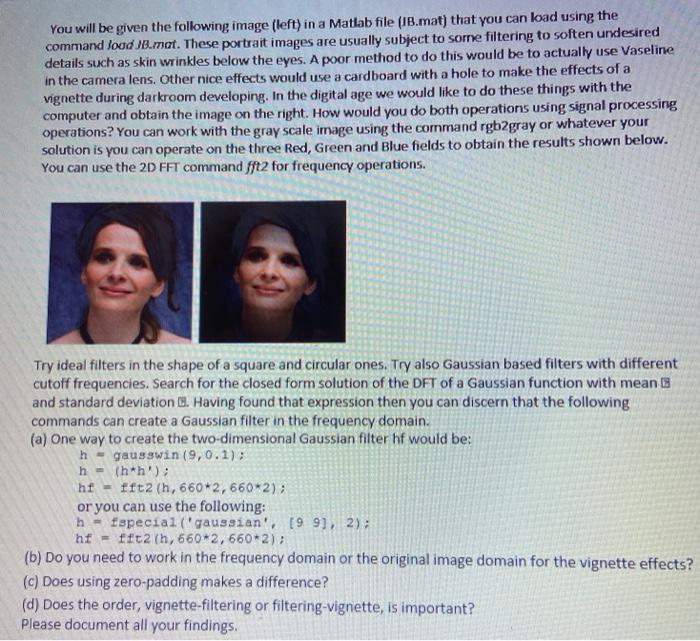
You will be given the following image (left) in a Matlab file (18.mat) that you can load using the command loud B.mat. These portrait images are usually subject to some filtering to soften undesired details such as skin wrinkles below the eyes. A poor method to do this would be to actually use Vaseline in the camera lens. Other nice effects would use a cardboard with a hole to make the effects of a vignette during darkroom developing. In the digital age we would like to do these things with the computer and obtain the image on the right. How would you do both operations using signal processing operations? You can work with the gray scale image using the command rgb2gray or whatever your solution is you can operate on the three Red, Green and Blue fields to obtain the results shown below. You can use the 2D FFT command fft2 for frequency operations. Try ideal filters in the shape of a square and circular ones. Try also Gaussian based filters with different cutoff frequencies. Search for the closed form solution of the DFT of a Gaussian function with mean and standard deviation 1. Having found that expression then you can discern that the following commands can create a Gaussian filter in the frequency domain. (a) One way to create the two-dimensional Gaussian filter hf would be: h - gausswin (9,0.1): n - (h*h'); hf - fft2 (h, 660*2,660*2); or you can use the following: h - Especial ('gaussian', [99], 2); hf = fft2 th, 660*2, 660*2); (b) Do you need to work in the frequency domain or the original image domain for the vignette effects? (c) Does using zero-padding makes a difference? (d) Does the order, vignette-filtering or filtering-vignette, is important? Please document all your findings. You will be given the following image (left) in a Matlab file (18.mat) that you can load using the command loud B.mat. These portrait images are usually subject to some filtering to soften undesired details such as skin wrinkles below the eyes. A poor method to do this would be to actually use Vaseline in the camera lens. Other nice effects would use a cardboard with a hole to make the effects of a vignette during darkroom developing. In the digital age we would like to do these things with the computer and obtain the image on the right. How would you do both operations using signal processing operations? You can work with the gray scale image using the command rgb2gray or whatever your solution is you can operate on the three Red, Green and Blue fields to obtain the results shown below. You can use the 2D FFT command fft2 for frequency operations. Try ideal filters in the shape of a square and circular ones. Try also Gaussian based filters with different cutoff frequencies. Search for the closed form solution of the DFT of a Gaussian function with mean and standard deviation 1. Having found that expression then you can discern that the following commands can create a Gaussian filter in the frequency domain. (a) One way to create the two-dimensional Gaussian filter hf would be: h - gausswin (9,0.1): n - (h*h'); hf - fft2 (h, 660*2,660*2); or you can use the following: h - Especial ('gaussian', [99], 2); hf = fft2 th, 660*2, 660*2); (b) Do you need to work in the frequency domain or the original image domain for the vignette effects? (c) Does using zero-padding makes a difference? (d) Does the order, vignette-filtering or filtering-vignette, is important? Please document all your findings
Step by Step Solution
There are 3 Steps involved in it

Get step-by-step solutions from verified subject matter experts
 Study Help