







Question: CODE: #include #include using namespace std; class BinarySearchTree { private: class node { public: node* left; node* right; node* parent; int key; string data; };
CODE:
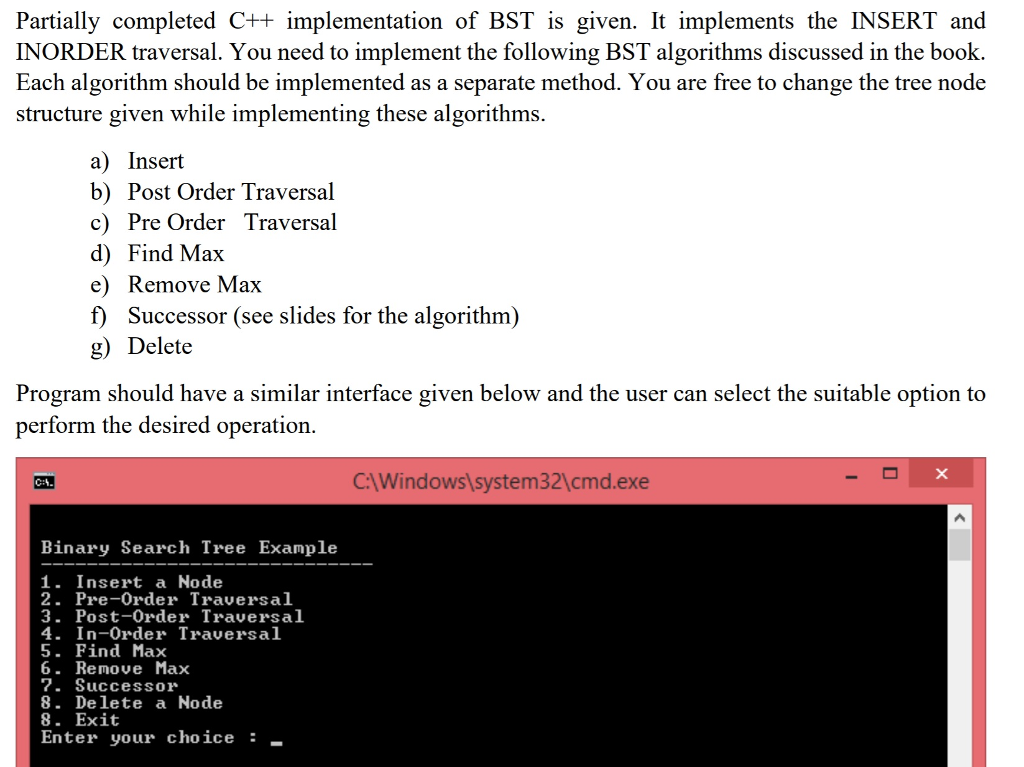
#include#include using namespace std; class BinarySearchTree { private: class node { public: node* left; node* right; node* parent; int key; string data; }; public: node* root; BinarySearchTree() { root = NULL; } bool isEmpty() const { return root == NULL; } void INORDER_TREE_WALK(node*); void TREE_INSERT(int ); }; void BinarySearchTree::TREE_INSERT(int d) { // This implements the algorithm in page 261 of the textbook node* z = new node(); z->key = d; z->left = NULL; z->right = NULL; node* y = NULL; node* x = root; node* parent = NULL; while (x != NULL) { y = x; if (z->key key) x = x->left; else x = x->right; } parent = y; if (y == NULL) root = z; else if (z->key key) y->left = z; else y->right = z; } void BinarySearchTree::INORDER_TREE_WALK(node* x) { if (x != NULL) { if (x->left) INORDER_TREE_WALK(x->left); cout key right) INORDER_TREE_WALK(x->right); } } int main() { BinarySearchTree bst; int choice, key; while (true) { cout > choice; switch (choice) { case 1: cout > key; bst.TREE_INSERT(key); break; case 2: cout Partially completed C++ implementation of BST is given. It implements the INSERT and INORDER traversal. You need to implement the following BST algorithms discussed in the book Each algorithm should be implemented as a separate method. You are free to change the tree node structure given while implementing these algorithms. a) Insert b) Post Order Traversa.l c) Pre Order Traversal d) Find Max e) Remove Max f) Successor (see slides for the algorithm) g) Delete Program should have a similar interface given below and the user can select the suitable option to perform the desired operation C:Windows system32\cmd.exe Binary Search Tree Example 1. Insert a Node 2. Pre-Order Traversal 3. Post-Order Traversal 4. In-Order Traversal 5. Find Max 6. Remove Max 7. Successor 8. Delete a Node 8. Exit Enter your choice_
Step by Step Solution
There are 3 Steps involved in it
1 Expert Approved Answer
Step: 1 Unlock

Question Has Been Solved by an Expert!
Get step-by-step solutions from verified subject matter experts
Step: 2 Unlock
Step: 3 Unlock
 Study Help