



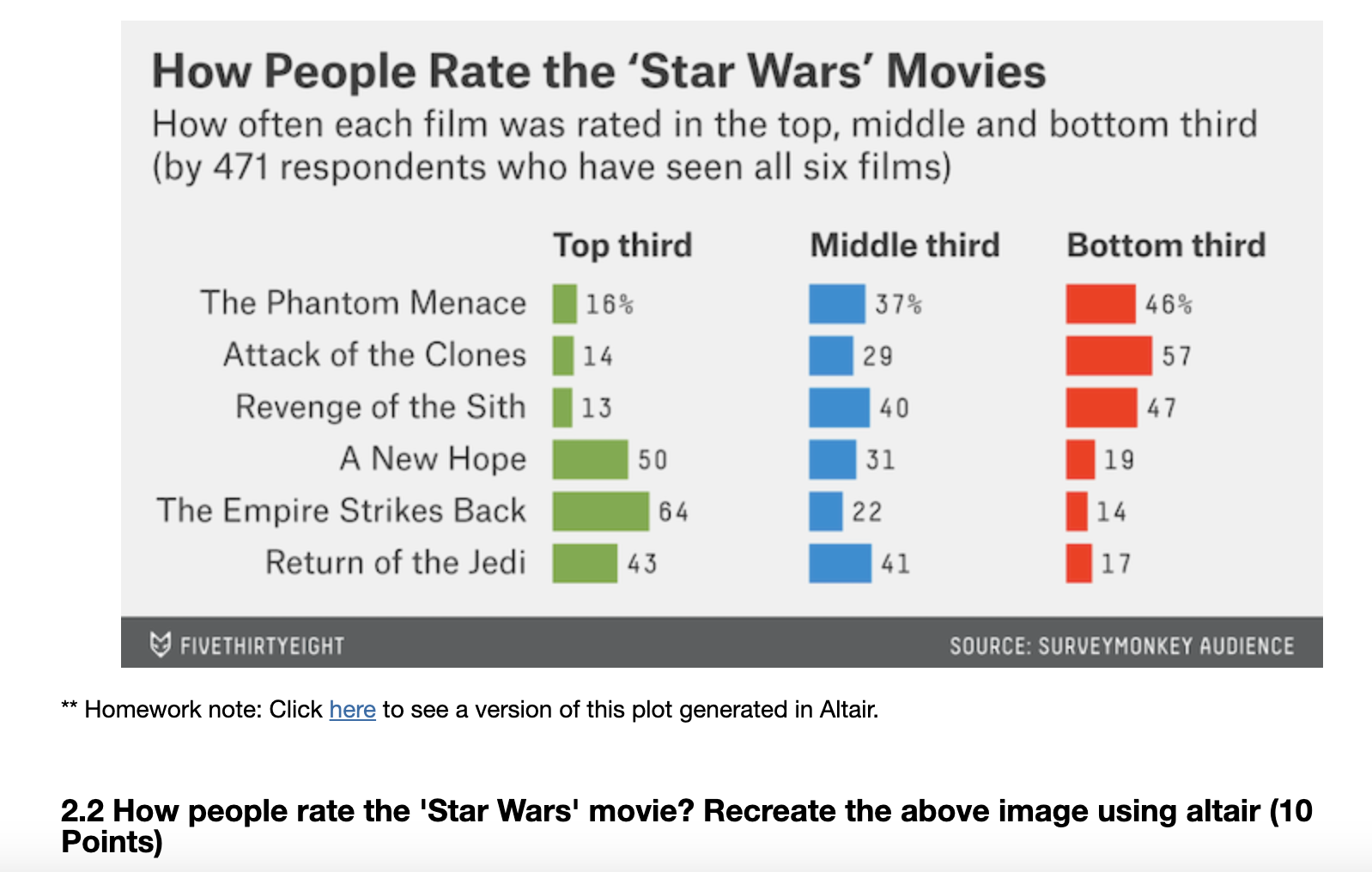
Question: CODE NOT GIVING CORRECT PERCENTAGES How People Rate the 'Star Wars' Movies How often each film was rated in the top, middle and bottom third
CODE NOT GIVING CORRECT PERCENTAGES
How People Rate the 'Star Wars' Movies
How often each film was rated in the top, middle and bottom third by respondents who have seen all six films
Homework note: Click here to see a version of this plot generated in Altair.
How people rate the 'Star Wars' movie? Recreate the above image using altair Points
MY CODE NOT GIVING CORRECT PERCENTAGES
def genRateVisinpf eps, namesnamesDict, nameslnamesList:
# input: inpf, the star wars dataset
# input: eps, the list of episodes
# input: names a dictionary of abbreviations to names default: namesDict
# input: namesl a list of all the movies in series order default: namesList
# output: the Altair visualization as described above
names
'The Phantom Menace',
'Attack of the Clones',
'Revenge of the Sith',
'A New Hope',
'The Empire Strikes Back',
'Return of the Jedi'
rankingcols franke for e in eps
inpf inpf.dropnasubsetseen ep for ep in eps how'all'
inpfrankingcols inpfrankingcolsapplypdtonumeric
totalresponses inpf.shape
dfpercinpfrankingcolssum totalresponsesresetindex
dfperccolumns Name 'Percentage'
dfpercName names
dfpercinpfrankingcolsisinsum totalresponsesresetindex
dfperccolumns Name 'Percentage'
dfpercName names
dfpercinpfrankingcolssum totalresponsesresetindex
dfperccolumns Name 'Percentage'
dfpercName names
base alt.Chartdfpercmarkbarsizeencode
xalt.XPercentage axisNone
yalt.YName:N axisalt.AxistickCount title sortnamesl
base alt.Chartdfpercmarkbarsizeencode
xalt.XPercentage axisNone
yalt.YName:N axisNone, sortnamesl
base alt.Chartdfpercmarkbarsizeencode
xalt.XPercentage axisNone
yalt.YName:N axisNone, sortnamesl
text basemarktextalign'left', baseline'middle', dxencode
textalt.TextPercentage:Q format
text basemarktextalign'left', baseline'middle', dxencode
textalt.TextPercentage:Q format
text basemarktextalign'left', baseline'middle', dxencode
textalt.TextPercentage:Q format
mixedtext baseencodecoloralt.value#abproperties
width height title"Top third"
mixedtext baseencodecoloralt.value#fdproperties
width height title"Middle third"
mixedtext baseencodecoloralt.value#CEAproperties
width height title"Bottom third"
res alt.hconcatmixed mixed mixedconfigureview
strokeWidth
properties
title
"text": "How People Rate the 'Star Wars' Movies",
"subtitle": "How often each film was rated in the top, middle and bottom third by respondents who have seen all six films
configuretitle
fontSize anchor'start', offset
return res
# let's check our solution
genRateVisswepisodes
Step by Step Solution
There are 3 Steps involved in it
1 Expert Approved Answer
Step: 1 Unlock

Question Has Been Solved by an Expert!
Get step-by-step solutions from verified subject matter experts
Step: 2 Unlock
Step: 3 Unlock