







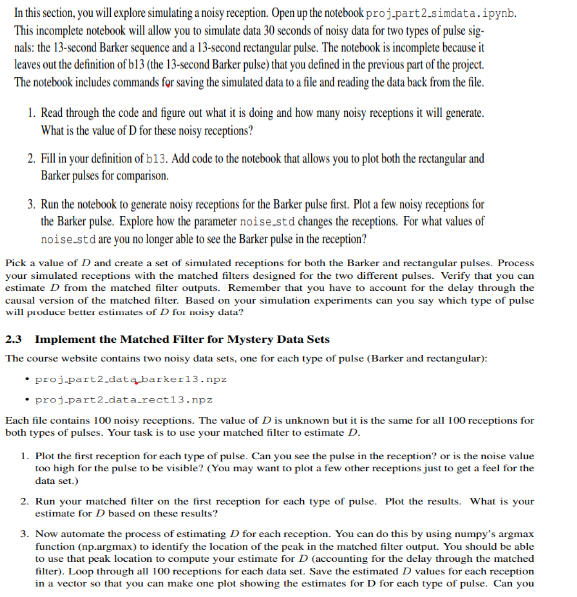
Question: code so far fs = 1 0 0 dur = 1 3 tt 1 3 = np . arange ( 0 , dur, 1 /
code so far
fs
dur
tt nparange dur, fs
n ttfs
b nparray
rectnponeslentt
# nreceptions number of receptions
# durreception is the total duration seconds of the reception that the signal pulse is embedded in
# datfile name of data file to save receptions in
# First set sigpulse equal to whichever of the two pulses we want to use b or rect
# and define the output data filename accordingly
# Uncomment the correct lines to make either the Barker or rectangular pulses
#sigpulseb
#datfile 'projpartdatabarkernpz
sigpulserect
datfile 'projpartdatarectnpz
# The settings below make receptions all with an arrival time of seconds
# Note that to increase or decrease the noise, change the noisestd variable noise standard deviation
nreceptions
starttime
arrivetime
indarrivenprintarrivetimefsastypeint
durreception
noisestd
# Initialize receptions matrix with zeros
receptionsnpzerosnreceptionsdurreceptionfs
# Create the signal piece sigpulse embedded in a zero vector
sigreceptnpzerosdurreceptionfs
sigreceptindarrive:indarrivelensigpulsesigpulse
# For loop to generate receptions
for ind in rangenreceptions:
# Create the Gaussian random noise to add to signal
noisereceptnoisestdnprandom.standardnormallensigrecept
# Store in reception in array
receptionsind:sigreceptnoiserecept
# Save the data
npsavezdatfilefsfsstarttimestarttime,nreceptionsnreceptions,receptionsreceptions
# You can change the name of indatfile to reflect whatever data set you're using
indatfiledatfile
npzfile nploadindatfile
fsnpzfilefs
starttimenpzfilestarttime
nreceptionsnpzfilenreceptions
receptionsnpzfilereceptions
pltplotreceptions:
pltplotreceptions:
pltshow
Step by Step Solution
There are 3 Steps involved in it
1 Expert Approved Answer
Step: 1 Unlock

Question Has Been Solved by an Expert!
Get step-by-step solutions from verified subject matter experts
Step: 2 Unlock
Step: 3 Unlock
 Study Help