







Question: code this project based on the parameters given in python There is only one checkout line. An event in this system might be the checker
code this project based on the parameters given in python There is only one checkout line. An event in this system might be the checker scanning a customer's item or a new customer joining the checkout line or both You will track how the line changes as customers are added at the end of the line and move forward through the line.
During each tick of the simulator clock, the cashier scans one item from the basket of the customer at the head of the line. When that customer's basket is empty, they exit the line. On any tick, a new customer may also be added at the end of the line. To be realistic, most simulations, including ours, involve inputs arriving randomly but under some specified probability distribution; customers arrive at random intervals and purchase random numbers of items. The similation is driven by an "event list." Each item on the event list for our market simulator is a nonnegative integer. Reading an item from the list is interpreted as ticking the simulator clock. At each tick, the line advances. That means to remove one item from the basket of the customer at the head of the line unless the line is empty and, if their basket becomes empty, they exit the line. But something else potentially happens on a tick: if the current event is nonzero, a new customer is added at the rear of the checkout line with that many items in their basket. For example, if the event item is a new customer is created with a basket containing items and the customer joins the checkout line. Number customers consecutively as you create them. At the end of each tick, you should also print out the current line. See the sample output below.
Finally, to make it easier for the TAs to grade your program, the event list will be supplied in a file, one event per line. This is also to give you practice in creating and reading files. You will process the file to create the event list. That is create the event list all at once prior to running the simulation, by reading successive items from the file and storing them in a list. You will write one function to generate the file and another function to read items from the file and store them on a list. The function to create the file is parameterized so that you can control the length of the list, the frequency with which new customers arrive and how many items they can purchase. See the link for a template below.
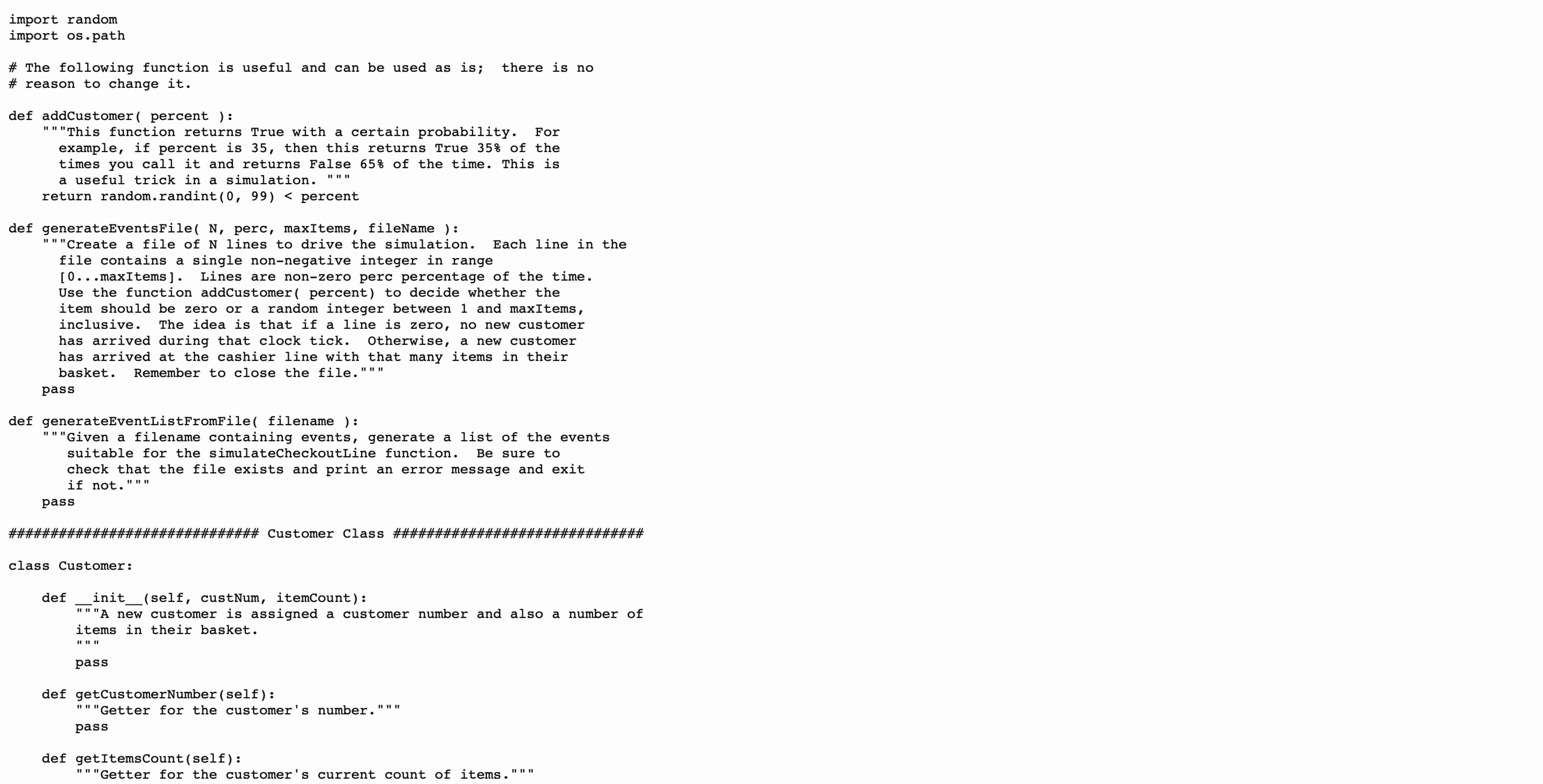
import random
import ospath
The following function is useful and can be used as is; there is no
reason to change it
def addCustomer percent :
This function returns True with a certain probability. For
example, if percent is then this returns True of the
times you call it and returns False of the time. This is
a useful trick in a simulation.
return random.randint percent
def generateEventsFile N perc, maxItems, fileName :
Create a file of N lines to drive the simulation. Each line in the
file contains a single nonnegative integer in range
maxItems Lines are nonzero perc percentage of the time.
Use the function addCustomer percent to decide whether the
item should be zero or a random integer between and maxItems,
inclusive. The idea is that if a line is zero, no new customer
has arrived during that clock tick. Otherwise, a new customer
has arrived at the cashier line with that many items in their
basket. Remember to close the file."""
pass
def generateEventListFromFile filename :
Given a filename containing events, generate a list of the events
suitable for the simulateCheckoutLine function. Be sure to
check that the file exists and print an error message and exit
if not."""
pass
#### Customer Class ######
class Customer:
def initself custNum, itemCount:
A new customer is assigned a customer number and also a number of
items in their basket.
pass
def getCustomerNumberself:
Getter for the customer's number."""
pass
def getItemsCountself:
Getter for the customer's current count of items."""
class Customer:
def initself custNum, itemCount:
"A new customer is assigned a customer number and also a number of
items in their basket.
pass
def getCustomerNumberself:
Getter for the customer's number."""
pass
def getItemsCountself:
Getter for the customer's current count of items."""
pass
def decrementItemsCountself:
Ring up remove one item from this customer's basket.
Typically, we'll only call this on the first customer in line."""
pass
def customerFinishedself:
Boolean function indicating that this customer will depart on
the current tick, ie there are zero items in their basket.
Typically we'll only call this on the first customer in line."""
pass
def strself:
If this is customer n with k items in basket,
return Cnk
pass
### CheckoutLine Class #
class CheckoutLine:
A checkout line is implemented as a list with customers added at the front
L and removed from the rear
class CheckoutLine:
A chec
d
Step by Step Solution
There are 3 Steps involved in it
1 Expert Approved Answer
Step: 1 Unlock

Question Has Been Solved by an Expert!
Get step-by-step solutions from verified subject matter experts
Step: 2 Unlock
Step: 3 Unlock
 Study Help