







Question: Code this using C language and use this links for reference and comment on each section to understand the code. Program 10 (Instruction Decoding and
Code this using C language and use this links for reference and comment on each section to understand the code.
Program 10 (Instruction Decoding and File I/0)
Source and header files (starter versions)
prog10_decode.c
http://mjgeiger.github.io/eece2160/programs/src/prog10_decode.c
prog10_functions.c (Note: may be empty if you don't define any new functions)
http://mjgeiger.github.io/eece2160/programs/src/prog10_functions.c?
prog10_functions.h
http://mjgeiger.github.io/eece2160/programs/src/prog10_functions.h
Assignment using bitwise operators from previous semesters (description, solution)
Binary input files
invals1.bin
http://mjgeiger.github.io/eece2160/programs/src/invals1.bin
invals2.bin
http://mjgeiger.github.io/eece2160/programs/src/invals2.bin
invals3.bin
http://mjgeiger.github.io/eece2160/programs/src/invals3.bin
Program input files
p1.txt
http://mjgeiger.github.io/eece2160/programs/src/p1.txt
p2.txt
http://mjgeiger.github.io/eece2160/programs/src/p2.txt
p3.txt
http://mjgeiger.github.io/eece2160/programs/src/p3.txt
Program output files (Note: File names are based on program input and binary input
file names. For example, "p1in1_out.txt" is the output of using binary input file
"invals1.bin" and program input file "p1.txt".)
Outputs from p1.txt: p1in1_out.txt | p1in2_out.txt | p1in3_out.txt
http://mjgeiger.github.io/eece2160/programs/src/p1in1_out.txt
http://mjgeiger.github.io/eece2160/programs/src/p1in2_out.txt
http://mjgeiger.github.io/eece2160/programs/src/p1in3_out.txt
Outputs from p2.txt: p2in1_out.txt | p2in2_out.txt | p2in3_out.txt
http://mjgeiger.github.io/eece2160/programs/src/p2in1_out.txt
http://mjgeiger.github.io/eece2160/programs/src/p2in2_out.txt
http://mjgeiger.github.io/eece2160/programs/src/p2in3_out.txt
Outputs from p3.txt: p3in1_out.txt | p3in2_out.txt | p3in3_out.txt
http://mjgeiger.github.io/eece2160/programs/src/p3in1_out.txt
http://mjgeiger.github.io/eece2160/programs/src/p3in2_out.txt
http://mjgeiger.github.io/eece2160/programs/src/p3in3_out.txt
1. Introduction
In this assignment, you will work with files to handle input and output. Your program will simulate a very simple processor that is controlled using a 32-bit instruction. The program will decode this instruction to determine what operation should be performed and what values should be used in the computation. Initial register values and instructions will be read from input files, and it prints its results to an output file.
2. Deliverables
This assignment uses multiple files; starter versions of each file are on the web page:
prog10_decode.c: Source file containing your main function.
prog10_functions.h: Header file containing function prototypes..
prog10_functions.c: Source file containing other user-defined functions
Submit all three files by uploading these files to your Dropbox folder. Place the files indirectly in your shared folderdo not create a sub-folder to hold them. Ensure your file names match the names specified above. Failure to meet this specification will reduce your grade, as described in the program grading guidelines.
3. Specifications
NOTE: See Section 6 for a full breakdown of instruction encoding, possible opcodes, and detailed information about the program inputs.
Variables: Your program should contain, at a minimum, the following variables:
unsigned int inst: The current instruction
int regs[32]: Array of register values. If you have an operation that uses R0, R5, and R22, youll access regs[0], regs[5], and regs[22].
unsigned int opcode: Instruction field indicating operation to be performed.
unsigned int dest: Instruction field that holds destination register number.
unsigned int src1: Instruction field with number of first source operand.
unsigned int src2: Instruction field with number of second source operand.
unsigned int shamt: Instruction field that holds shift amount; only used for left and right shift operations.
You will also need variables to handle two different input filesone binary file, one text fileand one output file. You may need other variables to complete the program.
Program outline: The program should perform the following operations:
Prompt the user to enter the name of a binary input file. This file will contain 32 integer valuesopen the file and read these values into the regs[] array to provide the initial register values.
o Sample binary files: invals1.bin, invals2.bin, and invals3.bin.
o Note that these files, as well as the text input file(s), should be placed in the same directory as your source code or executable.
Prompt the user to enter the names of two text files: one to be used for program input; the other to be used for program output. Open each of these files.
o The input file will contain a series of instructions32 bit unsigned integers in hexadecimal format.
o Sample program files: p1.txt, p2.txt, and p3.txt.
Set up a loop that will repeatedly read a single instruction from the program input file, stopping when it reaches the end of the file.
For each instruction:
o Decode the instruction into the appropriate fields. Note: the code to perform the decoding is not provided in the starter filean earlier version of the specification incorrectly specified that it was present.
o Perform the appropriate operation on the source values. See Section 5 for a list of operations and corresponding opcodes.
o Print the following output to the open text output file:
Line 1: The instruction, printed in the form:
INSTRUCTION :
The number printed indicates how many instructions have been read thus far.
Line 2: The registers and operation, in the form:
=
Line 3: The values used in the calculation and the result, in the form:
=
For example, the first instruction may generate the following output:
INSTRUCTION 0: 0x04011000
R0 = R1 + R2 = 1 + 2 = 3
o Store the instruction result in the appropriate regs[] array element.
Note: I suggest storing the result after printing the output, to ensure the output is correct. For example, if you have the instruction:
R17 = R17 + R17
You can only print the correct source values on the next line if you dont overwrite regs[17] until after youve printed the output.
Error checking: If your program cannot open any of the three files (binary input file, text input file, text output file), print an error message and repeat the prompt until a correct file name is entered. You may assume all input files are formatted correctly and therefore will not generate any errors.
Hints: Most hints for this program can be found in the following sources:
The starter files, which contain an outline of the program.
The slides and recording from Lectures 28 and 29, which dealt with file I/O.
The lecture slides and recordings from Lectures 31-33, which dealt with bitwise operators. Pay particular attention to the topics at the end of Lecture 33, which discuss how to isolate groups of bits from a larger valuethose techniques will be particularly helpful for instruction decoding.
The code presented on the course website, which shows an old assignment that provides further applications of bitwise operators.
5. Test Cases
The screenshots below show the console input and output from two different program runsone in which all files open successfully and another in which the user provides an invalid input file name:
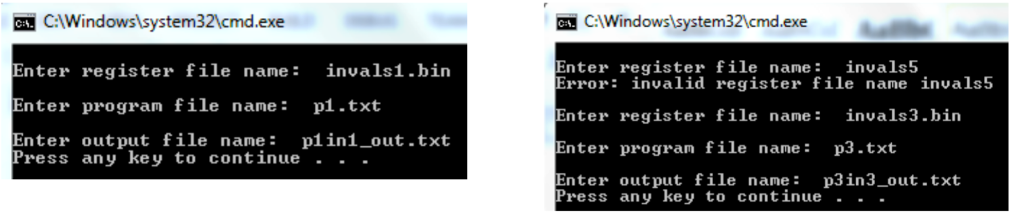
The more useful test cases can be found on the web page, in the form of input and output files. Follow the Program 10 files link to find sample input and output files, the starter code file, and the example bitwise operator program mentioned above.
Your output files should match these test cases exactly for the given input values.
CWindowslsystem321cmd.exe Enter register file name invals1.bin Enter program file name: p1.txt Enter output file name p1in1_out.txt CWindows system321cmd.exe Enter register file name invals5 Error: invalid register file name invals5 Enter register file nae invals3.bin Enter progran file nane: p3.txt Enter output file name p3in3_out.txt ress any key to continue - - Press any key to continue .. . CWindowslsystem321cmd.exe Enter register file name invals1.bin Enter program file name: p1.txt Enter output file name p1in1_out.txt CWindows system321cmd.exe Enter register file name invals5 Error: invalid register file name invals5 Enter register file nae invals3.bin Enter progran file nane: p3.txt Enter output file name p3in3_out.txt ress any key to continue - - Press any key to continue
Step by Step Solution
There are 3 Steps involved in it

Get step-by-step solutions from verified subject matter experts
 Study Help