







Question: Code using C++ and do not use Arrays. flightData.dat contains : NW1735 12:03 12:15 NW1395 12:56 13:21 UA8863 2:19 2:20 NW2852 2:45 3:15 UA2740 3:10
Code using C++ and do not use Arrays.
flightData.dat contains :
NW1735 12:03 12:15 NW1395 12:56 13:21 UA8863 2:19 2:20 NW2852 2:45 3:15 UA2740 3:10 4:00 NW1568 3:10 3:1 NW9886 14:21 19:36 DL2981 18:36 19:21 UA882 5:15 5:15 UA231 7:16 7:44
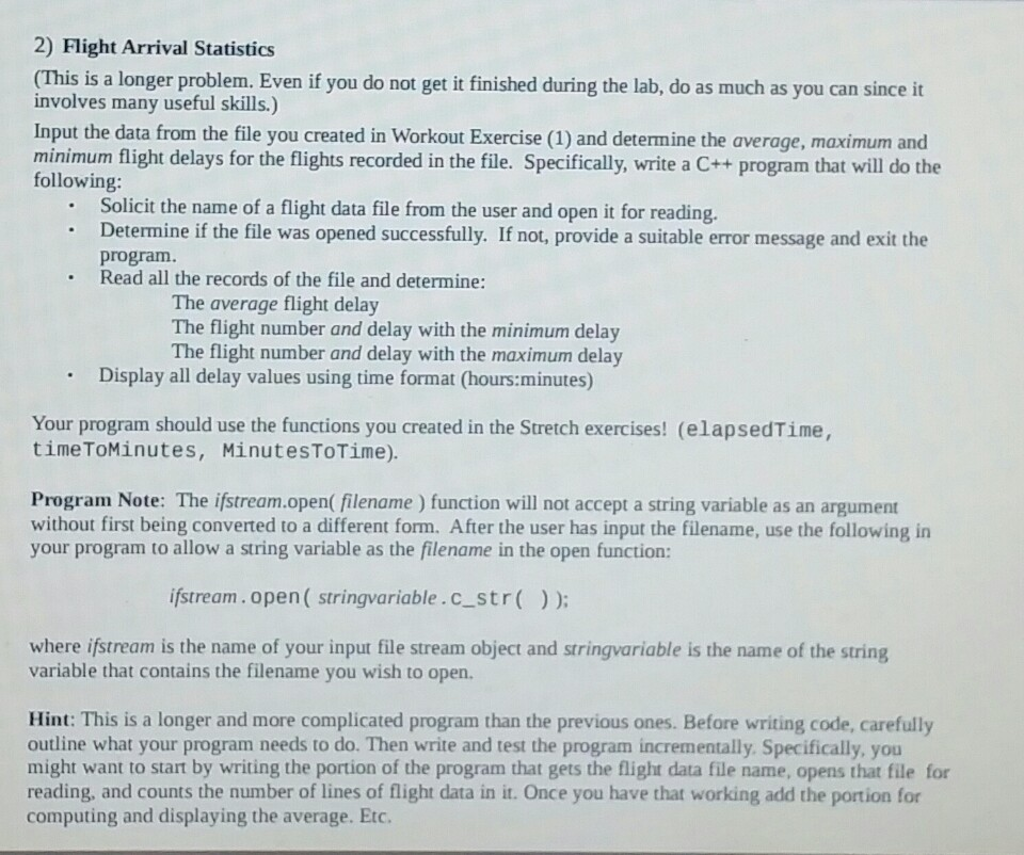
2) Flight Arrival Statistics (This is a longer problem. Even if you do not get it finished during the lab, do as much as you can since it involves many useful skills.) Input the data from the file you created in Workout Exercise (1) and determine the average, maximum and minimum flight delays for the flights recorded in the file. Specifically, write a C++ program that will do the following Solicit the name of a flight data file from the user and open it for reading. Determine if the file was opened successfully. If not, provide a suitable error message and exit the program Read all the records of the file and determine: The average flight delay The flight number and delay with the minimum delay The flight number and delay with the maximum delay Display all delay values using time format (hours:minutes) Your program should use the functions you created in the Stretch exercises! (elapsedTime, timeToMinutes, MinutesToTime). Program Note: The ifstream.open( filename) function will not accept a string variable as an argument without first being converted to a different form. After the user has input the filename, use the following in your program to allow a string variable as the filename in the open function: stream.open (stringvariable.cstr); where ifstream is the name of your input file stream object and stringvariable is the name of the string variable that contains the filename you wish to open. Hint: This is a longer and more complicated program than the previous ones. Before writing code, carefully outline what your program needs to do. Then write and test the program incrementally. Specifically, you might want to start by writing the portion of the program that gets the flight data file name, opens that file for reading, and counts the number of lines of flight data in it. Once you have that working add the portion for computing and displaying the average. Etc
Step by Step Solution
There are 3 Steps involved in it

Get step-by-step solutions from verified subject matter experts
 Study Help