







Question: Codio - Linux File Syster C Chegg Study | Guided Solut | https://codio.com/ib C Codio Project File Edit Find View Tools Education Help , Configure.
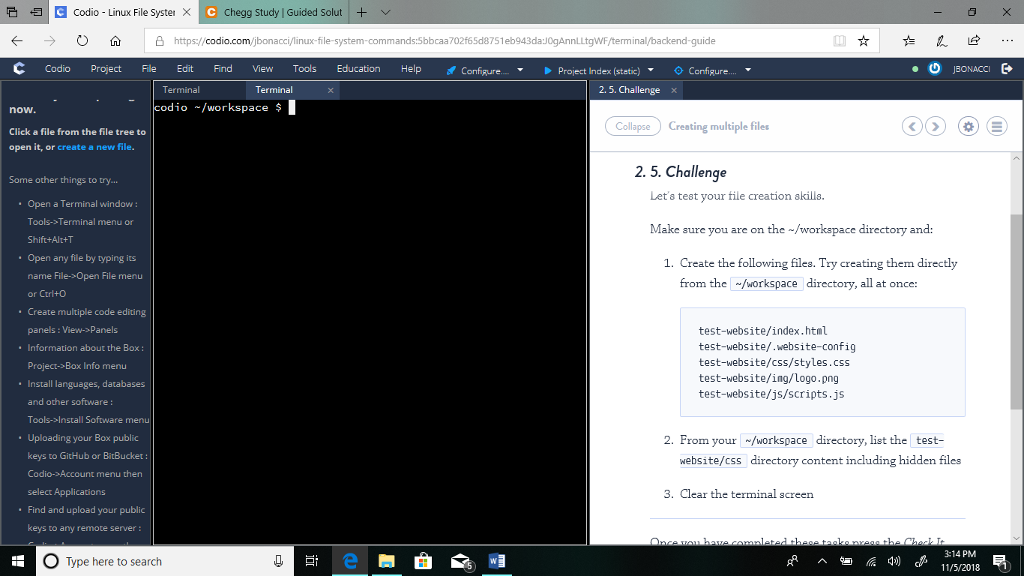
Codio - Linux File Syster C Chegg Study | Guided Solut | https://codio.com/ib C Codio Project File Edit Find View Tools Education Help , Configure. . Project Index (static) Configure . Terminal Terminal 2.5. Challenge x odio/workspace $ now Click a file from the file tree to open it, or create a new file. Collapse Creating mulsiple files 2. 5. Challenge Some other things to try... Let's test your file creation akilla. Open a Terminal window: Tools->Terminal menu or Shift+Alr+T Open any file by typing its name File->Open File menu or Ctrl+O Create multiple code editing panels: View->Panels Make sure you are on the-/workspace directory and: 1. Create the following files. Try creating them directly from the /workspace directory, all at once: test-website/index.html test-website/.website-config test-website/css/styles.css test-website/ing/Logo.png test-website/js/scripts.js . Information about the Box: Project->Box Info menu Install languages, databases and other software: Tools->Install Software Uploading your Box public keys to GitHub or BitBucket: Codio->Account menu then select Applications Find and upload your public keys to any remote server 2. From your /workspace directory, list the test- website/css directory content including hidden files 3. Clear the terminal screen O Type here to search 3-14 PM 11/5/2018 Codio - Linux File Syster C Chegg Study | Guided Solut | https://codio.com/ib C Codio Project File Edit Find View Tools Education Help , Configure. . Project Index (static) Configure . Terminal Terminal 2.5. Challenge x odio/workspace $ now Click a file from the file tree to open it, or create a new file. Collapse Creating mulsiple files 2. 5. Challenge Some other things to try... Let's test your file creation akilla. Open a Terminal window: Tools->Terminal menu or Shift+Alr+T Open any file by typing its name File->Open File menu or Ctrl+O Create multiple code editing panels: View->Panels Make sure you are on the-/workspace directory and: 1. Create the following files. Try creating them directly from the /workspace directory, all at once: test-website/index.html test-website/.website-config test-website/css/styles.css test-website/ing/Logo.png test-website/js/scripts.js . Information about the Box: Project->Box Info menu Install languages, databases and other software: Tools->Install Software Uploading your Box public keys to GitHub or BitBucket: Codio->Account menu then select Applications Find and upload your public keys to any remote server 2. From your /workspace directory, list the test- website/css directory content including hidden files 3. Clear the terminal screen O Type here to search 3-14 PM 11/5/2018
Step by Step Solution
There are 3 Steps involved in it

Get step-by-step solutions from verified subject matter experts
 Study Help