







Question: Collapse Resolve Logic Errors var slideIndex =0; While working on the lthaca Zoo website, another web developer noticed that the $( lprev). on ('click', function()
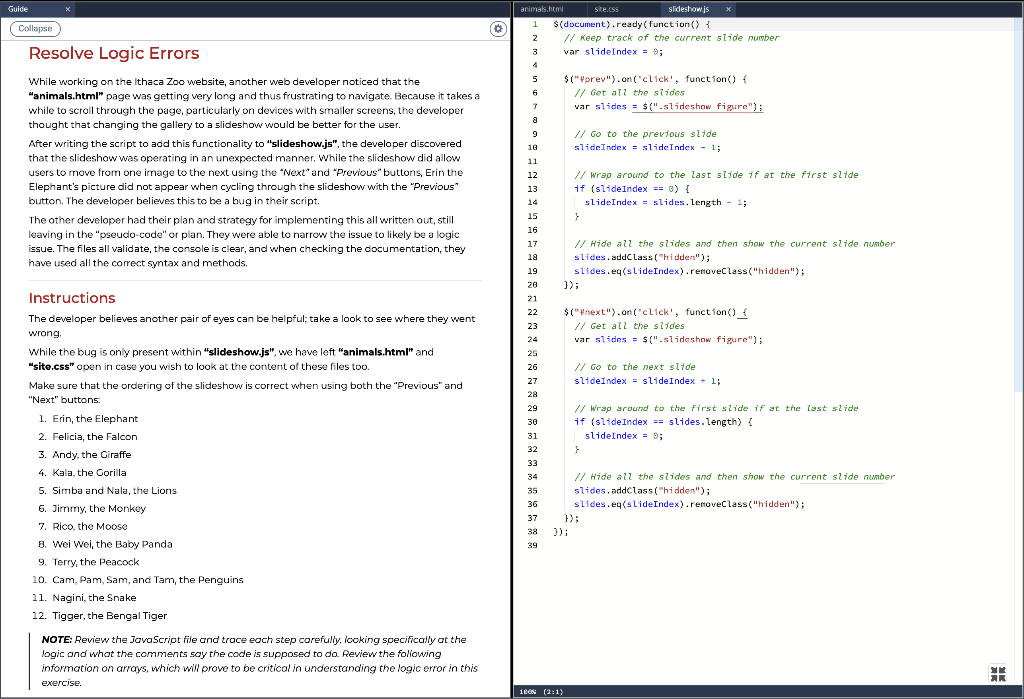
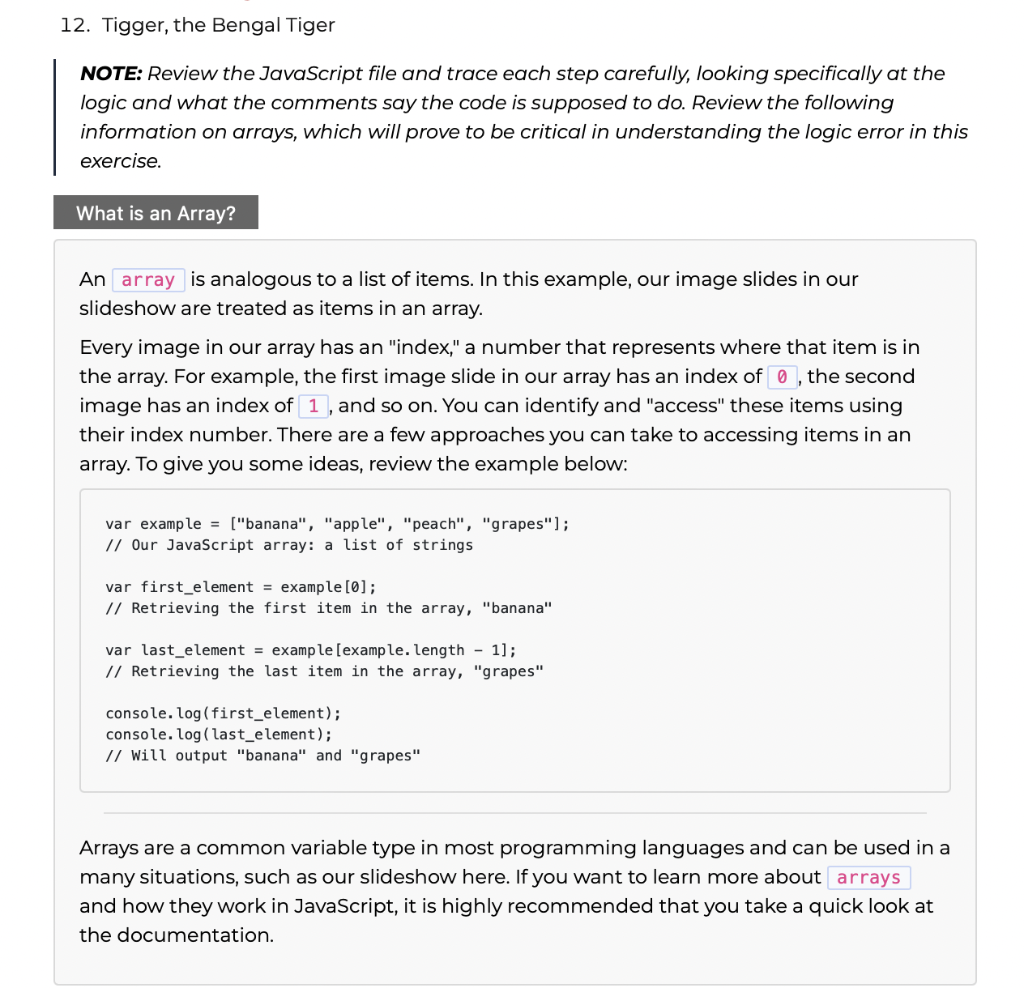
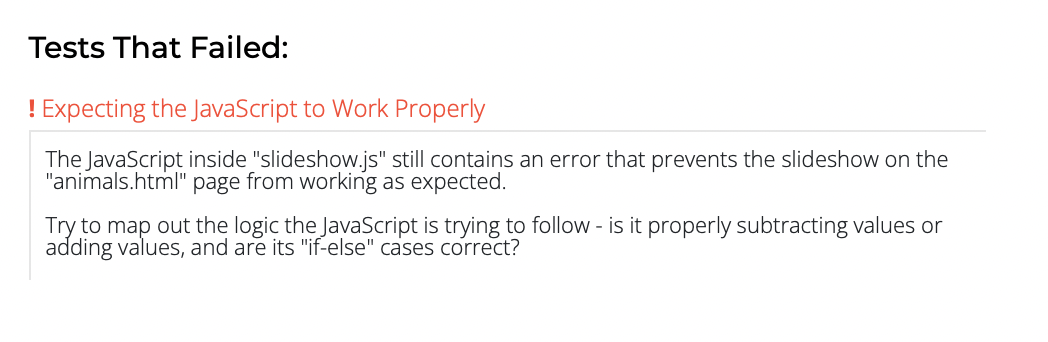
Collapse Resolve Logic Errors var slideIndex =0; While working on the lthaca Zoo website, another web developer noticed that the $( "lprev"). on ('click', function() f "animals.html" page was getting very long and thus frustrating to navigate. Because it takes a // Get all the slides while to scrall through the page, particularly on devices with smaller screens, the developer thought that changing the gallery to a slideshow would be better for the user. // Go to the previous sitde After writing the script to add this functionality to "slideshow.js", the developer discovered slideIndex = slideIndex 1; that the slideshow was operating in an unexpected manner. While the slideshow did allow users to move from one image to the next using the "Next" and "Previous" buttons, Erin the // wrap around to the last slide if at the first slide Elephant's picture did not appear when cycling through the slideshow with the "Previous" if (stideIndex ==0 ) \{ button. The developer believes this to be a bug in their script. slideIndex = slides. Length 1; The other developer had their plan and strategy for implementing this all written out, still leaving in the "pseudo-code" or plan. They were able to narrow the issue to likely be a logic issue. The files all validate, the console is clear, and when checking the documentation, they have used all the correct syntax and methods. Instructions The developer believes another pair of eyes can be helpful; take a look to see where they went wrong. While the bug is only present within "slideshow.js", we have left "animals.html" and "site.css" open in case you wish to look at the content of these files too. Make sure that the ordering of the slideshow is correct when using both the "Previous" and "Next" buttons: 1. Erin, the Elephant 2. Felicia, the Falcon 3. Andy, the Giraffe 4. Kala, the Corilla 5. Simba and Nala, the Lions 6. Jimmy, the monkey 7. Rico, the Moose B. Wei Wei, the Baby Panda 9. Terry, the Peacock 10. Cam, Pam, Sam, and Tam, the Penguins 11. Nagini, the Snake 12. Tigger, the Bengal Tiger NOTE: Review the JavaScript file and trace each step corefully, iooking specifically at the logic and what the comments say the code is supposed to da Review the following information on arrays, which wil prove to be critical in understanding the logic error in this exercise. 12. Tigger, the Bengal Tiger NOTE: Review the JavaScript file and trace each step carefully, looking specifically at the logic and what the comments say the code is supposed to do. Review the following information on arrays, which will prove to be critical in understanding the logic error in this exercise. An is analogous to a list of items. In this example, our image slides in our slideshow are treated as items in an array. Every image in our array has an "index," a number that represents where that item is in the array. For example, the first image slide in our array has an index of the second image has an index of 1 , and so on. You can identify and "access" these items using their index number. There are a few approaches you can take to accessing items in an array. To give you some ideas, review the example below: var example = ["banana", "apple", "peach", "grapes"] ; // Our JavaScript array: a list of strings var first_element = example [0] // Retrieving the first item in the array, "banana" var last_element = example [example. length -1]; // Retrieving the last item in the array, "grapes" console. log (first_element); console. log ( last_element); // Will output "banana" and "grapes" Arrays are a common variable type in most programming languages and can be used in a many situations, such as our slideshow here. If you want to learn more about and how they work in JavaScript, it is highly recommended that you take a quick look at the documentation. Tests That Failed: ! Expecting the JavaScript to Work Properly The JavaScript inside "slideshow.js" still contains an error that prevents the slideshow on the "animals.html" page from working as expected. Try to map out the logic the JavaScript is trying to follow - is it properly subtracting values or adding values, and are its "if-else" cases correct? Collapse Resolve Logic Errors var slideIndex =0; While working on the lthaca Zoo website, another web developer noticed that the $( "lprev"). on ('click', function() f "animals.html" page was getting very long and thus frustrating to navigate. Because it takes a // Get all the slides while to scrall through the page, particularly on devices with smaller screens, the developer thought that changing the gallery to a slideshow would be better for the user. // Go to the previous sitde After writing the script to add this functionality to "slideshow.js", the developer discovered slideIndex = slideIndex 1; that the slideshow was operating in an unexpected manner. While the slideshow did allow users to move from one image to the next using the "Next" and "Previous" buttons, Erin the // wrap around to the last slide if at the first slide Elephant's picture did not appear when cycling through the slideshow with the "Previous" if (stideIndex ==0 ) \{ button. The developer believes this to be a bug in their script. slideIndex = slides. Length 1; The other developer had their plan and strategy for implementing this all written out, still leaving in the "pseudo-code" or plan. They were able to narrow the issue to likely be a logic issue. The files all validate, the console is clear, and when checking the documentation, they have used all the correct syntax and methods. Instructions The developer believes another pair of eyes can be helpful; take a look to see where they went wrong. While the bug is only present within "slideshow.js", we have left "animals.html" and "site.css" open in case you wish to look at the content of these files too. Make sure that the ordering of the slideshow is correct when using both the "Previous" and "Next" buttons: 1. Erin, the Elephant 2. Felicia, the Falcon 3. Andy, the Giraffe 4. Kala, the Corilla 5. Simba and Nala, the Lions 6. Jimmy, the monkey 7. Rico, the Moose B. Wei Wei, the Baby Panda 9. Terry, the Peacock 10. Cam, Pam, Sam, and Tam, the Penguins 11. Nagini, the Snake 12. Tigger, the Bengal Tiger NOTE: Review the JavaScript file and trace each step corefully, iooking specifically at the logic and what the comments say the code is supposed to da Review the following information on arrays, which wil prove to be critical in understanding the logic error in this exercise. 12. Tigger, the Bengal Tiger NOTE: Review the JavaScript file and trace each step carefully, looking specifically at the logic and what the comments say the code is supposed to do. Review the following information on arrays, which will prove to be critical in understanding the logic error in this exercise. An is analogous to a list of items. In this example, our image slides in our slideshow are treated as items in an array. Every image in our array has an "index," a number that represents where that item is in the array. For example, the first image slide in our array has an index of the second image has an index of 1 , and so on. You can identify and "access" these items using their index number. There are a few approaches you can take to accessing items in an array. To give you some ideas, review the example below: var example = ["banana", "apple", "peach", "grapes"] ; // Our JavaScript array: a list of strings var first_element = example [0] // Retrieving the first item in the array, "banana" var last_element = example [example. length -1]; // Retrieving the last item in the array, "grapes" console. log (first_element); console. log ( last_element); // Will output "banana" and "grapes" Arrays are a common variable type in most programming languages and can be used in a many situations, such as our slideshow here. If you want to learn more about and how they work in JavaScript, it is highly recommended that you take a quick look at the documentation. Tests That Failed: ! Expecting the JavaScript to Work Properly The JavaScript inside "slideshow.js" still contains an error that prevents the slideshow on the "animals.html" page from working as expected. Try to map out the logic the JavaScript is trying to follow - is it properly subtracting values or adding values, and are its "if-else" cases correct
Step by Step Solution
There are 3 Steps involved in it

Get step-by-step solutions from verified subject matter experts
 Study Help