







Question: COMP 100 - Work Sheet Computer Essentials Homework Instructions 1- Merge & Center the title of the table. (Hint: A1:F1) 2- Apply Text Wrapping
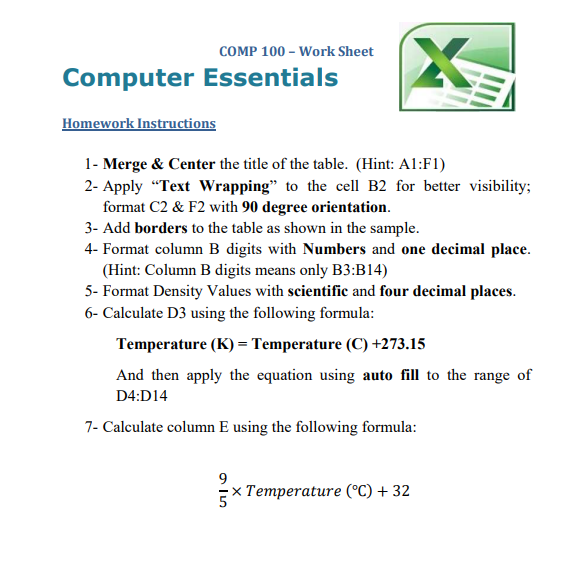
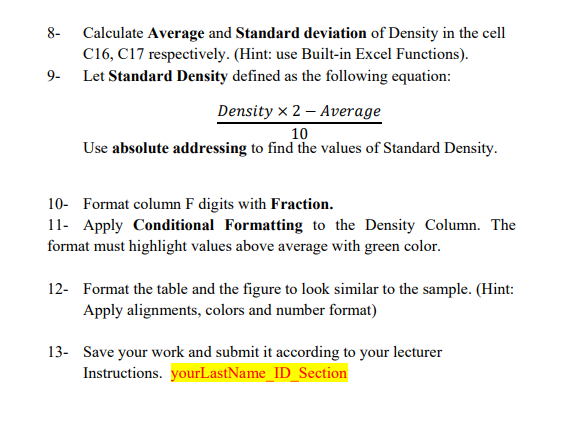
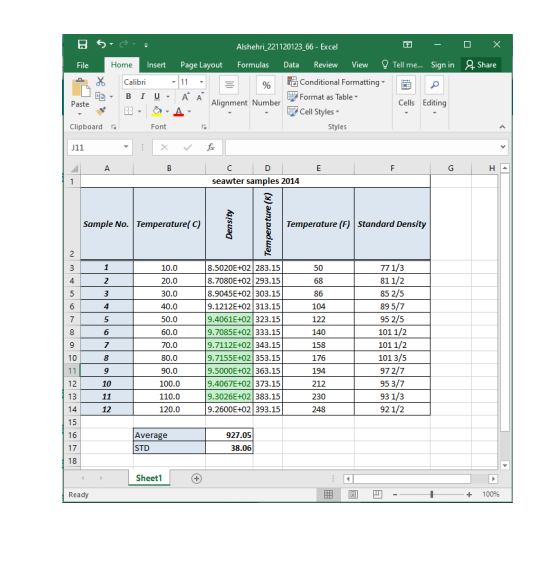
COMP 100 - Work Sheet Computer Essentials Homework Instructions 1- Merge & Center the title of the table. (Hint: A1:F1) 2- Apply "Text Wrapping" to the cell B2 for better visibility; format C2 & F2 with 90 degree orientation. 3- Add borders to the table as shown in the sample. 4- Format column B digits with Numbers and one decimal place. (Hint: Column B digits means only B3:B14) 5- Format Density Values with scientific and four decimal places. 6- Calculate D3 using the following formula: Temperature (K) = Temperature (C) +273.15 And then apply the equation using auto fill to the range of D4:D14 7- Calculate column E using the following formula: 9 Temperature (C) + 32
Step by Step Solution
There are 3 Steps involved in it

Get step-by-step solutions from verified subject matter experts
 Study Help