







Question: COMP 1516 Python project Function is_magic_date(), the function prompts the user to enter the month value, the day value and two digit year value. The
 COMP 1516 Python project
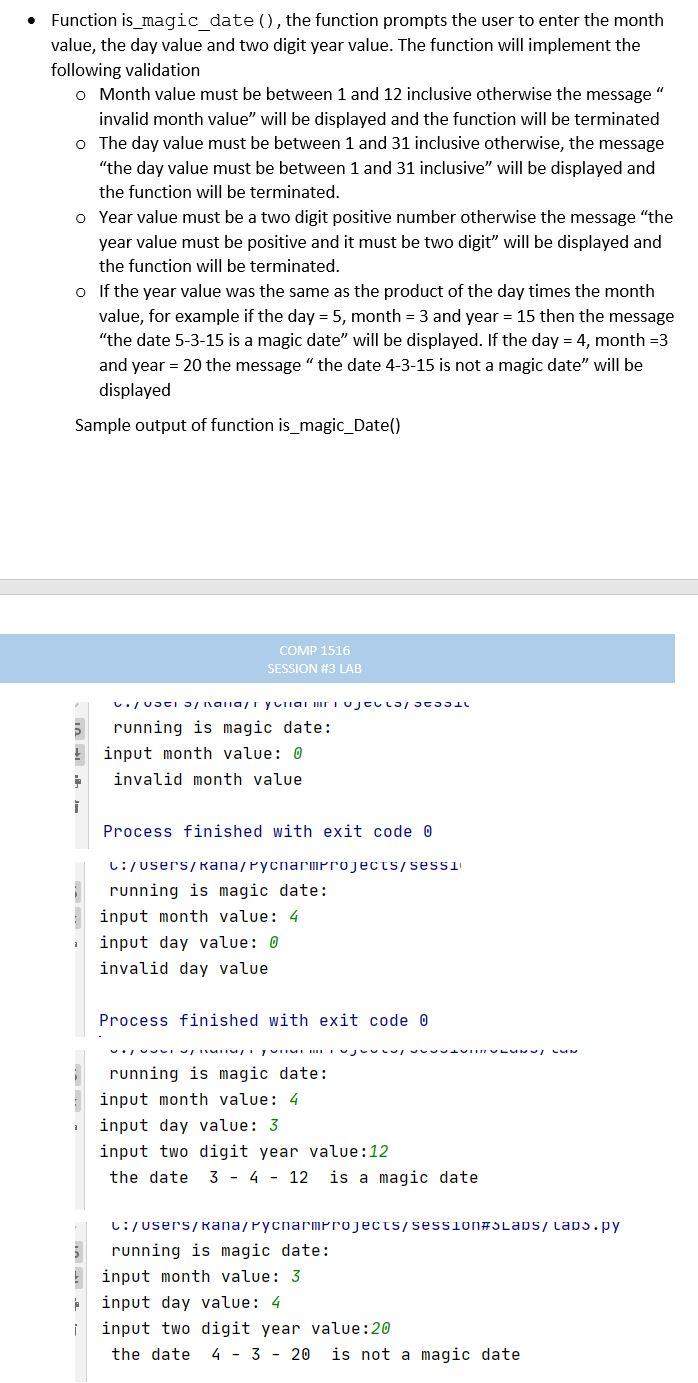
Function is_magic_date(), the function prompts the user to enter the month value, the day value and two digit year value. The function will implement the following validation o Month value must be between 1 and 12 inclusive otherwise the message" invalid month value" will be displayed and the function will be terminated o The day value must be between 1 and 31 inclusive otherwise, the message "the day value must be between 1 and 31 inclusive" will be displayed and the function will be terminated. o Year value must be a two digit positive number otherwise the message "the year value must be positive and it must be two digit" will be displayed and the function will be terminated. o If the year value was the same as the product of the day times the month value, for example if the day = 5, month = 3 and year = 15 then the message "the date 5-3-15 is a magic date will be displayed. If the day = 4, month=3 and year = 20 the message " the date 4-3-15 is not a magic date will be displayed Sample output of function is_magic_Date() COMP 1516 SESSION #3 LAB ./ VOCI / Nana Ya HTI UJELLO SCOIL B running is magic date: ! input month value: 0 invalid month value i Process finished with exit code o C:/Users/Rana/Pycharmprojects/sessi running is magic date: input month value: 4 input day value: 0 invalid day value Process finished with exit code o VIVULIU TIITLI HILI LUN running is magic date: input month value: 4 input day value: 3 input two digit year value: 12 the date 3 - 4 - 12 is a magic date C:/Users/Rana/Pycharmprojects/session#SLaDs/ laps.py 5 running is magic date: ! input month value: 3 input day value: 4 i input two digit year value:20 the date 4 - 3 - 20 is not a magic date
Step by Step Solution
There are 3 Steps involved in it

Get step-by-step solutions from verified subject matter experts
 Study Help