







Question: Complete exercise 3-1 with my attached current code pasted below below. Pictures are posted for instructions use strict; var $ = function (id) { return
Complete exercise 3-1 with my attached current code pasted below below. Pictures are posted for instructions 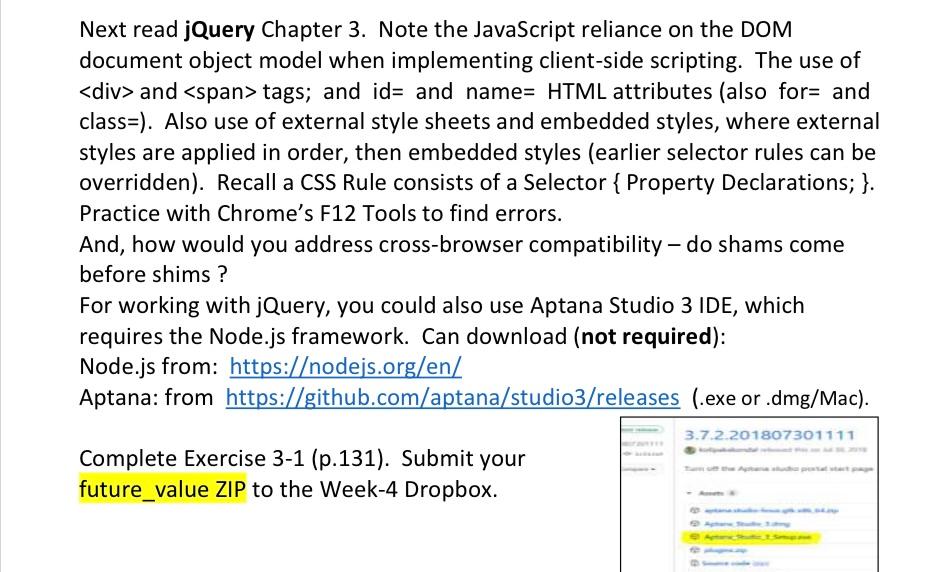
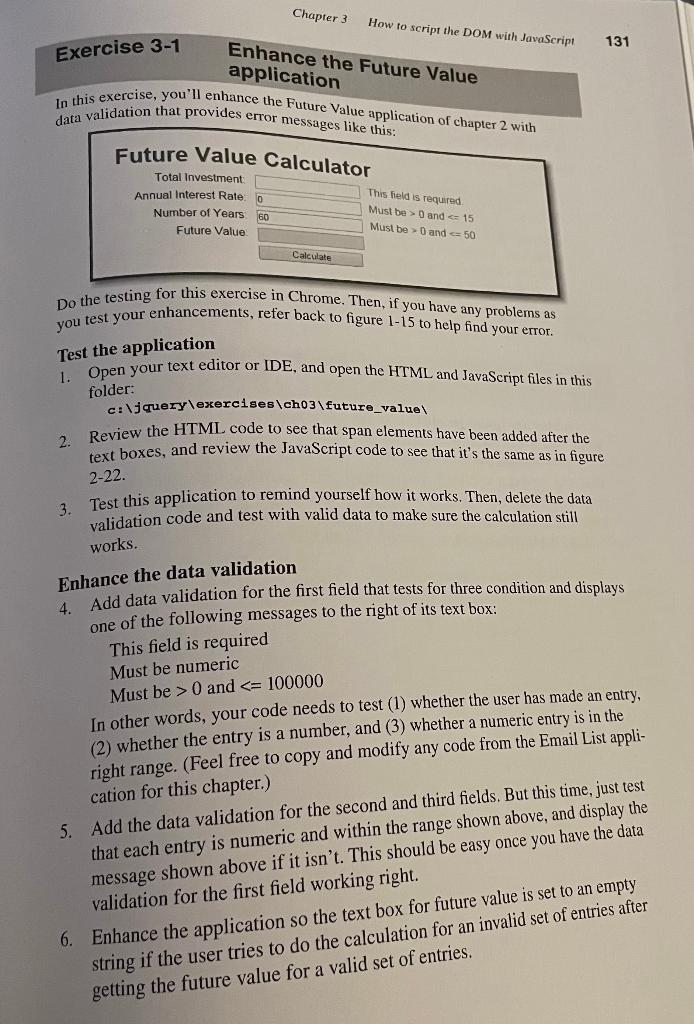
"use strict"; var $ = function (id) { return document.getElementById(id); } function calculateFV(investment, rate, years) { var futureValue = investment; for (var i = 1; i 100000) { alert("Enter an investment greater than 0 and less than or equal to 100000."); } else if (isNaN(rate) || rate 15) { alert("Enter an interest rate greater than 0 and less than or equal to 16."); } else if (isNaN(years) || years 50) { alert("Enter a number of years greater than 0 and less than or equal to 50."); } else { $("future_value").value = calculateFV(investment, rate, years); } } window.onload = function () { $("calculate").onclick = processEntries; $("investment").focus(); $("clear_entries").onclick = clearEntries; $("investment").ondblclick = clearEntries; }Next read jQuery Chapter 3. Note the JavaScript reliance on the DOM document object model when implementing client-side scripting. The use of and tags; and id= and name = HTML attributes (also for = and class=). Also use of external style sheets and embedded styles, where external styles are applied in order, then embedded styles (earlier selector rules can be overridden). Recall a CSS Rule consists of a Selector \{Property Declarations; \}. Practice with Chrome's F12 Tools to find errors. And, how would you address cross-browser compatibility - do shams come before shims? For working with jQuery, you could also use Aptana Studio 3 IDE, which requires the Node.js framework. Can download (not required): Node.js from: https:/odejs.org/en/ Aptana: from https://github.com/aptana/studio3/releases (.exe or .dmg/Mac). Complete Exercise 3-1 (p.131). Submit your future_value ZIP to the Week-4 Dropbox. In this exercise, you'll enhance the Future Value application of chapter 2 with data validation that provides error messages like thio. Do the testing for this exercise in Chrome. Then, if you have any problems as you test your enhancements, refer back to figure 1-15 to help find your error. Test the application 1. Open your text editor or IDE, and open the HTML and JavaScript files in this folder: c: \ jquery \ exercises \ch03\future_value\ 2. Review the HTML code to see that span elements have been added after the text boxes, and review the JavaScript code to see that it's the same as in figure 222. 3. Test this application to remind yourself how it works. Then, delete the data validation code and test with valid data to make sure the calculation still works. Enhance the data validation 4. Add data validation for the first field that tests for three condition and displays one of the following messages to the right of its text box: This field is required Must be numeric Must be >0 and
Step by Step Solution
There are 3 Steps involved in it

Get step-by-step solutions from verified subject matter experts
 Study Help